Screen scraping reads data from what’s visually displayed on a screen. Web scraping pulls data from the code behind a website. Both automate data collection — but they work differently and suit different situations.
Choosing the wrong method costs time, money, and often clean data. This guide breaks down exactly how each works, where each fits, and how to pick the right one for your use case.
| Screen Scraping | Web Scraping | |
| Data Source | Visual display of any application | HTML code of websites |
| Extraction Method | OCR, pixel analysis, GUI automation | HTTP request, HTML parsing |
| Speed | Slower, resource-intensive | Fast, scales to large volumes |
| Accuracy | Prone to visual variation errors | High – works with structured code |
| Best For | Legacy systems, desktop apps, terminals | Websites and web applications |
| Legality | Context-dependent | Context-dependent |
What is Screen Scraping? (A Clear Definition)
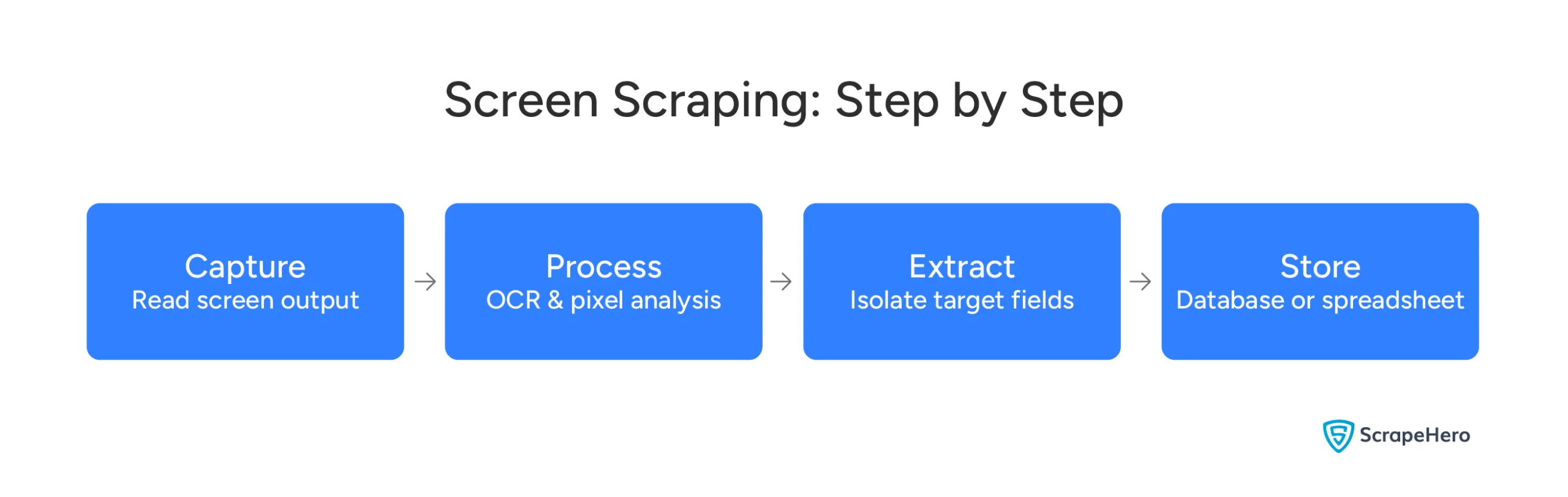
Screen scraping is the process of extracting data from what’s visually displayed on a screen.
Think of it this way. When you look at an application and see text, numbers, or tables — screen scraping captures exactly that. It reads the visual output, not the code behind it.
It then converts that visual data into a structured format you can actually use — like a spreadsheet or a database.
How Does Screen Scraping Work?
Screen scraping tools use a combination of techniques to read and capture on-screen data:
- OCR (Optical Character Recognition) — Converts text visible on screen into machine-readable characters
- Pixel Analysis — Identifies specific elements on screen by examining pixel-level data
- GUI Automation — Simulates mouse clicks and keyboard inputs to navigate through an application and retrieve data
- Virtual Display Capturing — Captures screen output in the background without interrupting the live interface
Where is Screen Scraping Used?
Screen scraping is typically the only option when a system has no API and no accessible code layer. Common scenarios include:
- Legacy systems — Old software built before APIs existed
- Mainframe and terminal applications — Still widely used in banking, insurance, and government
- Closed enterprise software — ERP and CRM systems where direct database access is restricted
- Desktop applications — Software with no data export functionality
If the data exists on a screen and there is no other way to get it out — screen scraping is how it gets done.
What is Web Scraping?
Web scraping is the automated process of extracting data from websites.
Instead of reading what’s on a screen, web scraping goes directly to the source — the code behind a webpage. It sends a request to the website, retrieves the HTML, and pulls out exactly the data you need.
The result is clean, structured data ready for analysis or integration.
It’s worth noting that you can screen scrape a web page too — capturing what’s visually rendered in a browser rather than parsing its HTML. However, for web sources, web scraping is almost always faster, more accurate, and easier to maintain.
How Does Web Scraping Work?
Web scraping tools follow a straightforward process:
- Send a request — A script asks the website’s server for the page content
- Retrieve the HTML — The server returns the page’s underlying code
- Parse the content — The tool reads through the HTML to find the relevant data
- Handle dynamic content — For pages that load data via JavaScript, tools like Selenium or Puppeteer render the page first
- Extract and store — The target data is pulled out and saved in a usable format — a database, CSV, or JSON file
Where is Web Scraping Used?
Web scraping works wherever the data lives on a website. Common use cases include:
- Price monitoring — Tracking competitor pricing across e-commerce platforms in real time
- Market research — Collecting product data, reviews, and trends at scale
- Business intelligence — Aggregating data from multiple sources for reporting and decision-making
- Brand monitoring — Tracking mentions, reviews, and unauthorized resellers across the web
If the data is on a website and you need it at scale — web scraping is how it gets done.
Web Scraping vs Screen Scraping: What’s the Difference?
Both methods automate data collection. But they work differently — and suit very different situations.
Here’s how they compare across the dimensions that matter most to your decision.
Data Source
Web scraping pulls data from the HTML code of a website. It works at the code level — not the visual level.
Screen scraping reads what’s visually displayed on a screen. It doesn’t care what’s behind the interface. If it’s visible on screen, it can capture it.
This is the most fundamental difference between the two methods.
Extraction Method
Web scraping uses HTTP requests and HTML parsing. It’s systematic and precise — targeting specific elements in the page’s code.
Screen scraping uses OCR, pixel analysis, and GUI automation. It interprets visual output the same way a human eye would — by reading what’s displayed.
Data Structure
Web scraping works with structured, machine-readable code. The data it returns is clean and consistent.
Screen scraping works with visual output. That output isn’t always consistent — fonts, layouts, and screen resolutions can all affect what gets captured.
Speed and Scale
Web scraping is fast, particularly for static HTML pages, which can be processed at scale with modest infrastructure.
For JavaScript-rendered pages requiring tools like Selenium or Puppeteer, speed drops considerably. Each page must be fully rendered before data can be extracted — making it more resource-intensive than it appears.
Screen scraping is slower by default. Every data point requires capturing, rendering, and processing a visual output. For large-scale data needs, web scraping is generally the faster choice — but the gap narrows when JavaScript rendering is involved.
Complexity and Maintenance
Both methods require maintenance when the source system changes.
Web scraping with well-maintained selectors can be stable — but HTML changes from redesigns, A/B testing, or framework updates can break scrapers just as easily as a visual interface change breaks a screen scraper.
Modern screen scraping tools with AI and computer vision are increasingly resilient to minor layout shifts — closing the gap with web scraping. The difference today is less about which method breaks and more about how quickly each can be fixed when it does.
Legality
Neither method is inherently illegal. But both carry risks depending on:
- What data you’re collecting
- Where your users or data subjects are located
- What the source system’s Terms of Service say
We cover this in full in the Legal and Compliance section below.
So far: Web scraping is generally faster and works with structured data. Screen scraping is the right tool when there’s no website to scrape — only a screen. Both require maintenance, though modern AI-powered screen scraping tools are closing the gap.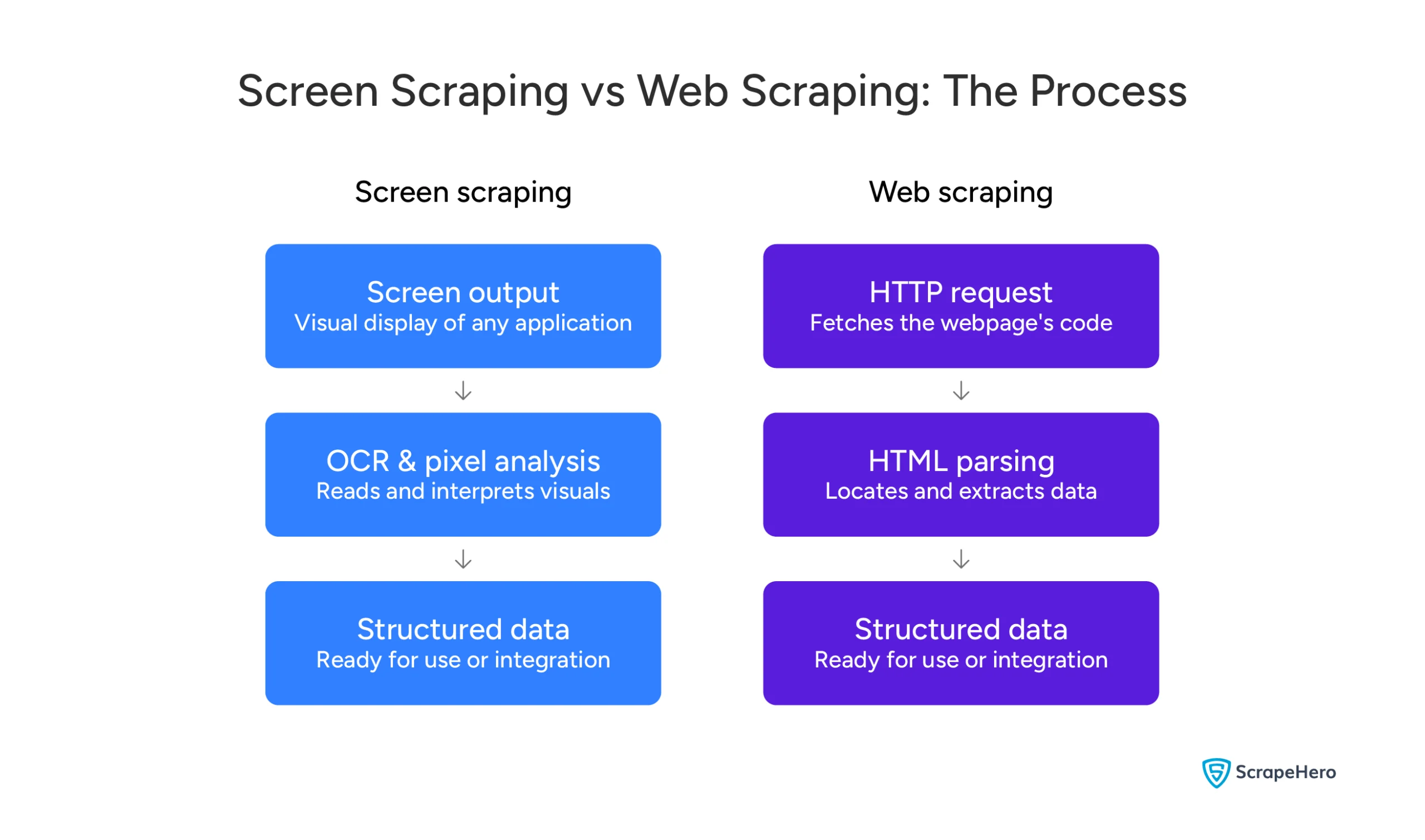
Screen Scraping and Web Scraping: Real-World Use Cases
Understanding the difference is one thing. Seeing how each method is actually used — that’s where it clicks.
Here’s how businesses across a range of industries rely on these methods. Let’s look at three common examples.
Finance and Banking
Banks and fintech companies have long used screen scraping to access data from legacy core banking systems — platforms built decades before APIs existed.
Personal finance apps were early adopters. They used screen scraping to pull transaction data from banking portals and present it in one unified dashboard.
Regulations like the EU’s PSD2 directive and the UK Open Banking Standard have pushed most financial institutions toward dedicated APIs — though screen scraping persists in some jurisdictions and continues to be used for internal legacy system integration and reconciliation workflows.
Web scraping, on the other hand, is used in finance for alternative data collection — earnings reports, SEC filings, job postings, which signal company growth and hiring momentum, and commodity pricing from public exchanges.
E-Commerce
E-commerce is the most active domain for web scraping — and for good reason.
Retailers and brands use it to:
- Track competitor pricing in real time across thousands of product listings
- Monitor stock availability across multiple platforms simultaneously
- Aggregate customer reviews for sentiment analysis and product improvement
- Detect MAP violations — unauthorized resellers undercutting minimum advertised prices
A leading toy manufacturer partnered with ScrapeHero to do exactly this. The result — 500,000+ reviews scraped weekly across 100,000+ products, with new reviews captured within 24–48 hours of posting. Their previous vendor couldn’t deliver that. ScrapeHero did.
Logistics and Supply Chain
Logistics companies deal with a familiar problem — critical data locked inside outdated systems.
Web scraping helps them extract:
- Publicly listed shipping rates and freight indices from market data platforms
- Fuel surcharge tables published on carrier websites
- Port delay and service announcements from port authority websites
Screen scraping is often used to extract data from older Transportation Management Systems and warehouse software where API access is limited or unavailable. That data then feeds into modern supply chain dashboards, giving operations teams a complete, real-time picture.
Screen Scraping and RPA: How They Work Together
RPA stands for Robotic Process Automation. It’s a technology that uses software bots to automate repetitive, rule-based tasks — the kind of tasks that employees do manually every day.
Screen scraping is one of the primary ways RPA bots read and interact with applications — particularly when no API or direct integration is available.
RPA bots need to interact with applications the same way a human would — logging in, navigating screens, reading data, entering information. Screen scraping gives them that ability.
Where Does Screen Scraping Fit in an RPA Workflow?
Think of it as a chain:
- Screen scraping reads data from the source system — a legacy ERP, a mainframe, a desktop application
- The RPA bot processes, transforms, and routes that data
- Web scraping — where needed — supplements with external data from websites or web applications
- The integration layer delivers clean, structured data to modern platforms — CRM, BI tools, ERP systems
A Real-World Workflow
An insurance company needs to migrate policy data from a 1990s mainframe into a modern Salesforce CRM.
There’s no API connecting the two systems. Building one would take months and cost significantly more.
Instead, screen scraping reads the policy data directly from the mainframe interface. An RPA bot then transfers that data into Salesforce automatically — at speed, without manual intervention.
No manual data entry. No expensive integration project. Just a working automation that runs in the background.
Enterprise RPA Platforms That Use Screen Scraping
Leading enterprise RPA platforms have screen scraping built in as a core capability:
- UiPath — UiPath has a built-in AI module that visually identifies elements on any screen — like buttons, fields, and menus — the same way a human eye would. This means it can read and interact with legacy systems without needing access to their underlying code.
- Blue Prism — Blue Prism includes surface automation as part of its automation toolkit, allowing bots to interact with any application through its visual interface. This makes screen scraping possible even when deeper integration methods — like APIs or database connectors — aren’t available.
For organizations already running UiPath or Blue Prism workflows, the biggest challenge is often the data layer — keeping the scraping reliable, accurate, and compliant as source systems change. That’s exactly what ScrapeHero manages.
Building and maintaining screen scraping or RPA workflows in-house is complex, time-consuming, and expensive. ScrapeHero’s managed data scraping service takes care of all of it — so your team focuses on using the data, not collecting it.
So far: Screen scraping is used across finance, e-commerce, logistics, and more. In enterprise automation, it works as the data-reading layer inside RPA workflows — allowing bots to interact with legacy systems that have no API. Web scraping supplements that with external data from the web where needed.
Best Screen Scraping Tools and Software in 2026
The right tool makes a significant difference in how reliably screen scraping works in production.
Here are the most widely used screen scraping tools in 2026 — what each does, what it’s best for, and where it falls short.
| Tool | Best For | Key Capability | Limitation |
| UiPath | Enterprise RPA workflows | AI Computer Vision for UI element detection | Requires RPA expertise to implement |
| Blue Prism | Legacy system automation in regulated industries | Surface automation and object-oriented design | Higher licensing cost |
| Sikuli/SikuliX | Any GUI-based application | Image recognition to locate screen elements | Breaks when UI visuals change |
| AutoIt | Windows desktop automation | Lightweight scripting for GUI interactions | Windows only |
| PyAutoGUI | Cross-platform desktop automation | Simulates mouse and keyboard interactions | Limited to simpler workflows |
A Closer Look at Each Tool
UiPath UiPath is the leading enterprise RPA platform for screen scraping at scale. Its AI Computer Vision module identifies UI elements visually — making it reliable even on legacy or inconsistently rendered screens. Best suited for organizations already running or planning RPA workflows.
Blue Prism Blue Prism is built for regulated industries — banking, insurance, and healthcare. Its object-oriented design creates stable, reusable automation components. Surface automation and screen scraping are available when deeper integration isn’t possible.
Sikuli/SikuliX Sikuli uses image recognition to find and interact with elements on any screen. Because it works by appearance rather than code, it works on virtually any application. The downside — even minor visual changes to the interface can break it.
AutoIt A lightweight Windows scripting tool for automating desktop GUI interactions. Simple to use for straightforward tasks but limited to Windows environments and less suited for complex enterprise workflows.
PyAutoGUI A Python library that simulates mouse movements and keyboard inputs across platforms. Useful for simpler automation tasks but not built for the complexity or scale of enterprise screen scraping deployments.
Looking for web scraping tools specifically? We’ve put together a detailed breakdown of the top free and paid options — check it out here.
If you’d rather skip the tools entirely and get data delivered via API, ScrapeHero’s custom web scraping API is built for exactly that.
Legal and Compliance: What You Need to Know
Neither screen scraping nor web scraping is inherently illegal.
But both carry legal risks depending on what you’re collecting, where your data subjects are located, and what the source system’s Terms of Service says.
Here’s what you need to know before deploying either method at scale.
Terms of Service
Most websites and applications prohibit automated data extraction in their Terms of Service.
Violating a ToS doesn’t automatically mean you’ve broken the law. But it can expose your organization to civil liability, account termination, and in some jurisdictions, claims under USA’s computer fraud statutes.
In the hiQ Labs v. LinkedIn case, the Ninth Circuit ruled that scraping publicly available data does not violate the CFAA, but this ruling applies only within the Ninth Circuit. Courts in other USA jurisdictions have reached different conclusions. The legal landscape around scraping and the CFAA remains unsettled across the US.
GDPR
If you’re collecting personal data of EU residents — names, email addresses, behavioral data — GDPR applies.
You need a lawful basis for processing that data. Without one, fines can reach up to 4% of global annual turnover under Article 83(5) of the GDPR.
Data minimization also applies — collect only what you need, nothing more.
CCPA
If you’re scraping personal data of California residents, the California Consumer Privacy Act requires you to:
- Disclose your data collection practices
- Honor consumer rights requests
- Provide opt-out mechanisms where required
Scraping without these safeguards in place may constitute a CCPA violation.
Screen Scraping in Banking
This deserves special attention.
Regulatory bodies including the EU’s PSD2 framework and the UK’s Financial Conduct Authority have actively pushed financial institutions toward dedicated open banking APIs — replacing screen scraping as the preferred method for financial data access.
Some major banks have moved to block credential-based screen scraping — though practices vary widely by institution and region, and fallback mechanisms remain in use. If your use case involves financial data, verify your compliance posture carefully before proceeding.
A Practical Note
This section is an overview — not legal advice.
Before deploying screen scraping or web scraping at scale, always:
- Review the target system’s Terms of Service
- Conduct a GDPR or CCPA data impact assessment if personal data is involved
- Consult legal counsel
Working with an established data scraping company means compliance considerations are built into the service methodology from day one — not treated as an afterthought.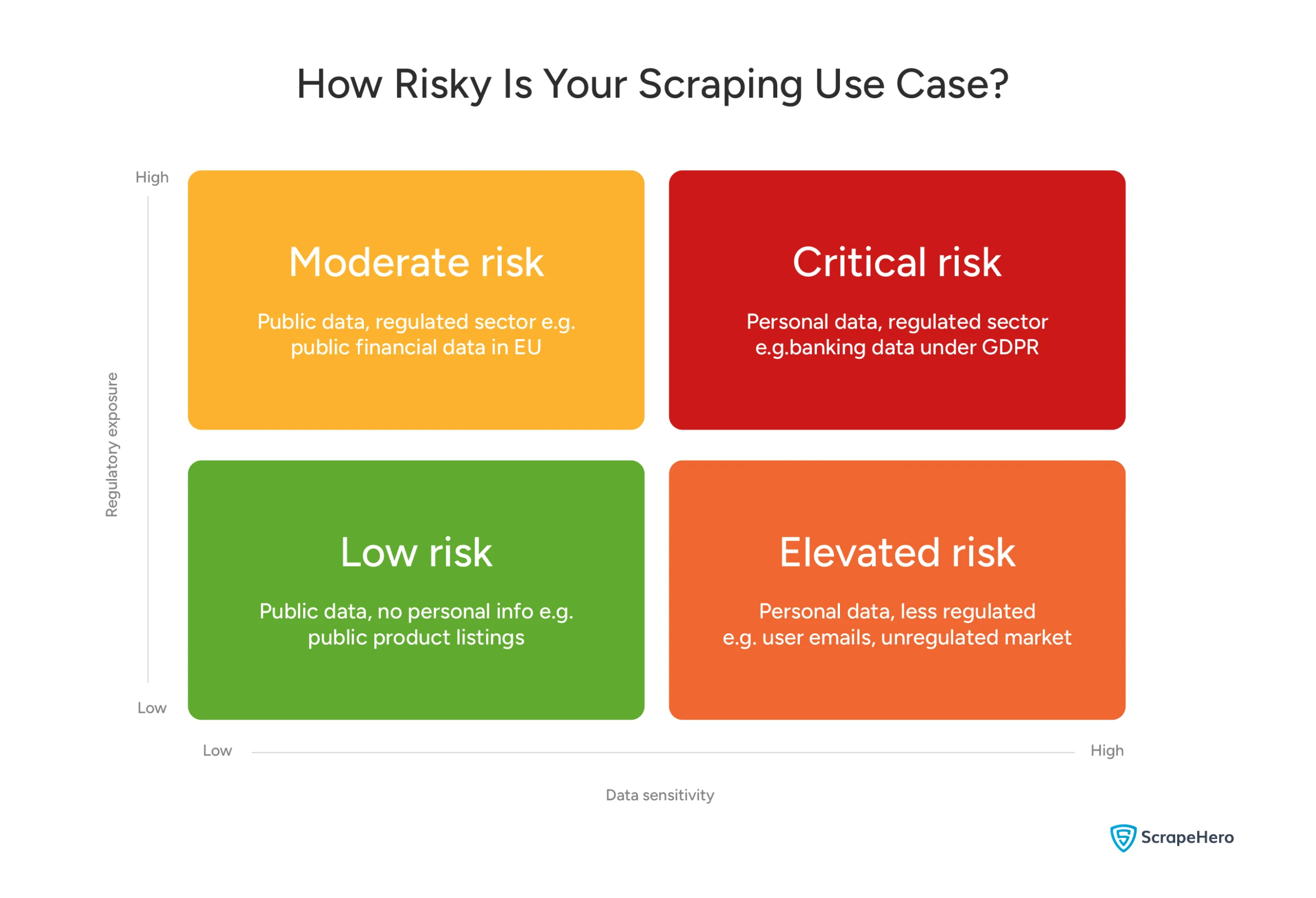
Disclaimer: This matrix is a general guide to help you think through your risk exposure — not a legal assessment. Every use case is different. Always consult legal counsel before deploying scraping at scale.
So far: Neither method is inherently illegal. But both carry risk depending on what data you’re collecting, where your users are located, and what the source system’s Terms of Service allows. In financial services, regulations have pushed most institutions toward APIs — though screen scraping persists in some jurisdictions and for internal use cases.
Screen Scraping vs Web Scraping: Which Method is Right for You?
Not sure whether you need screen scraping or web scraping? Answer these questions and you’ll know.
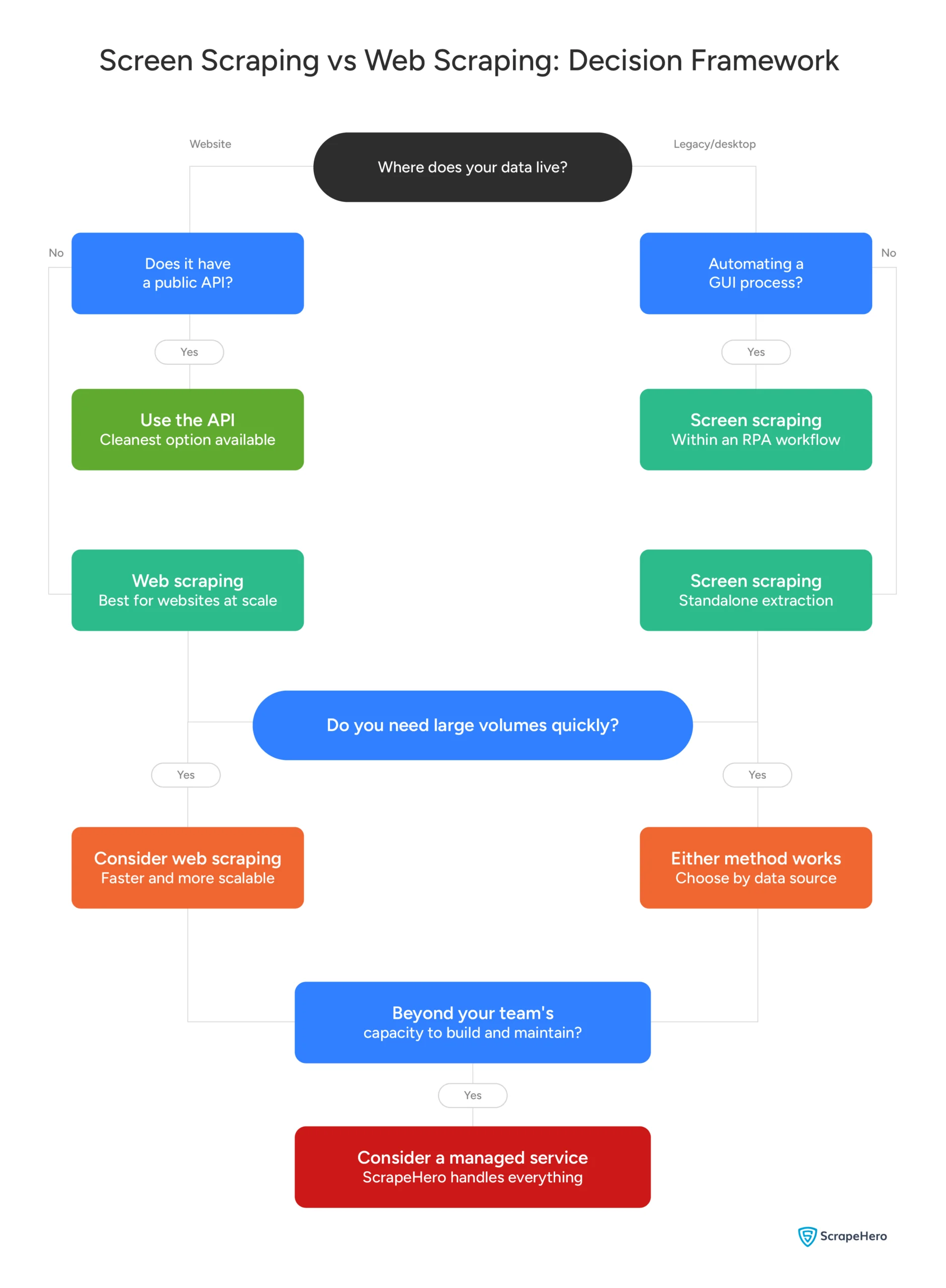
If you landed at question 6, you’re not alone!
Most organizations underestimate the ongoing cost of maintaining scraping infrastructure. Building it is one challenge. Keeping it running as websites change, systems update, and data volumes grow is another.
That’s exactly what ScrapeHero’s data scraping service is built for.
Key Takeaways From the Article
Screen scraping and web scraping solve the same core problem — getting data out of systems that weren’t designed to share it easily.
Web scraping is faster, more accurate, and built for scale. It’s the right choice when your data lives on a website.
Screen scraping is the right choice when it doesn’t — when data is locked inside a legacy system, a desktop application, or a terminal with no API in sight.
For most organizations, the answer isn’t one or the other. Complex data operations use both — often within a unified RPA workflow that pulls from every source in the ecosystem.
The harder question isn’t which method to use. It’s whether building and maintaining it in-house is the best use of your team’s time and resources.
If the answer is no — that’s where ScrapeHero comes in.
ScrapeHero is one of the top 3 web scraping services globally, and unlike most data services, we are fully managed. That means real experts handle your data requirements from start to finish, no technical expertise needed on your end.
In an age where AI drives most of the process, ScrapeHero keeps a human at every point — from the first conversation about your requirements to manual QA before delivery. You get clean, structured, trustworthy data without having to chase it yourself.
Talk to our team and tell us what you need.
Frequently Asked Questions
Screen scraping is not inherently illegal. But legality depends on context — what data you’re collecting, where your data subjects are located, and what the source system’s Terms of Service says.
Scraping publicly visible data is generally permissible. But scraping personal data without a lawful basis under GDPR or CCPA can result in regulatory penalties. Always consult legal counsel before deploying screen scraping at scale.
For a full breakdown, see our Legal and Compliance section above.
An API is a structured, intentional data access channel provided by the application owner. It returns clean, structured data in a predictable format.
Screen scraping captures data from the visual output of an application — without the application’s direct cooperation. It’s used when no API exists or when access to one isn’t available.
APIs are more reliable, stable, and legally cleaner. Screen scraping is the alternative when APIs aren’t an option.
The main risks are:
1. Data accuracy — OCR errors and visual variation can introduce inconsistencies in extracted data
2. Script fragility — A minor UI change in the source application can break a screen scraping script entirely
3. Performance limits — Screen scraping is slower and more resource-intensive than web scraping at scale
4. Legal and compliance risk — ToS violations and data protection regulations can expose organizations to liability
5. Security — Improper handling of credentials in automated workflows can create vulnerabilities
In Robotic Process Automation, screen scraping is how a software bot reads data from an application’s visual interface — the same way a human employee would.
RPA platforms like UiPath and Blue Prism include screen scraping as a core module. It allows bots to interact with legacy systems that have no API — extracting data and feeding it into modern platforms automatically.
For more detail, see our RPA section above.
Yes — historically, screen scraping was widely used in banking and fintech to access customer account data from banking portals.
That has largely changed. Regulations like the EU’s PSD2 directive and the UK Open Banking Standard have pushed most financial institutions toward dedicated APIs — though screen scraping persists in some jurisdictions and for internal use cases. Some major banks have moved to block credential-based screen scraping, though practices vary widely by institution and region.
Open banking APIs — encouraged or mandated by regulations like PSD2 in the EU, the UK Open Banking Standard, and the Consumer Data Right in Australia — have become the preferred method for financial data access in many markets. Screen scraping persists in some jurisdictions and for internal legacy system use cases where APIs are not yet available.
These APIs provide secure, structured, consented access to account data without requiring credentials to be shared with third-party applications.
Screen scraping testing is the process of validating that a screen scraper is capturing the right data accurately and consistently.
It typically involves:
1. Output validation — Checking that extracted data matches what’s on screen
2. Stability testing — Verifying the scraper holds up when the source application’s interface changes
3. Performance testing — Ensuring the scraper handles expected data volumes without failure
For production deployments, ongoing testing and monitoring are essential — screen scrapers break more often than web scrapers when source systems update.