A proxy server (or simply “proxy”) acts as an intermediary between a user and the internet, enabling more secure, anonymous, and sometimes less restricted access.
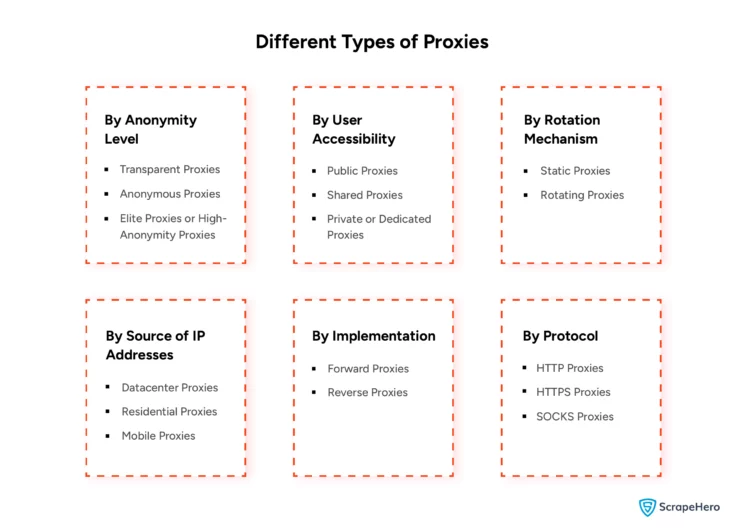
Because needs vary, proxies are classified in multiple ways—by how anonymous they are, who can use them, how they rotate, where their IPs come from, how they’re deployed in networks, and which protocols they support.
This guide walks through each category so you can choose a proxy type that fits your use case and reduces avoidable risk and cost.
Note: In this article, the words “proxies” and “proxy servers” are used interchangeably.

Types of Proxy Servers in a Computer Network
Before choosing proxy types, it’s useful to understand why proxies are used in web scraping in the first place: to reduce the risk of detection, throttling, and blocking when many requests come from a single IP within a short time window.
To learn how websites detect the presence of bots, you can read our article on detecting bots using bot mitigation tools.
Understanding the different types of proxy servers starts with knowing that they can be categorized by:
Proxies can be categorized by:
- By Anonymity Level
- By User Accessibility
- By the Rotation Mechanism
- By Source of IP Addresses
- By Implementation
- By Protocol
Let’s explore each proxy category in detail, understanding its functionality and usability across multiple use cases.
1) By Anonymity Level
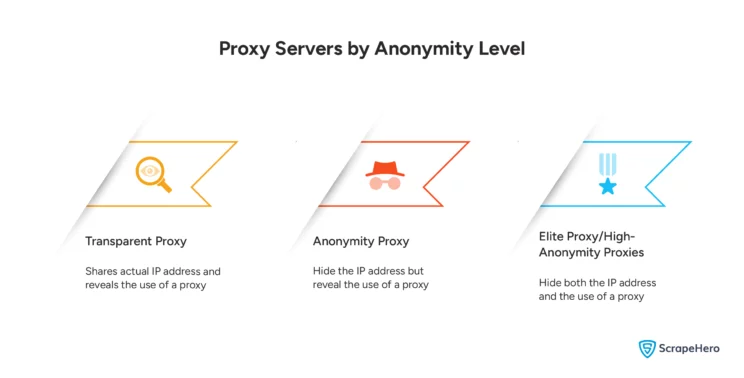
Anonymity level describes how well a proxy hides (a) your original IP address and (b) the fact that you’re using a proxy.
They are classified into:
- Transparent Proxies
- Anonymous Proxies
- Elite Proxies or High-Anonymity Proxies
Let’s understand each such proxy in detail.
Transparent proxies
Transparent proxies do not provide anonymity—they pass your real IP address to the destination. Since they make proxy usage obvious, they’re more common for caching or policy enforcement than privacy.
Anonymous proxies
Anonymous proxies hide your IP address but may still send identifying HTTP headers that hint that a proxy is in use. They’re useful when you want basic IP masking but don’t mind disclosing proxy usage.
Elite (high-anonymity) proxies
Elite proxies aim to hide both your IP and any clear signal that a proxy is being used, making them popular when you need stronger privacy or reduced detection risk.
2) By User Accessibility
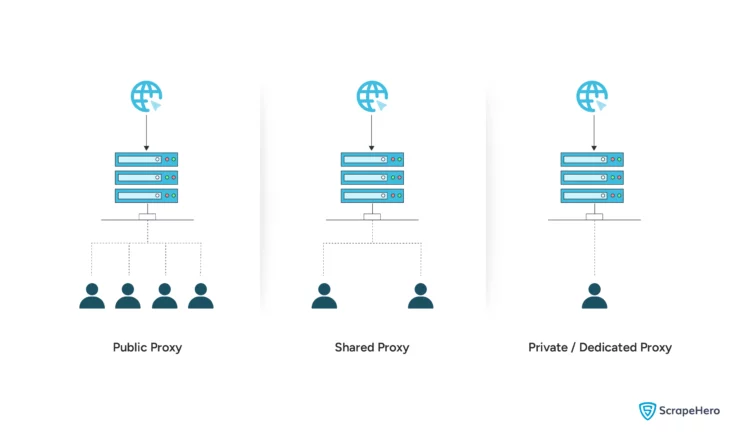
User accessibility refers to who can use the proxy infrastructure. They are classified into:
- Public Proxies
- Shared Proxies
- Private or Dedicated Proxies
Public proxies
Public proxies are often free and open to anyone, usually without authentication. Because they’re shared by unknown users, they’re typically unreliable and carry a higher security risk.
Shared proxies
Shared proxies are paid, but used by multiple customers. They often strike a balance between price and performance and are usually more reliable than public proxies.
Private (dedicated) proxies
Dedicated proxies are assigned to a single user or organization, offering stronger performance consistency and improved control/security for business use cases.
3) By the Rotation Mechanism
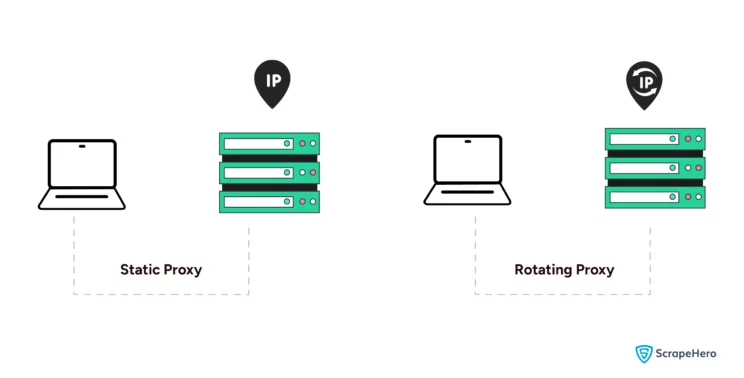
Rotation refers to how frequently IPs change to reduce blocking and rate-limiting pressure. They are classified into: Among the different types of proxy servers, those categorized by rotation are:
- Static Proxies
- Rotating Proxies
Static proxies
Static proxies keep the same IP address for each session. They’re useful when you need a consistent identity—e.g., account management workflows—rather than high-volume crawling.
Rotating proxies
Rotating proxies change IPs per request or at set intervals. They’re commonly used in web scraping and crawling to lower the chance of detection and IP-based bans.
4) By Source of IP Addresses
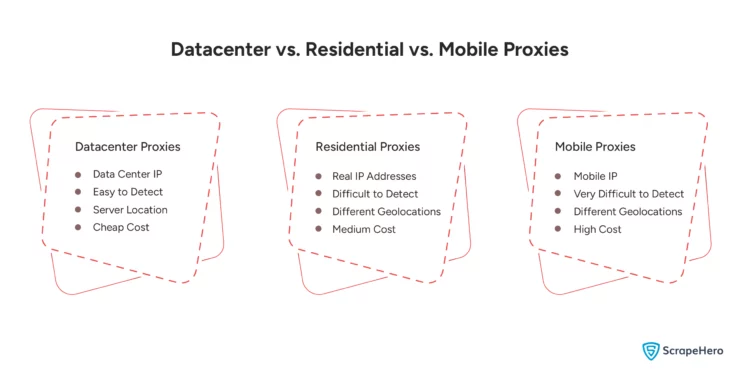
This category focuses on where the IPs originate, which heavily influences speed, detection risk, and legitimacy. They are classified into:
- Datacenter Proxies
- Residential Proxies
- Mobile Proxies
Datacenter proxies
Datacenter IPs are issued from servers in data centers and are known for speed and cost-efficiency. The tradeoff: they’re easier for some sites to detect/flag as they have non-residential IP addresses.
Residential proxies
Residential proxies use IPs assigned to households. Because they look more like “real user” traffic, they’re less likely to be blocked in many scenarios—often making them a go-to choice when legitimacy matters.
Mobile proxies
Mobile proxies use IPs from cellular carriers. Because mobile IPs are dynamic and shared at scale, they can be especially effective for difficult targets.
5) By Implementation
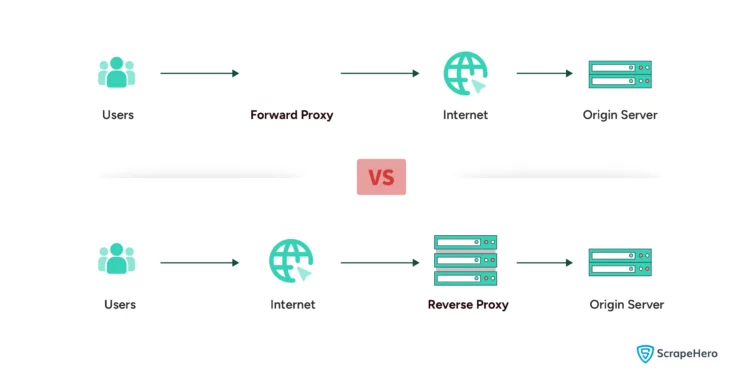
The implementation refers to where the proxy sits and what it’s protecting—clients or servers. They are classified into:
- Forward Proxies
- Reverse Proxies
Forward proxies
Forward proxies sit between clients and the internet, fetching data on behalf of users or internal networks.
Reverse proxies
Reverse proxies sit in front of servers, handling inbound traffic and forwarding requests to origin systems. They’re widely used for security, caching, and load balancing in server architectures.
6) By Protocol
The protocol of proxies refers to the types of network protocols they support for handling traffic. They are classified into:
- HTTP Proxies
- HTTPS Proxies
- SOCKS Proxies
HTTP proxies
HTTP proxies handle HTTP traffic and are common for basic browsing and content filtering. They don’t encrypt data themselves.
HTTPS proxies
HTTPS proxies support the HTTPS protocol and add SSL encryption to ensure secure and encrypted data transmission. As a result of this process, they are slightly slower, even though they enhance security.
SOCKS proxies
SOCKS proxies can handle various TCP/IP traffic beyond HTTP/HTTPS, such as FTP and P2P. They’re flexible but don’t provide specific performance optimizations, such as caching, which can affect speed.
What’s changed in proxy selection (and what to test) in 2026
In 2025–2026, many anti-bot systems moved beyond “IP reputation only” and increasingly evaluate fingerprints and protocol consistency (TLS/HTTP2 behavior, header ordering, and other network-layer signals). That means “good proxies” can still fail if your client stack looks synthetic—even when your IPs are residential.
Knowing which of the different types of proxy servers to use is only half the battle — here’s a hands-on way to sanity-check a proxy pool before you commit:
- Run a small canary crawl (100–300 requests) and compare block rates across data centers and between residential and mobile, using the same request pattern.
- Watch session stability (how long an IP stays usable) separately from raw success rate—high “200 OK” rates can still hide rising friction (CAPTCHA, soft blocks, forced JS challenges).
- Confirm ethical sourcing for residential/mobile lanes. In early 2026, Google’s threat intel team publicly described disrupting a large residential proxy network (IPIDEA) tied to malicious app/SDK distribution—an important reminder that not all “residential” inventory is clean. Prefer providers that clearly document consent, auditing, and abuse controls.
- Plan for HTTP/3/QUIC drift. More sites are enabling HTTP/3, but proxy support is uneven—some stacks still terminate/fallback to HTTP/2. If your targets are modern edge/CDN setups, verify whether your tooling and proxies behave consistently under HTTP/2 vs HTTP/3 to avoid fingerprint mismatches.
Net: proxy choice is now tightly coupled with client realism and inventory integrity, not just rotation and geography.
Wrapping Up
Proxies can improve security and help overcome geographic and access barriers. But selecting the right proxy type—based on anonymity, access model, rotation, IP source, implementation, and protocol—can be tricky, especially at enterprise scale.
These challenges are quickly resolved by ScrapeHero, which offers more sophisticated services and products, such as ScrapeHero Cloud.
In the rapidly evolving technological landscape, efficient data handling is crucial. ScrapeHero’s web scraping service is designed to deliver effective solutions and tackle emerging digital challenges, ensuring the highest data quality.
FAQs
A proxy server acts as an intermediary between a user and the internet, forwarding requests while masking or modifying the user’s IP address for anonymity or security. It works by receiving user requests, passing them to the destination server, and then sending the response back to the user.
The main types of proxy servers include transparent, anonymous, and elite proxies, which differ in the level of anonymity they provide; and public, shared, and private proxies, which vary in accessibility and user exclusivity. Proxy servers can also be categorized by rotation mechanism, IP source (residential, datacenter, or mobile), protocol (HTTP, HTTPS, SOCKS), and implementation (forward or reverse).
Residential proxies use IPs assigned to real households, making them harder to detect and more reliable for tasks like web scraping. In contrast, datacenter proxies originate from data centers and are faster and cheaper, but are easier for websites to flag as non-residential, increasing the risk of detection.