Python’s requests library is enough for scraping static sites. But what if the website is dynamic? You then need to execute JavaScript while scraping, which is where Selenium web scraping shines.
This article shows you how to get started with web scraping using Selenium.
Selenium Web Scraping: The Environment
You can install Selenium with a single pip command.
pip install selenium
This tutorial solely uses Selenium’s data extraction methods. However, Selenium Python web scraping can also mean fetching HTML source code and then extracting data using BeautifulSoup.
Selenium Web Scraping: The Code
The code in this Selenium scraping guide illustrates Selenium web scraping by extracting details of professional certifications from Coursera.
It will
- Search for ‘Data Analyst’
- Select the filters ‘Professional Certificates’
- Extract the details of the loaded certifications
The code starts with importing the required packages. Import three modules from the Selenium library
- webdriver: For controlling the browser
- By: For specifying the locator method while finding elements
- Keys: For sending keyboard inputs
Other packages to import are
- sleep: For pausing the script execution to ensure all the HTML elements are loaded.
- json: For writing extracted data to a JSON file.
from selenium import webdriver
from selenium.webdriver.common.keys import Keys
from selenium.webdriver.common.by import By
from time import sleep
import json
Next, the code defines four functions:
- run_selenium(): Navigates Coursera.org to reach the desired page.
- extract_details(): Extracts the certification details.
- clean_details(): Cleans the details.
- save_details(): Saves the extracted details.
Let’s learn about them in detail.
run_selenium()
The function:
- Launches the Selenium browser
- Navigates to Coursera.org
- Maximizes the window
- Searches for ‘Data Analyst’
- Selects the filters ‘Professional Certificates’
- Extracts the details of the loaded certifications
The function launches Chrome using the Chrome() method from the webdriver module.
Note: Although this tutorial uses a Chrome webdriver, you can use others, such as Firefox or Chromium.
browser = webdriver.Chrome()To visit a webpage, the function uses the get() method. This method takes a URL as an argument.
browser.get("https://coursera.org")Coursera’s website structure changes with the window size. Therefore, to maintain a standard, the function maximizes the Selenium web browser window.
browser.maximize_window()You can now search the query in the input bar.
The function finds the input bar using Selenium’s find_element method. This method can locate the element using several locators; here, locate the element by its tag name, ‘input’.
inputbar = browser.find_element(By.TAG_NAME,'input')
Other locators include XPath, class name, and ID.
After locating the input bar, the function uses the send_keys() method to send keystrokes to the browser.
First, the function enters the string ‘Data Analyst’ into the input bar.
inputbar.send_keys('Data Analyst')
Next, it simulates the ‘ENTER’ key using the Keys class, which navigates the Selenium browser to the page containing details of available courses.
inputbar.send_keys(Keys.ENTER)The current page includes details on all types of products, but you only need information on professional certifications. That means you need to add filters, which means more browser interactions.
To add the filters, the function uses a try-except block.
Try Block
The try block adds filters by clicking the buttons, opening the drop-down menus, and selecting a filter. It uses the text of the clickable items to do so.
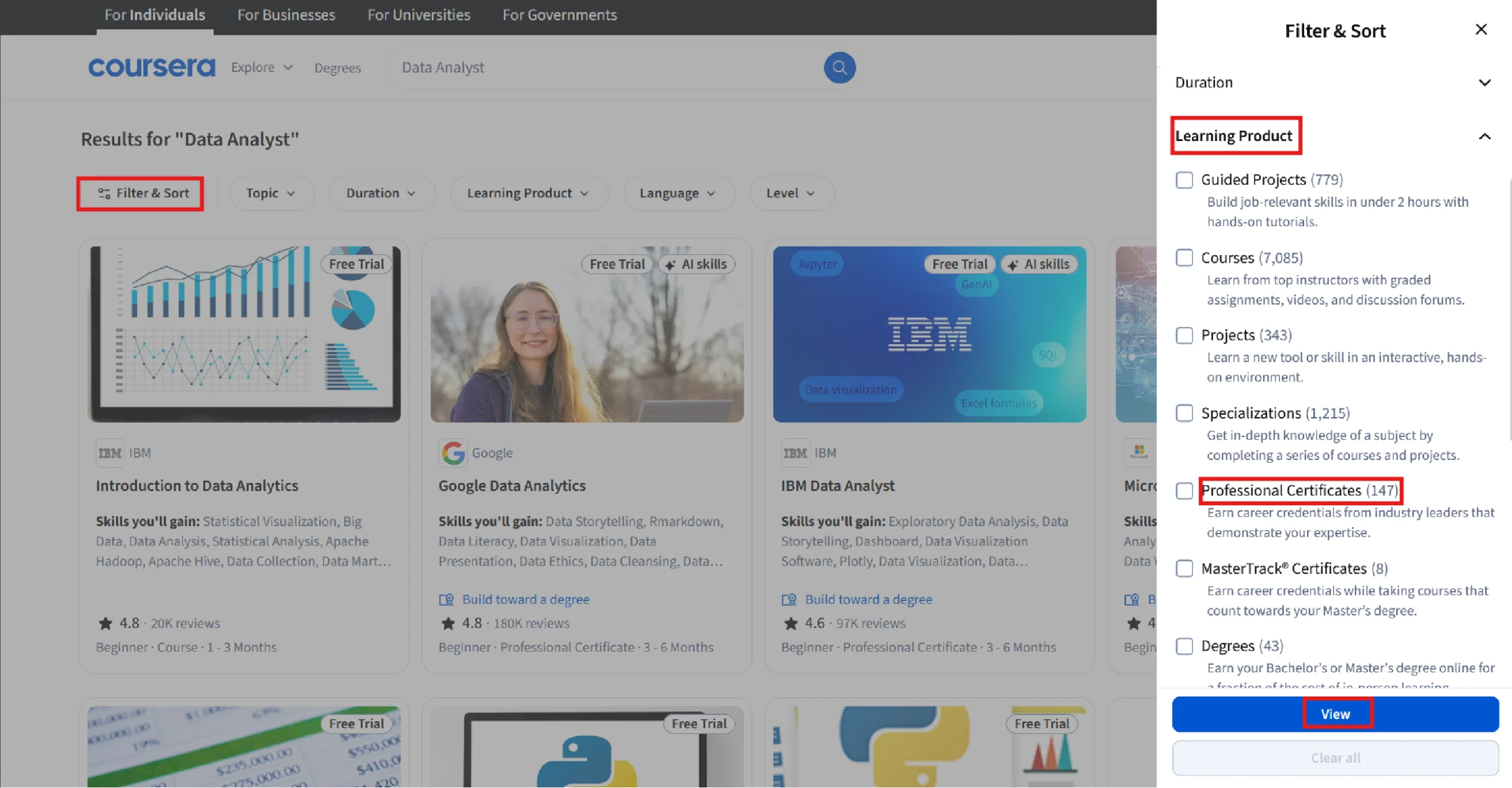
To do so, the block extracts all button elements and iterates over them. In each iteration, it
1. Clicks the one with the text ‘Filters’.
buttons = browser.find_elements(By.TAG_NAME,"button")
for button in buttons:
if 'Filter' in button.text:
button.click()2.Clicks the button with the text ‘Learning Product’ and extracts all the filters, which are inside the label tag.
browser.find_element(By.XPATH,"//button//span[contains(text(),'Learning Product')]").click()
sleep(1)
filters = browser.find_elements(By.TAG_NAME,"label")
3. Starts a sub-loop to iterate through the filters and clicks on the ones with the text and ‘Professional Certificates’.
for filter in filters:
if "Professional Certificates" in filter.text:
filter.find_element(By.TAG_NAME,'input').click()
sleep(3)
break
4. Clicks on the button containing the text ‘View’
browser.find_element(By.XPATH,"//button/span[contains(text(),'View')]").click()Except Block
If the try block fails, the except block prints a message.
except:
print("Could not find the filter: HTML structure must've changed")Since Coursera uses lazy loading, you may need to scroll to load all the available certifications.
You can scroll using Selenium’s execute_script() method. Here, the code uses this method to scroll 10 times to load all the available certifications.
for i in range(10):
browser.execute_script("window.scrollBy(0, 500);")
sleep(3)
The function then uses the find_elements () method to extract all elements containing the certificate details. By inspecting the page, you can see that these elements are inside div tags with the data-testid “product-card-cds”
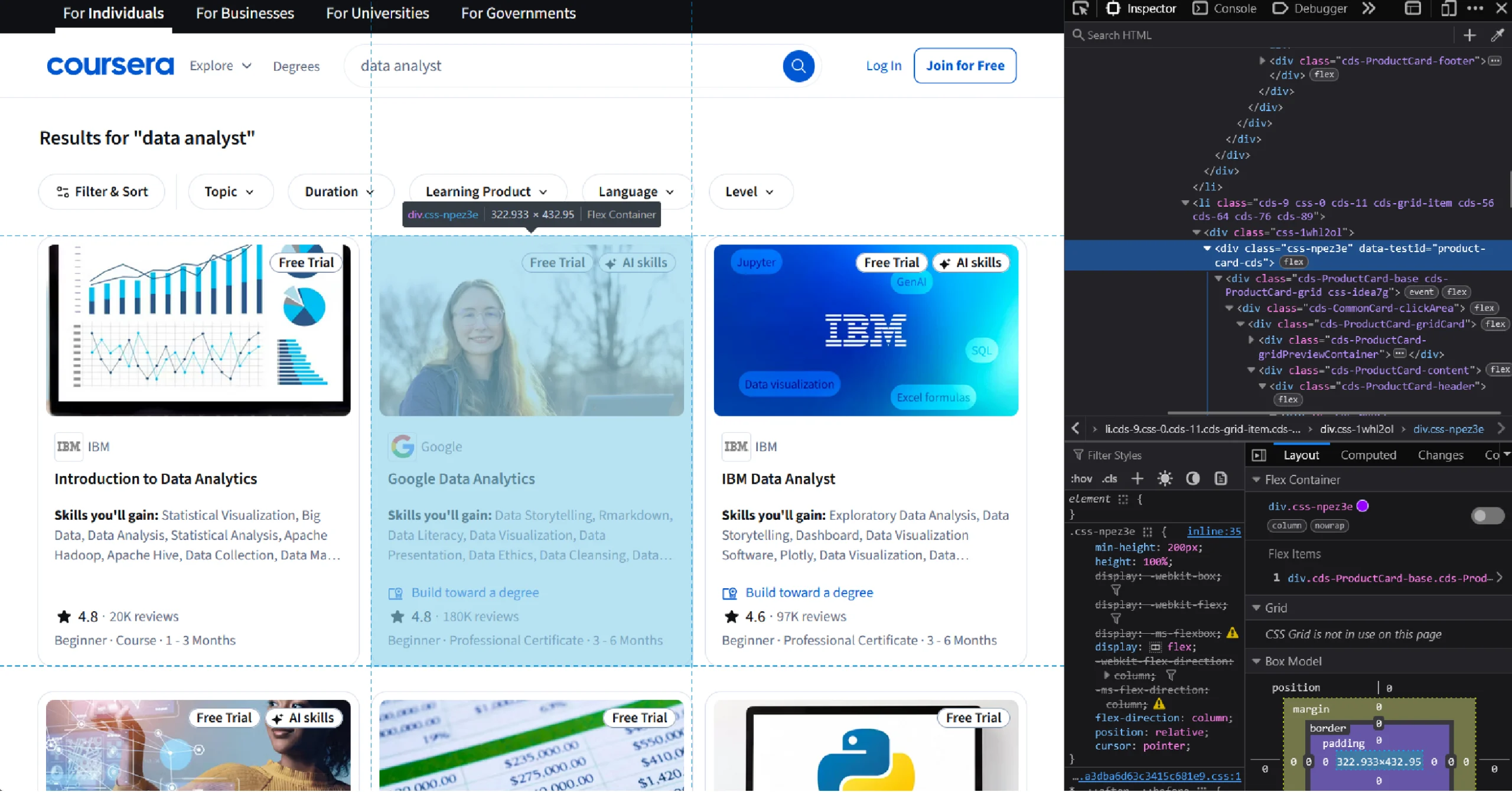
certificates = browser.find_elements(By.XPATH,'//div[@data-testid="product-card-cds"]')Finally, the function returns the extracted elements as a list.
return certificates
extract_details()
The function accepts a list of HTML elements containing certificate details, loops through them, and extracts details.
It stores the extracted details as an array of dicts.
The function starts by defining an array to store the dicts containing the extracted details.
proCerts = []
Next, it loops through the list of elements holding the certification details. And in each loop, the function:
1. Gets all the text from the current element and splits it at every new line.
details = certificate.text.split('\n')2. Gets the URL from the anchor tag inside the element. It uses Selenium’s get_attribute() method to extract the ‘href’ attribute and get the URL.
url = certificate.find_element(By.TAG_NAME,'a').get_attribute('href')
3. Creates an empty dict. This dict will store the details of the current certification.
detailDict = {}4. Calls clean_details(), which accepts the empty dict and the extracted details, extracts the required details, and stores them in the dict.
clean_details(detailDict,details)
5. Adds the URL to the dict.
detailDict['URL']=url
6. Appends the extracted dict to the empty array defined earlier.
proCerts.append(detailDict)Finally, extract_details() returns the array.
clean_details()
The text extracted from the element that holds the professional certifications will be in an unstructured format. The function clean_details() gives it a consistent structure.
One of the arguments of clean_details() is an array containing extracted text. Each item of this array corresponds to one line:
['Status: Free Trial', 'Free Trial', 'Status: AI skills', 'AI skills', 'Microsoft', 'Microsoft Power BI Data Analyst', "Skills you'll gain: Power BI, Microsoft Excel, Data Analysis, Microsoft Power Platform, Data Integrity, Data Visualization, Data Storage, Data Collection, Data Quality, Data Manipulation, Business Analytics, Timelines, Advanced Analytics, Database Design, Statistical Reporting, Report Writing, Data Processing, Data Warehousing, Business Intelligence, SQL", 'Build toward a degree', '4.6', 'Rating, 4.6 out of 5 stars', '·', '8.8K reviews', 'Beginner · Professional Certificate · 3 - 6 Months']
The code loops through the array items, processes them, and stores them in a dict with keys corresponding to the data.
For instance, if the item is the course name, the key would be ‘Certificate’.
The function starts by defining an array of strings that it will use to filter out unnecessary strings from the extracted text.
fluff = ['Status','New','stars','Make progress','Months','Skills','Free Trial','AI skills','Build toward a degree','·']Next, it defines an array of strings to store the keys of the dict.
keys = ['Company','Certificate','Skills','Rating','Review Count','Other Details']The function then loops through the array items and, for each item, checks whether it contains any of the strings in the fluff array.
i = 0
print(details)
for detail in details:
if not any(s in detail for s in fluff):
try:
detailDict[keys[i]] = detail.replace('(','').replace(')','')
i=i+1
except:
continue If the item contains the string ‘Months’, the function creates a dict and stores data with Level, Type, and Duration as keys.
if 'Months' in detail:
metas = ['Level','Type','Duration']
meta = detail.split('·')
meta_dict = {}
n = 0
for m in meta:
meta_dict[metas[n]] = m
n=n+1
try:
detailDict[keys[i]] = meta_dict
except:
break
i=i+1
Similarly, if the item contains the string ‘Skills’, the function splits the string at the colon and stores the left and right parts as keys and values in the dict.
if 'Skills' in detail:
keyValue = detail.split(":")
detailDict[keyValue[0]] = keyValue[1]
i=i+1
Note that under each if statement, the function increments the index i by 1. This is to move to the next key in the keys array.
save_details()
This function takes the extracted details and saves them in a JSON file.
def save_details(details):
with open('selenium.json','w',encoding='utf-8') as f:
json.dump(details,f,indent=4,ensure_ascii = False)Finally, you can call the functions in order to execute the script.
if __name__ == "__main__":
certificates = run_selenium()
certificate_details = extract_details(certificates)
save_details(certificate_details)The extracted details would look like this.
{
"Company": "Microsoft",
"Certificate": "Microsoft Power BI Data Analyst",
"Skills you'll gain": " Power BI, Microsoft Excel, Data Analysis, Microsoft Power Platform, Data Integrity, Data Visualization, Data Storage, Data Collection, Data Quality, Data Manipulation, Business Analytics, Timelines, Advanced Analytics, Database Design, Statistical Reporting, Report Writing, Data Processing, Data Warehousing, Business Intelligence, SQL",
"Rating": "4.6",
"Review Count": "8.8K reviews",
"Other Details": {
"Level": "Beginner ",
"Type": " Professional Certificate ",
"Duration": " 3 - 6 Months"
},
"URL": "https://www.coursera.org/professional-certificates/microsoft-power-bi-data-analyst"
}
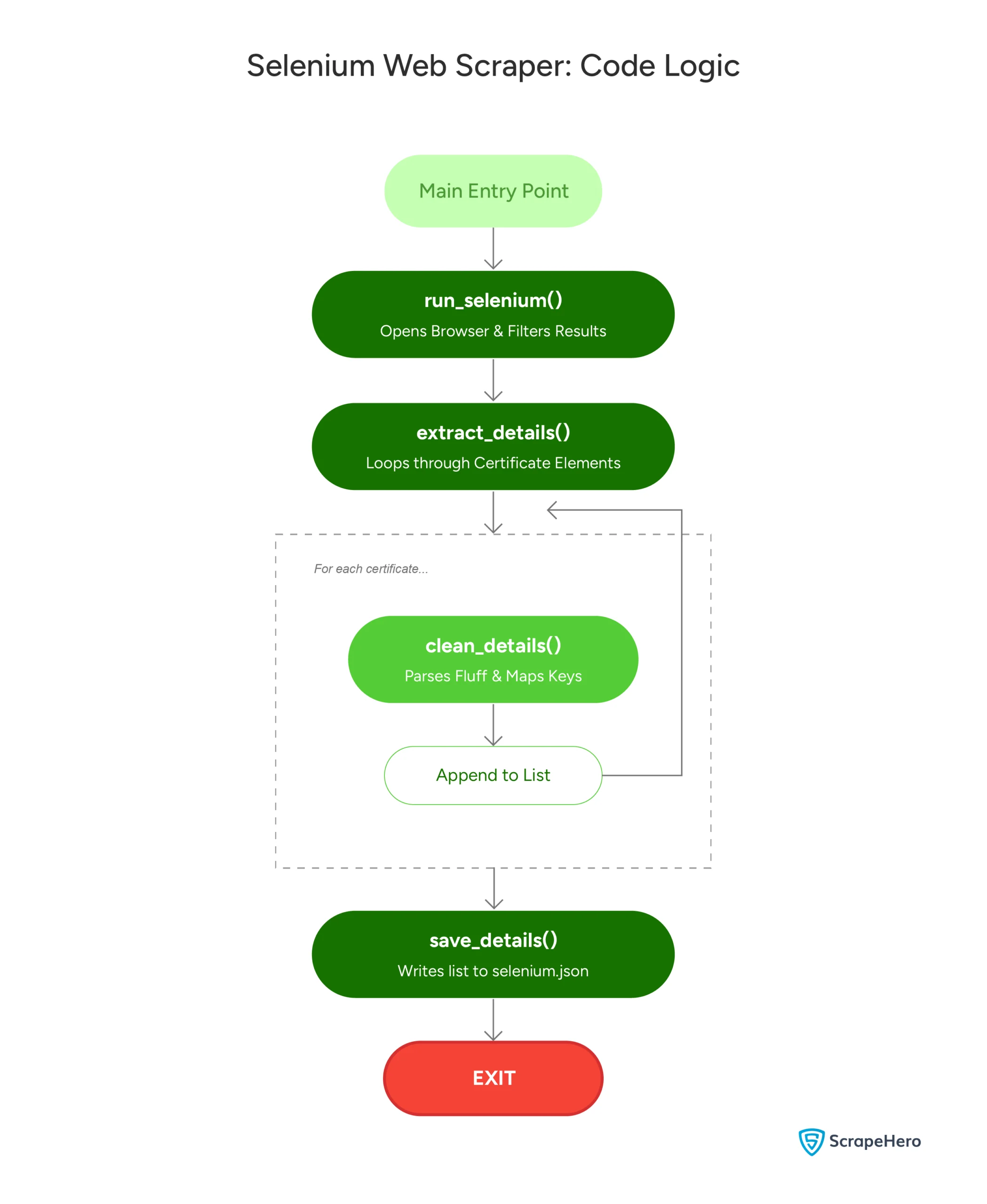
Here’s a flowchart showing the code logic:
Code Limitations
Although the code shown in this Selenium web scraping guide works, there are some limitations:
- You need to monitor Coursera.org constantly for any changes and reflect them in the code.
- The code is not suitable for large-scale scraping as it doesn’t bypass anti-scraping measures.
Best Practices for Web Scraping with Selenium
Web scraping requires a mindful approach, especially when using powerful tools like Selenium. Here are some best practices:
1. Be Mindful of Server Load
Sending too many requests in a short time can overwhelm a website’s servers. To avoid this, use proper delays between requests, or consider adding randomness to your delays to mimic human browsing behavior.
2. Use Proxies to Avoid IP Blocking
Many websites will block an IP address after multiple scraping attempts. Using a proxy server can help you distribute your requests, reducing the chances of being blocked. There are free proxy services available, but investing in a paid service often provides more reliability and security.
3. Handle Captchas
Websites increasingly use CAPTCHA to prevent scraping. While Selenium can solve captchas on its own by using its click() method, you can integrate third-party services that specialize in solving captchas.
4. Monitor and Maintain Your Scripts
Web scraping is a constant game of cat and mouse. Websites frequently update their structures, which can break your scraper. Monitor your scripts regularly to ensure they are working as expected.
Advantages and Disadvantages of Selenium for Scraping
Selenium has its strengths, but it also has limitations. Here’s a quick breakdown:
Advantages:
- Handles dynamic content and JavaScript with ease
- Can simulate user actions like clicks and form submissions
- Works across different browsers, offering flexibility
Disadvantages:
- Slower compared to other scraping tools like BeautifulSoup or Scrapy since it loads the entire page, including images and scripts.
- Requires more setup and maintenance for complex tasks
- Needs advanced infrastructure for large-scale scraping
How a Web Scraping Service Can Help You
Selenium web scraping can extract data from websites with dynamic content. While it may not be the fastest scraping tool, it excels when interacting with the page is necessary, such as filling out forms or clicking buttons.
However, you need to consider the legalities and implement techniques to bypass anti-scraping measures, which you can forget by using a web scraping service like ScrapeHero.
ScrapeHero is a fully managed web scraping service capable of building large-scale scrapers and crawlers. We will ensure compliance with best practices and legal requirements for web scraping. Moreover, our advanced browser farms can handle large-scale scraping with multiple Selenium instances running in parallel.
FAQs
Technically, you can scrape most websites, but it may not be efficient for all of them. Websites that don’t use JavaScript to display content don’t require Selenium, and you can get away with using Python requests.
Selenium is ideal for scraping a dynamic website or interacting with a website. BeautifulSoup, on the other hand, is faster and more efficient for static pages. Many developers use them together for maximum effectiveness.
You can avoid being blocked by using proxies, rotating user agents, and adding delays between requests. Scraping responsibly is critical to staying under the radar.
Yes, you need basic programming knowledge, especially Python, to effectively use Selenium for web scraping. The good news is that Selenium’s syntax is simple and easy to learn.
Yes, Selenium can handle websites that use AJAX to load content. You just need to wait for the page to fully load before extracting data.