Netflix is a dynamic website, with most of its dynamic content only appearing after you log in. However, this article on web scraping Netflix focuses on static public pages.
This makes it possible to scrape data from Netflix using HTTP requests; this tutorial will guide you through the process.
Read on to learn how to scrape Netflix data with Python using two libraries: Python requests and BeautifulSoup.
Note: This article covers scraping movie details, not the movies themselves. Extracting movies from Netflix without permission is illegal as it violates copyright laws.
Data Scraped from Netflix
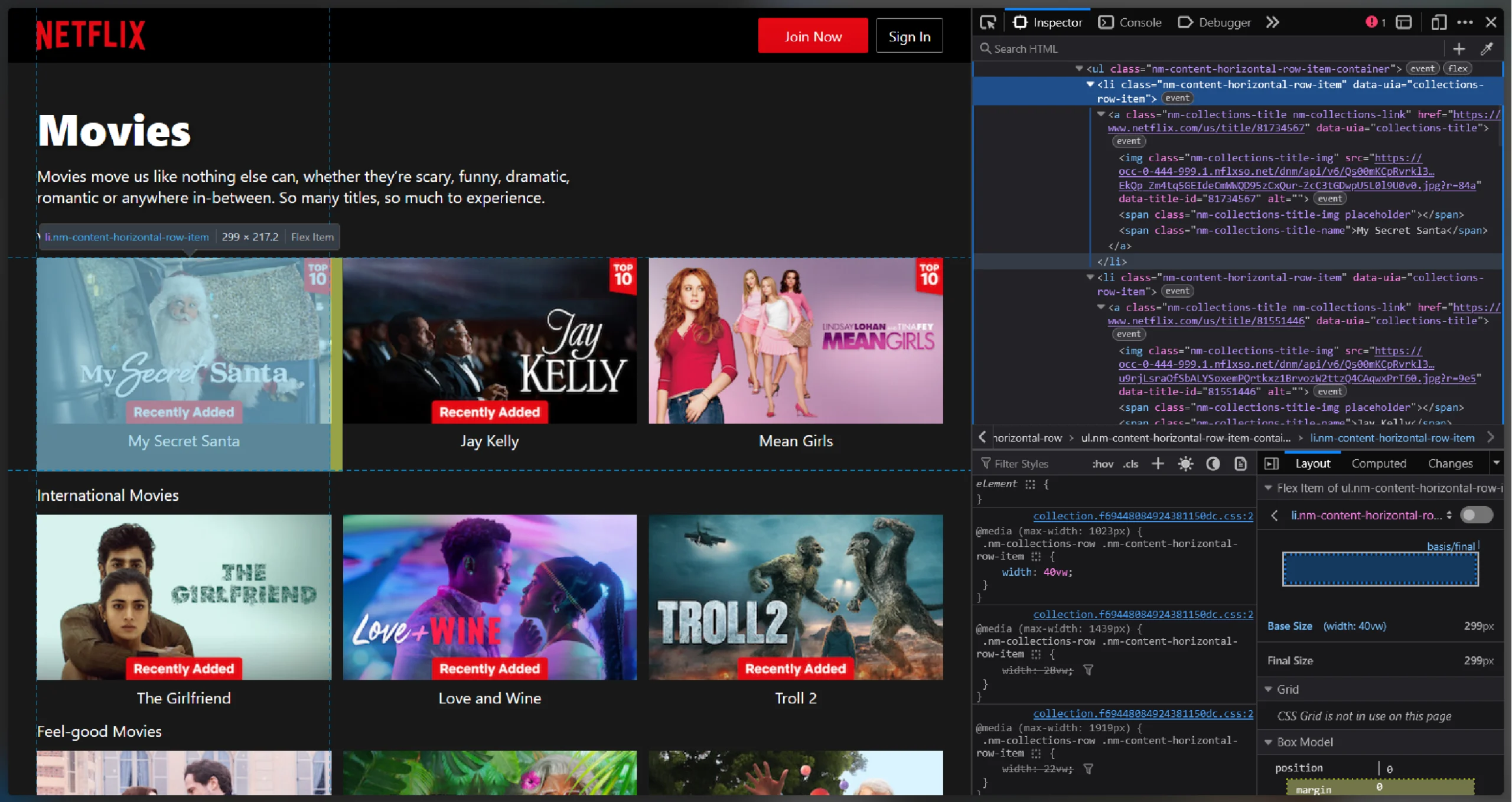
This tutorial will help you extract details of movies and series. Initially, it extracts the links to movies and series from these URLs:
- For series: https://www.netflix.com/us/browse/genre/83
- For movies: https://www.netflix.com/us/browse/genre/34399
You can use F12 to inspect the webpage to identify the tags containing the links to movies/series.
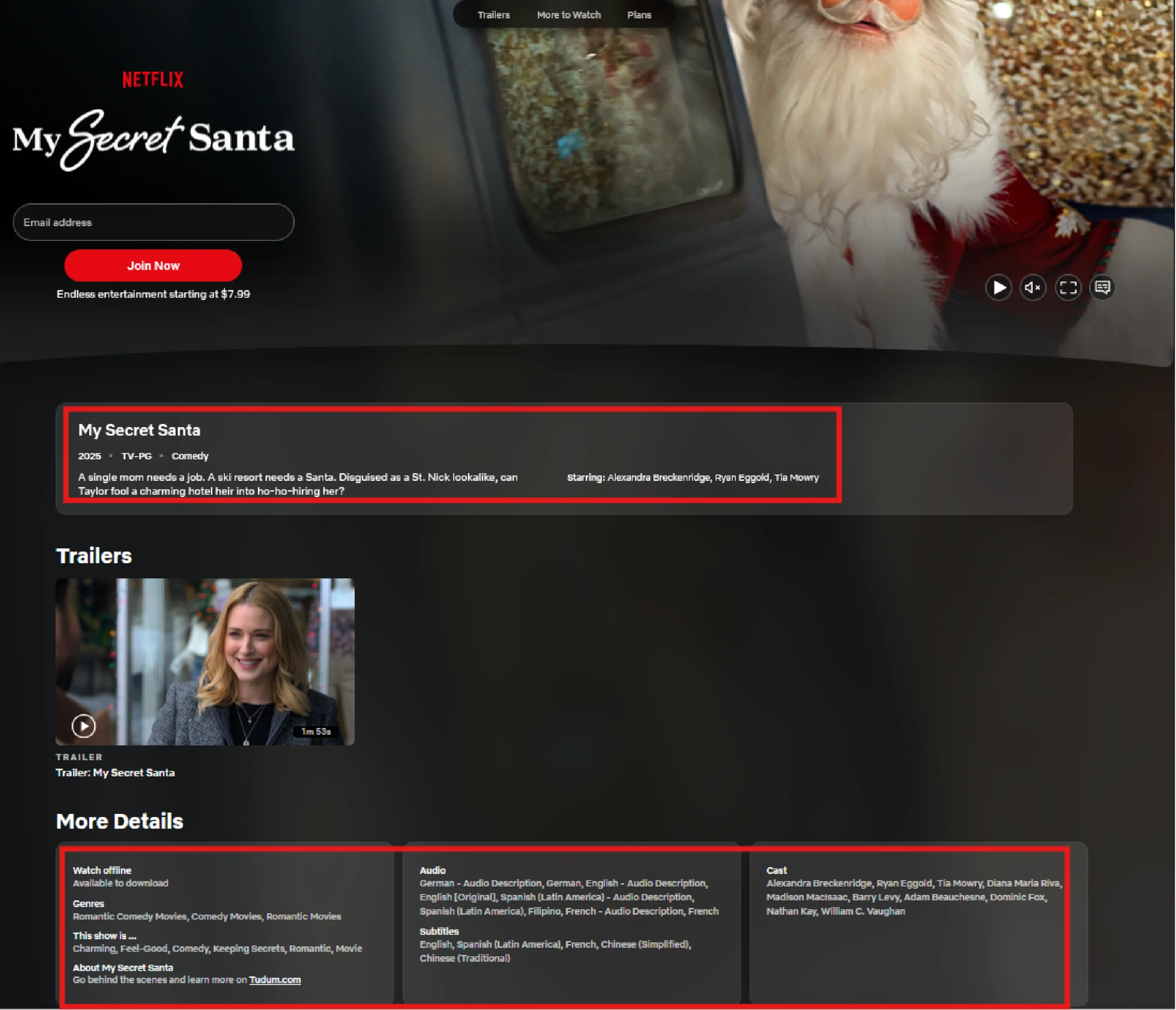
Once the code extracts the URLs, it retrieves specific details from each. Here is what it collects:
- Name
- Genre
- Synopsis
- Related Genres
- Audio
- Subtitles
- Release Date
- Rating
- Mood
- Seasons (For series)
- Cast
- URL
Web Scraping Netflix: The Environment
This code requires three external packages:
Python requests fetches the HTML source code of the target web page. Meanwhile, BeautifulSoup helps you parse and extract the required data.
You can install these packages using the Python package manager pip.
pip install bs4 requests
Additionally, the code also uses the json module to save the extracted data to a JSON file. You don’t need to install it as it comes with the Python standard library.
Web Scraping Netflix: The Code
If you want to start scraping movie details right away, here’s the complete code.
import requests
import json
from bs4 import BeautifulSoup
def getType(series_url, movies_url):
searchType = input("Enter \n1) for series\n2) for movies")
selector = {
"1": series_url,
"2": movies_url
}
try:
url = selector[searchType]
except:
print("Wrong entry. Enter either 1 or 2.")
getType()
return url
def getTitleDetails(url):
print("getting",url)
title_response = requests.get(url)
title_soup = BeautifulSoup(title_response.text,'lxml')
json_scripts = title_soup.find_all('script',type='application/ld+json')
data = None
for script in json_scripts:
if 'schema.org' in script.text:
data = json.loads(script.text)
break
genre = data['genre']
release_date = data['dateCreated']
number_of_seasons = data.get('numberOfSeasons')
rating = data['contentRating']
synopsis = data['description']
audio = title_soup.find('h4',string='Audio').find_next_sibling('span')
subtitles = title_soup.find('h4',string='Subtitles').find_next_sibling('span')
moods = title_soup.find('h4',string='This show is ...').find_next_sibling('span')
cast = title_soup.find('h4',string='Cast').find_next_sibling('span') if title_soup.find('h4',string='Cast') else None
related_genres = title_soup.find('h4',string='Genres').find_next_sibling('span')
title_details = {
"Genre":genre if genre else "NA",
"Synopsis":synopsis if synopsis else "NA",
"Related Genres": related_genres.text if related_genres else "NA",
"Audio":audio.text if audio else "NA",
"Subtitles":subtitles.text if subtitles else "NA",
"Release Date": release_date,
"Rating":rating if rating else "NA" ,
"Mood":moods.text if moods else "NA",
"Seasons":number_of_seasons if number_of_seasons else "NA",
"Cast":cast.text if cast else "NA",
"URL":url
}
title_details = {k: v for k, v in title_details.items() if v not in ["NA", None, ""]}
return [title_details, title_soup.h1.text]
def getDetails(url):
response = requests.get(url,timeout=5)
print(response.status_code)
if response.status_code == 200:
soup = BeautifulSoup(response.text,'lxml')
else:
return {"Error":"Server blocked your scraper or the URL is not correct."}
sections = soup.find_all('section',{'class':'nm-collections-row'})
all_sections = {}
for section in sections[:3]:
try:
section_name = section.find('span',{'class':'nm-collections-row-name'}).text
except:
section_name = section.find('h2',{'class':'nm-collections-row-name'}).text
movie_urls = [item.a['href'] for item in section.ul.find_all('li')]
all_details = {}
print(len(movie_urls))
for url in movie_urls[:3]:
try:
title_details,title = getTitleDetails(url)
all_details[title] = title_details
except Exception as e:
print("Error in getting title details",e)
continue
all_sections[section_name] = all_details
return all_sections
def saveData(data):
with open("netflix.json","w",encoding="utf-8") as f:
json.dump(data,f,indent=4,ensure_ascii=False)
if __name__ == "__main__":
series_url = "https://www.netflix.com/in/browse/genre/83"
movies_url = "https://www.netflix.com/in/browse/genre/34399"
urls = getType(series_url,movies_url)
titleDetails = getDetails(urls)
saveData(titleDetails)
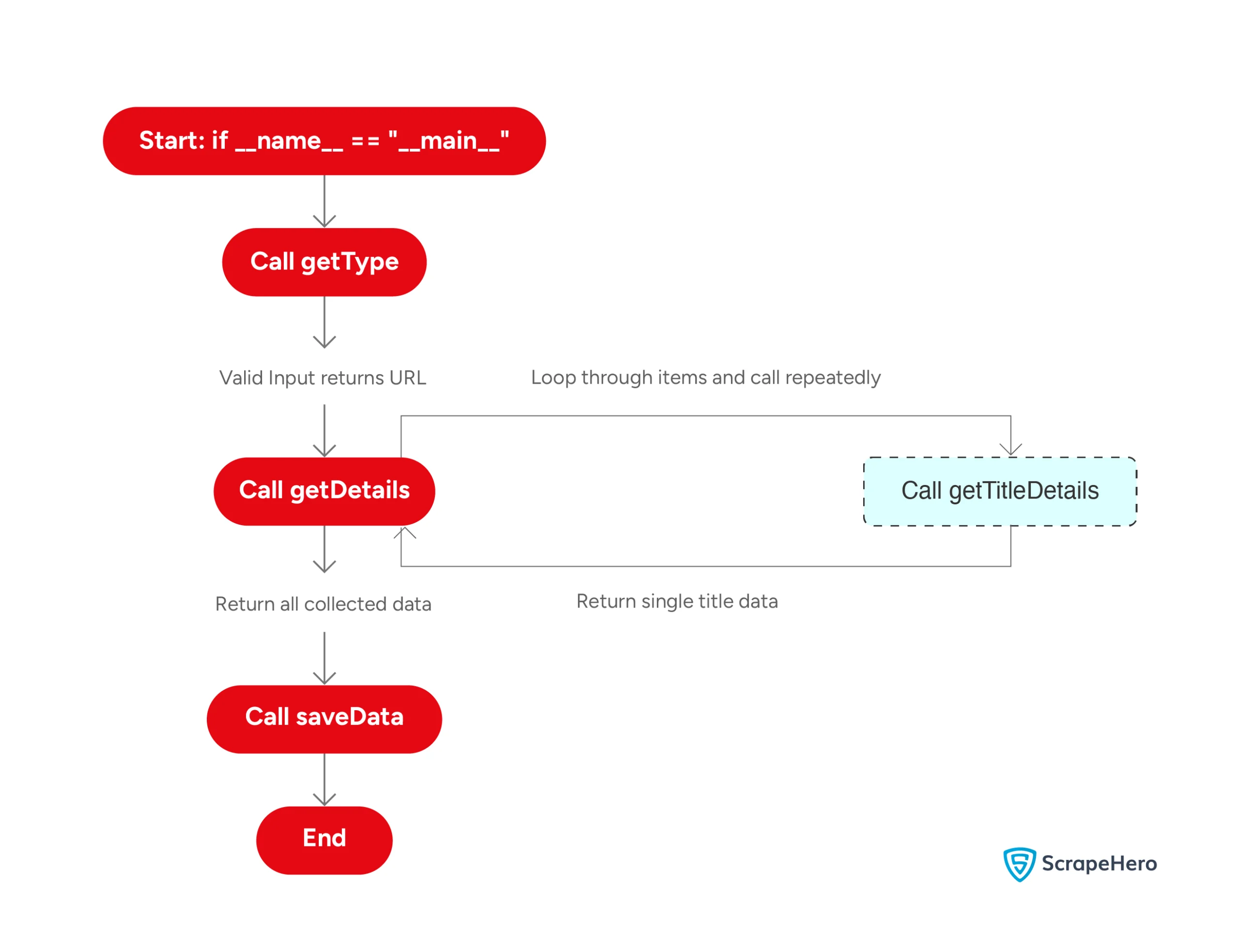
Here’s a flowchart showing the code logic:
The code starts by importing the packages necessary for web scraping Netflix.
import requests
import json
from fake_useragent import UserAgent
from bs4 import BeautifulSoup
The code can scrape both series and movie details, but it doesn’t do both at the same time. So it uses a function, getType(), that asks users whether they want to scrape movie or series details.
def getType():
The function uses the input() method to prompt for input.
searchType = input("Enter \n1) for series\n2) for movies")
Based on the user’s choice, getType() picks the correct URL from the dict variable.
selector = {
"1": series_url,
"2": movies_url
}
try:
url = selectvor[searchType]
except:
print("Wrong entry. Enter either 1 or 2.")
getType()
The try-except block prevents errors if you enter an invalid character. In that case, the function notifies you and calls itself again, making getType() a recursive function.
Once you have the correct URL, you can start extracting the data.
Next, the code defines a function getDetails() that accepts a URL as input and scrapes the details of the movies/series available on that page.
def getDetails():
It begins sending an HTTP request to the URL using Python requests.
response = requests.get(url)
The function then parses the response text if the status code is 200.
if response.status_code == 200:
soup = BeautifulSoup(response.text,'lxml')
else:
return {"Error":"Server blocked your scraper or the URL is not correct."}Netflix organizes movies in various sections, so extracting each section separately would be more efficient.
You can select the sections using the find_all method of BeautifulSoup.
sections = soup.find_all('section',{'class':'nm-collections-row'})
Note: The class nm-collections-row may change, so inspect the HTML to find the new class if the code is not working.
Next, the function loops through the sections and extracts the details. Before starting the loop, getDetails() defines an empty dict, all_sections, to store the extracted details.
all_sections = {}
While looping, use try-except blocks to avoid errors.
Start by extracting the section name. This is a bit tricky as some sections use the span tag while others use the h2 tag.
So, use another try-except block to handle both cases.
try:
section_name = section.find('span',{'class':'nm-collections-row-name'}).text
except:
section_name = section.find('h2',{'class':'nm-collections-row-name'}).text
The function then finds the URLs that lead to the movies/series pages.
Now, loop through the URLs to extract movie details. Store the extracted information in an empty dict, all_details.
Inside the loop, the function will:
1. Call a helper function getTitleDetails() that returns the title name and its details dictionary.
title_details,title = getTitleDetails(url)
2. Add the extracted details to the dict all_details with the title name as the key.
all_details[title] = title_detailsOutside the loop, the function adds the extracted details of all movies/series in a section to the dict all_sections. Use the section name as the key.
all_sections[section_name] = all_details
Finally, this function returns the dict all_sections.
return all_sections
As mentioned above, the code uses a helper function, getTitleDetails(), that extracts details from each page.
This function accepts a URL and returns the movie/series details and its name.
It starts by making a request to the URL using requests.get().
title_response = requests.get(url)
Then, it parses the response text using BeautifulSoup.
title_soup = BeautifulSoup(title_response.text,'lxml')
getTitleDetails() extracts details from the schema inside a script tag.
To do so, first, the function:
- Finds all the script tags with the type “application/ld+json”
- Iterates through them
- Extracts the text from the one with the string “schema.org”
- Creates a JSON object from the text
for script in json_scripts:
if 'schema.org' in script.text:
data = json.loads(script.text)
break
The function then extracts genre, release date, number of seasons, rating, and synopsis using the correct indices from the JSON object.
genre = data['genre']
release_date = data['dateCreated']
number_of_seasons = data.get('numberOfSeasons')
rating = data['contentRating']
synopsis = data['description']Next, getTitleDetails() extracts the remaining data points from the correct span elements.
audio = title_soup.find('h4',string='Audio').find_next_sibling('span')
subtitles = title_soup.find('h4',string='Subtitles').find_next_sibling('span')
moods = title_soup.find('h4',string='This show is ...').find_next_sibling('span')
cast = title_soup.find('h4',string='Cast').find_next_sibling('span') if title_soup.find('h4',string='Cast') else None
related_genres = title_soup.find('h4',string='Genres').find_next_sibling('span')
After extracting the data, getTitleDetails() saves it in a dictionary and returns the dictionary and the title name.
title_details = {
"Genre":genre if genre else "NA",
"Synopsis":synopsis if synopsis else "NA",
"Related Genres": related_genres.text if related_genres else "NA",
"Audio":audio.text if audio else "NA",
"Subtitles":subtitles.text if subtitles else "NA",
"Release Date": release_date,
"Rating":rating if rating else "NA" ,
"Mood":moods.text if moods else "NA",
"Seasons":number_of_seasons if number_of_seasons else "NA",
"Cast":cast.text if cast else "NA",
"URL":url
}
title_details = {k: v for k, v in title_details.items() if v not in ["NA", None, ""]}
return [title_details, title_soup.h1.text]
After extracting data, it’s time to save it. The saveData() function does this for you. It accepts the extracted data as the argument and uses the json.dump() method to save it to a JSON file.
Finally, the code puts all the functions together:
1. Define movie and series URLs
series_url = "https://www.netflix.com/in/browse/genre/83"
movies_url = "https://www.netflix.com/in/browse/genre/34399"
2. Call getType() and get the list of movie/series URLs
urls = getType(series_url,movies_url)
3. Call getDetails() with the URL list as the argument and extract the details of all the movies/series
titleDetails = getDetails(urls)
4. Call saveData() to save the extracted details to a JSON file
saveData(titleDetails)
The extracted details will look like this:
"Bingeworthy TV Shows": {
"Delhi Crime": {
"Genre": "Thrillers",
"Synopsis": "Inspired by both real and fictional events, this series follows a police force as they investigate high-profile crimes in Delhi.",
"Related Genres": "TV Dramas, Crime TV Shows, TV Thrillers, Hindi-Language TV Shows, and Social Issue TV Dramas",
"Audio": "English, Hindi - Audio Description, Hindi [Original], Tamil, and Telugu",
"Subtitles": "English, Hindi",
"Release Date": "2019-3-22",
"Rating": "A",
"Mood": "Gritty, Dark, Thriller, Police Detectives, Indian, Filmfare Award Nominee, Drama, and TV",
"Seasons": 3,
"Cast": "Shefali Shah, Huma Qureshi, Rasika Dugal, Rajesh Tailang, Sayani Gupta, Mita Vasisht, Anuraag Arora, Jaya Bhattacharya, Gopal Datt, and Denzil Smith",
"URL": "https://www.netflix.com/in/title/81076756"
},
"Wednesday": {
"Genre": "Comedies",
"Synopsis": "Smart, sarcastic and a little dead inside, Wednesday Addams investigates twisted mysteries while making new friends — and foes — at Nevermore Academy.",
"Related Genres": "Teen TV Shows, TV Mysteries, TV Comedies, Crime TV Shows, US TV Shows, and Fantasy TV Shows",
"Audio": "English - Audio Description, English [Original], Hindi - Audio Description, Hindi, Tamil, and Telugu",
"Subtitles": "English",
"Release Date": "2022-11-23",
"Rating": "U/A 16+",
"Mood": "Deadpan, Chilling, Dark Comedy, Psychic Power, US, Golden Globe Nominee, Imaginative, Amateur Detective, Fantasy TV, and Teen",
"Seasons": 2,
"Cast": "Jenna Ortega, Gwendoline Christie, Catherine Zeta-Jones, Emma Myers, Luis Guzmán, Christina Ricci, Steve Buscemi, Hunter Doohan, Joy Sunday, and Riki Lindhome",
"URL": "https://www.netflix.com/in/title/81231974"
},
"Money Heist": {
"Genre": "Thrillers",
"Synopsis": "Eight thieves take hostages and lock themselves in the Royal Mint of Spain as a criminal mastermind manipulates the police to carry out his plan.",
"Related Genres": "Spanish, Crime TV Shows, and TV Thrillers",
"Audio": "English - Audio Description, English, European Spanish - Audio Description, European Spanish [Original], Hindi, Tamil, and Telugu",
"Subtitles": "English, European Spanish",
"Release Date": "2017-12-20",
"Rating": "A",
"Mood": "Suspenseful, Exciting, Thriller, Notable Soundtrack, Police Detectives, Madrid, Spanish, Critically Acclaimed, Heist, and TV",
"Seasons": 5,
"Cast": "Úrsula Corberó, Álvaro Morte, Itziar Ituño, Pedro Alonso, Miguel Herrán, Jaime Lorente, Esther Acebo, Darko Perić, Hovik Keuchkerian, and Luka Peroš",
"URL": "https://www.netflix.com/in/title/80192098"
}
}
Code Limitations
You can use this code to make your own Netflix scraper. But there are some limitations to keep in mind:
- HTML Structure Changes: The code relies on Netflix.com’s current HTML structure to find data. If Netflix changes the structure, the scraper might break. You’ll then need to update the code to adapt to the changes.
- Anti-Scraping Measures: This code isn’t built to scrape without getting blocked. It lacks techniques to bypass anti-scraping measures, which could be a problem if you send too many requests. Netflix may block your IP; this also makes it unsuitable for large-scale web scraping.
Wrapping Up: Why Use a Web Scraping Service?
You saw how to scrape Netflix using Python requests and BeautifulSoup. These tools allow you to fetch HTML source code and extract details of movies and series.
However, the limitations mentioned, such as the need to handle anti-scraping measures and to maintain continuous monitoring, can make web scraping Netflix challenging. So, if you only need data, why not avoid the hassle by using a web scraping service like ScrapeHero?
ScrapeHero is a full-service web scraping service provider. We can build enterprise-grade web scrapers according to your specifications. This will let you focus on using the data rather than worrying about technical details.