
StockTwits is a website that hosts stock-market data, such as retail investor sentiment, stock discussions, and trending tickers. You can scrape StockTwits and create a data pipeline to track and analyze the market.
However, because the site is highly dynamic, scraping it requires a slightly different approach than static pages.
Developers usually rely on browser automation libraries for this, but this guide covers how to extract StockTwits data directly using Python requests.
What is StockTwits Scraping?
StockTwits scraping means programmatically extracting public data from StockTwits.com. You can do this using a browser automation library. But it is a resource-intensive process because you need to run a full-fledged browser.
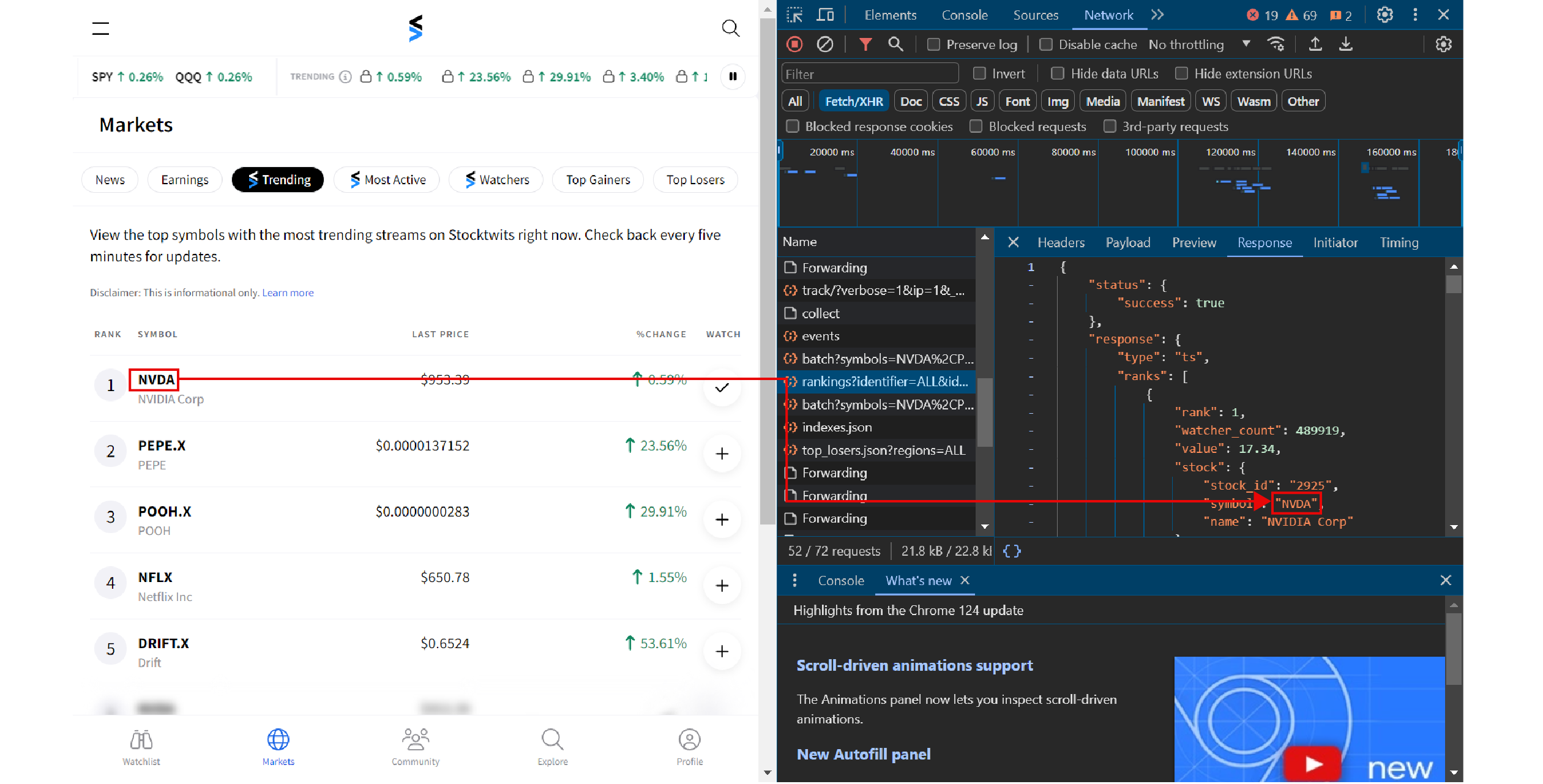
Another approach is to use the URLs that StockTwits uses to fetch data. To do so, you need to identify the URLs:
1. Visit StockTwits.com
2. Open DevTools
3. Go to the Network tab
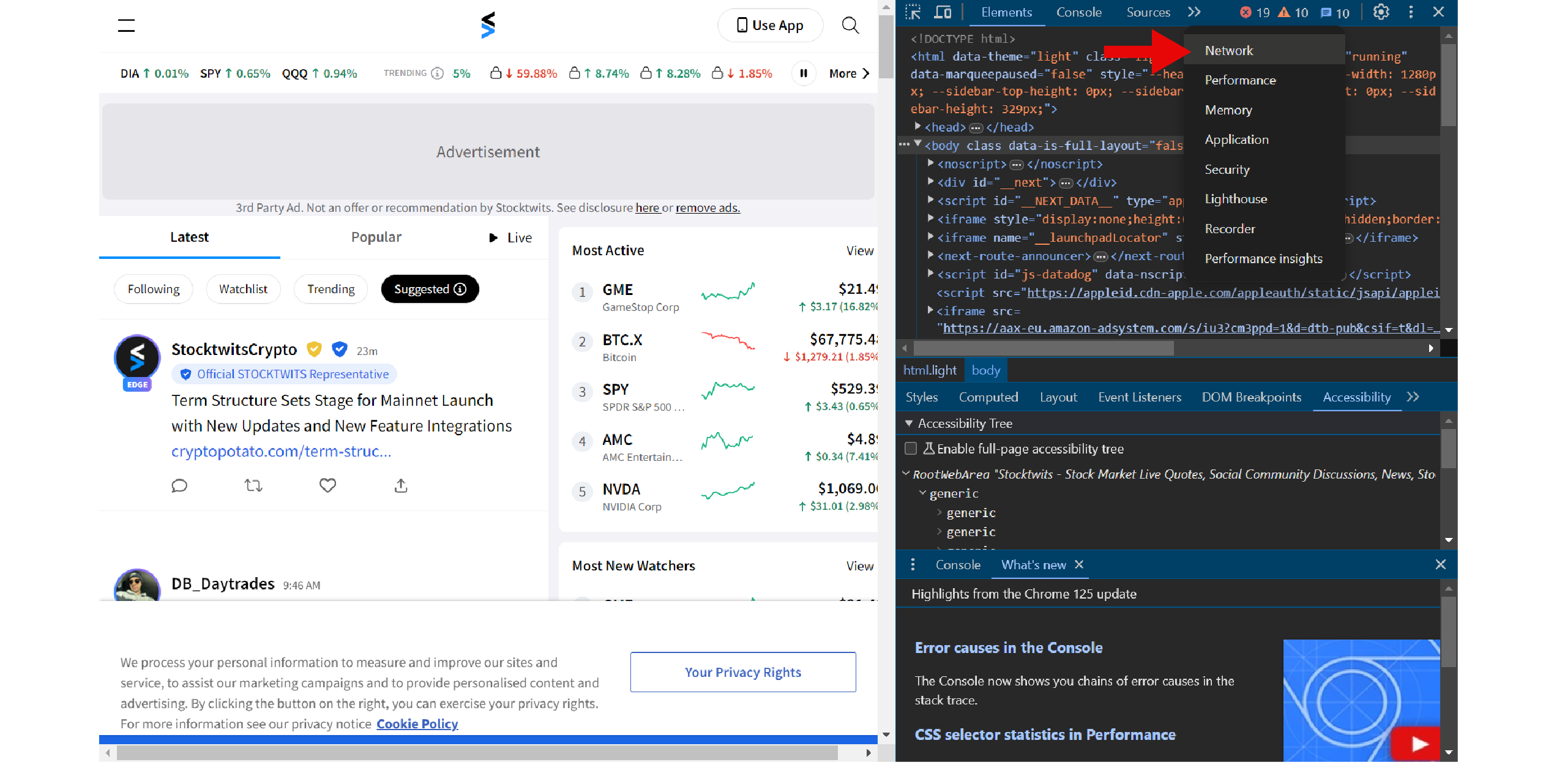
4. Select Fetch/XHR
5. Scroll in the Name column to find the URLs
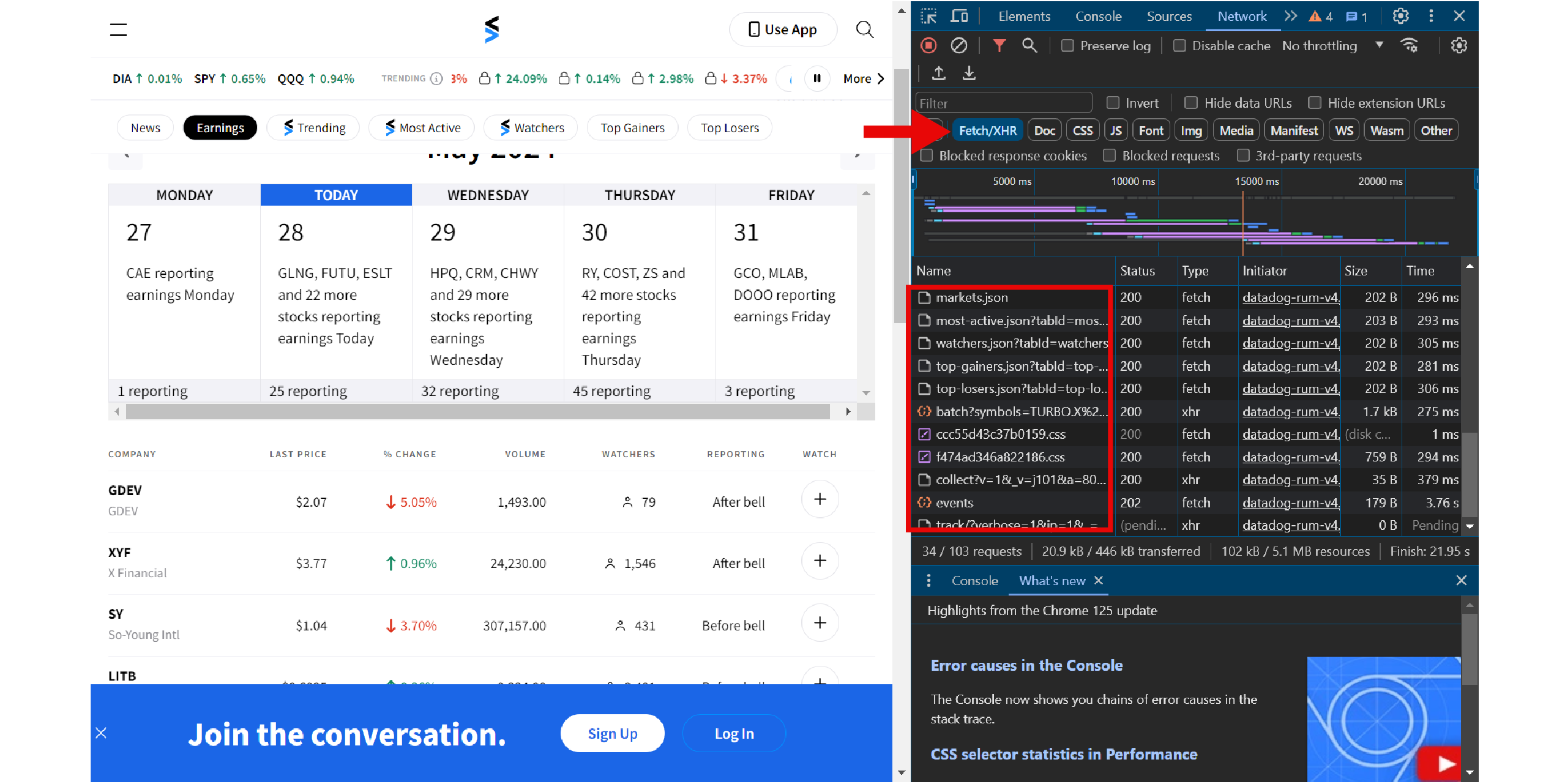
Since these URLs deliver data in JSON, you can directly use Python requests to get the data. No browser automation libraries needed.
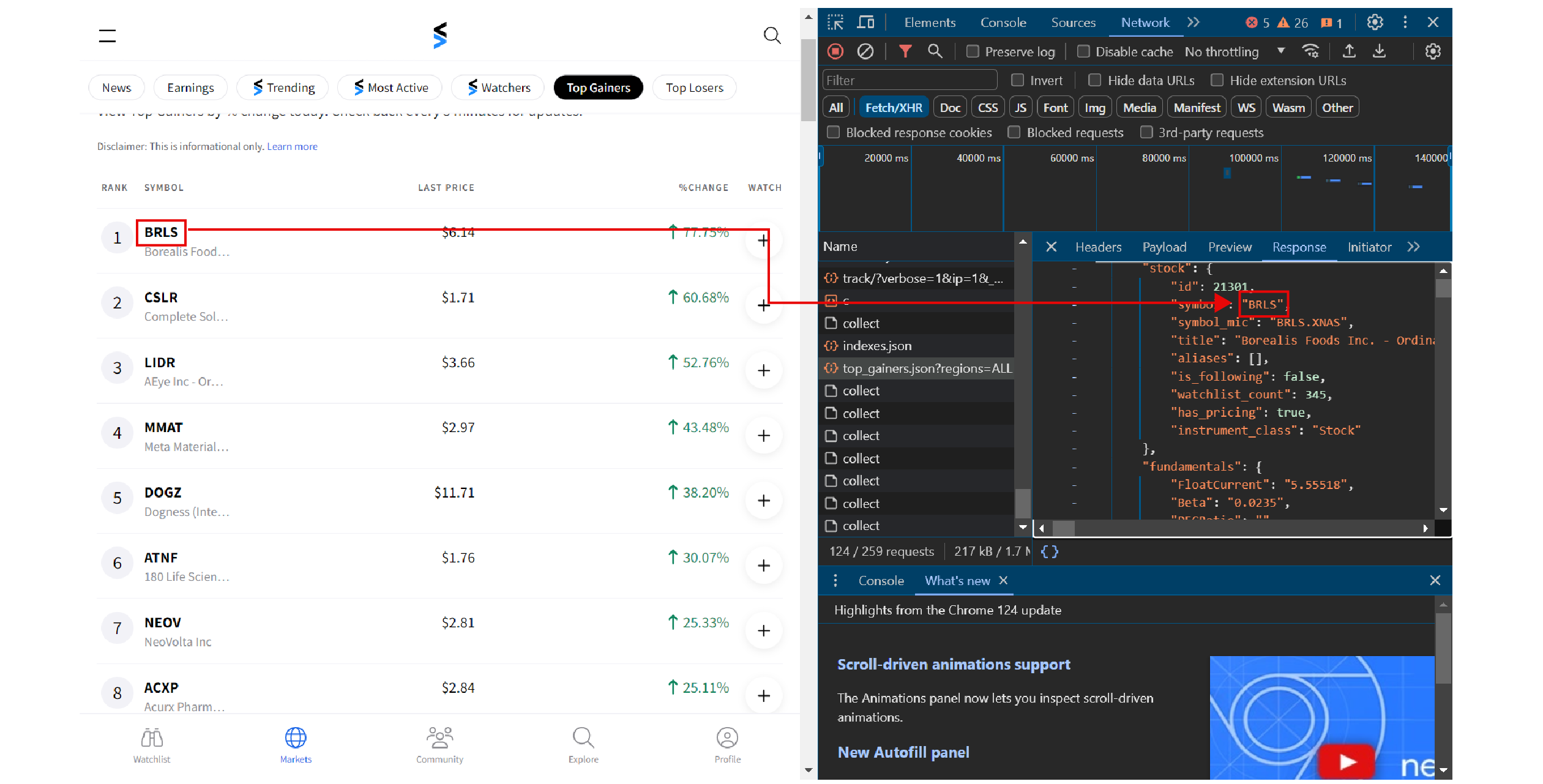
- Top Losers: Stocks with the biggest percentage drop
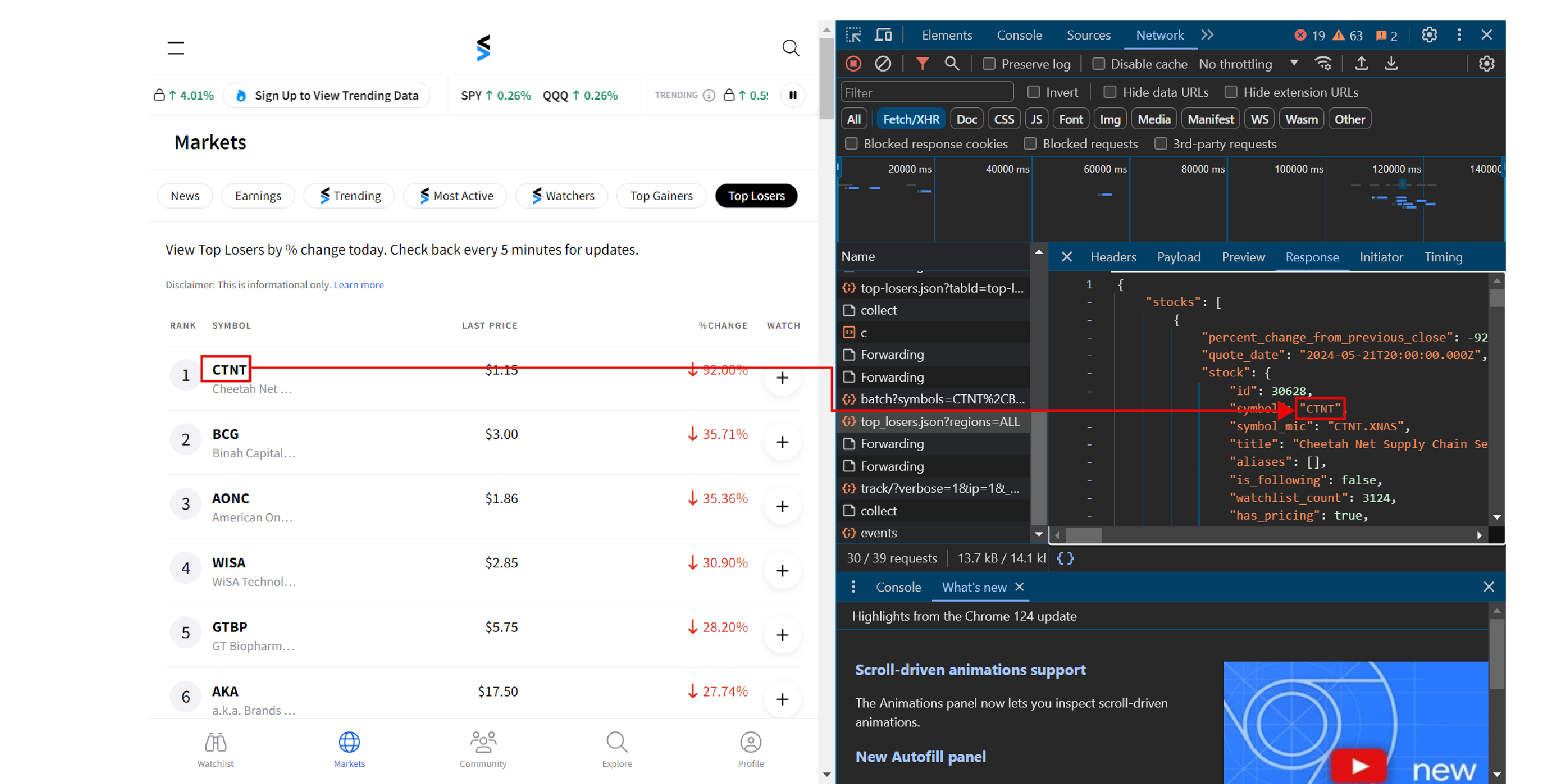
- Trending Stocks: Stocks getting the most user attention
Running the script saves each of these as its own JSON file.
The Environment
This tutorial uses the requests library to scrape StockTwits from the URLs that deliver stock data. You can install the library using:
pip install requestsThe code also requires the json module to save the extracted data to a JSON file, which comes with the standard Python library.
The code to scrape StockTwits data begins with the import statements. Import the json module and requests.
import json
import requests
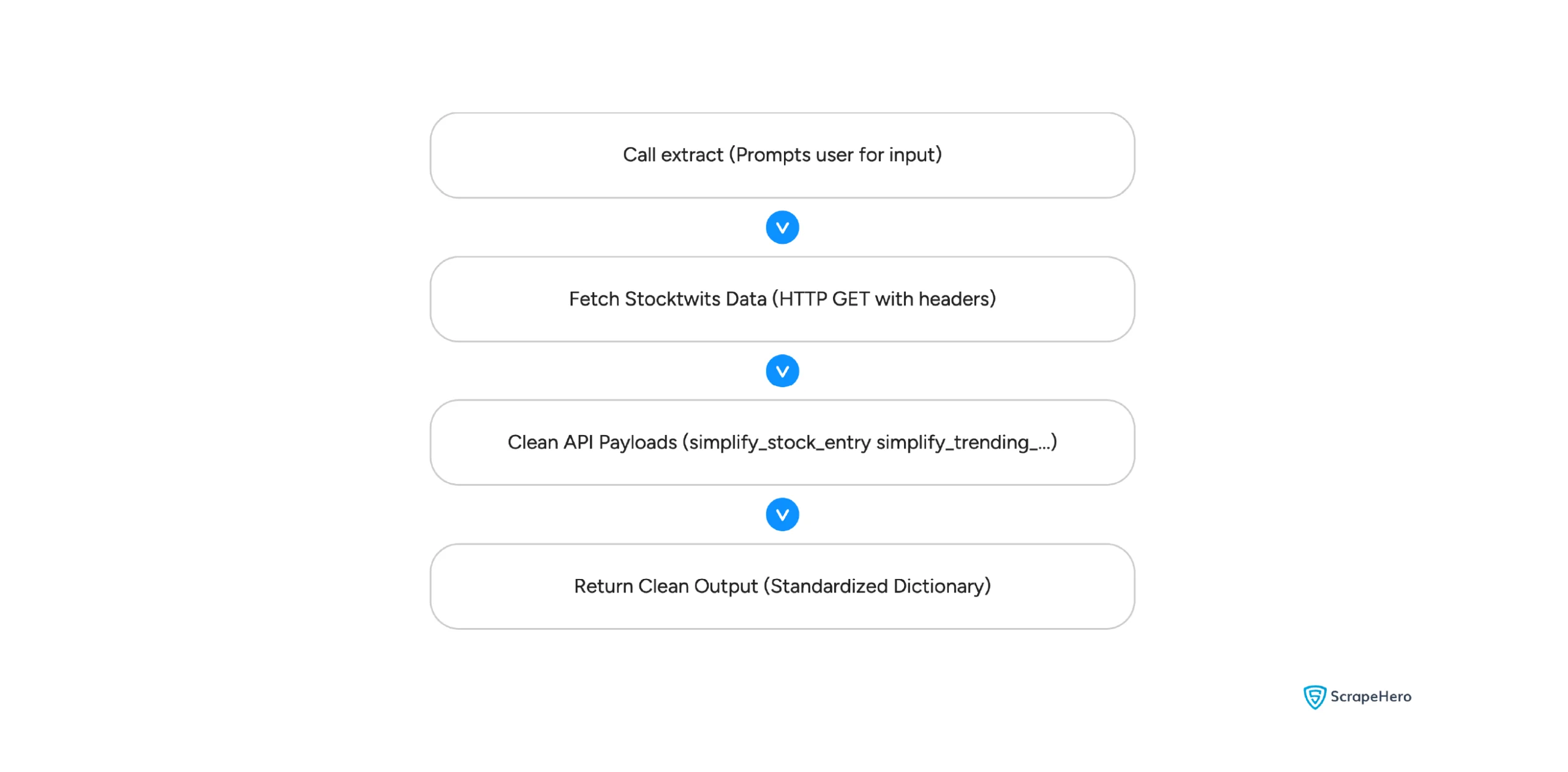
The code uses three functions: simplify_stock_entry(), simplify_trending_symbol(), and extract():
- The helper functions clean the API responses for top gainers, top losers, and trending stocks.
- The final function, extract(), is the code’s entry point. It asks the user what to scrape and executes the code accordingly.
Before extract(), the code defines a headers dictionary with a User-Agent. The requests library calls use these headers when fetching the API URLs.
headers = {
"User-Agent": "Mozilla/5.0 (Windows NT 10.0; Win64; x64) AppleWebKit/537.36 (KHTML, like Gecko) Chrome/120.0.0.0 Safari/537.36"
}
The top gainers and top losers API responses include more data than the output needs. The simplify_stock_entry() function keeps the useful fields before saving the JSON file.
def simplify_stock_entry(stock_data):
fundamentals = stock_data.get("fundamentals", {}) or {}
stock = stock_data.get("stock", {}) or {}
return {
"symbol": stock.get("symbol") or stock.get("symbol_display") or fundamentals.get("Symbol") or "",
"company_name": stock.get("title") or fundamentals.get("Name") or "",
"summary": fundamentals.get("BusinessDescription") or fundamentals.get("Description") or "",
"business_description": fundamentals.get("BusinessDescription") or fundamentals.get("Description") or "",
"percent_change": stock_data.get("percent_change_from_previous_close"),
"quote_date": stock_data.get("quote_date"),
"market_cap": fundamentals.get("MarketCapitalization"),
"price_to_book": fundamentals.get("PriceToBook"),
"eps": fundamentals.get("EPS"),
"beta": fundamentals.get("Beta"),
"fifty_day_moving_average": fundamentals.get("50DayMovingAverage"),
"dividend_rate": fundamentals.get("DividendRate"),
}
This function takes raw stock lookup responses from Stocktwits and converts them into a clean, standardized format.
- Using .get() allows the program to read incoming keys safely, avoiding crashes if expected fields are missing.
- Checking multiple common key names guarantees that critical details like stock symbols and company names aren’t overlooked.
- Unnecessary payload clutter gets filtered out, retaining only essential financial metrics like market cap and EPS for easy saving or exporting.
Trending stocks use a different response structure, so the code uses simplify_trending_symbol() for that endpoint.
def simplify_trending_symbol(symbol_data):
trends = symbol_data.get("trends", {}) or {}
fundamentals = symbol_data.get("fundamentals", {}) or {}
price_data = symbol_data.get("price_data", {}) or {}
combined = price_data.get("combined", {}) or {}
return {
"symbol": symbol_data.get("symbol") or symbol_data.get("symbol_display") or "",
"company_name": symbol_data.get("title") or fundamentals.get("symbol") or "",
"summary": trends.get("summary") or "",
"business_description": fundamentals.get("business_description") or "",
"percent_change": combined.get("percent_change") or price_data.get("percent_change"),
"price": combined.get("price") or price_data.get("last"),
"market_cap": fundamentals.get("market_capitalization"),
"watchlist_count": symbol_data.get("watchlist_count"),
"trend_score": symbol_data.get("trending_score"),
"rank": symbol_data.get("rank"),
"quote_date": combined.get("timestamp") or price_data.get("timestamp"),
}
Here, the code processes social-focused data returned specifically by Stocktwits’ trending tickers endpoint.
- The logic zeroes in on community metrics—including watchlist totals, trending scores, and overall user sentiment.
- Missing social data is handled safely through .get(), keeping the script running smoothly without throwing errors.
- Complex, multi-layered objects are transformed into a straight-forward dictionary that is easy to store, view, or analyze.
extract()
The extract() function asks what to scrape. Option 0 exits the program, and the other options fetch top gainers, top losers, or trending stocks using Python requests. The function then saves the cleaned response to a JSON file.
def extract():
query = input(
"What to scrape? \n top-gainers [1]\n top-losers[2]\n trending stocks[3]\n Insert a number (1, 2, or 3)\n To cancel, enter 0."
)
if query == "0":
return
match int(query):
case 1:
url = "https://api.stocktwits.com/api/2/symbols/stats/top_gainers.json?regions=US"
name = "topGainers"
case 2:
url = "https://api.stocktwits.com/api/2/symbols/stats/top_losers.json?regions=US"
name = "topLosers"
case 3:
url = "https://api.stocktwits.com/api/2/trending/symbols_enhanced.json?class=all&payloads=qprices®ions=US&enable_price_v2=true"
name = "trending"
response = requests.get(url, headers=headers)
responseJson = json.loads(response.text)
if name in {"topGainers", "topLosers"}:
cleaned_json = {
"stocks": [simplify_stock_entry(item) for item in responseJson.get("stocks", [])],
"response": responseJson.get("response", {}),
}
else:
cleaned_json = {
"symbols": [simplify_trending_symbol(item) for item in responseJson.get("symbols", [])],
"response": responseJson.get("response", {}),
"cursor": responseJson.get("cursor"),
}
with open(f"{name}.json", "w") as jsonFile:
json.dump(cleaned_json, jsonFile, indent=4, ensure_ascii=False)
more = input("Do you want to continue")
if more.lower() == "yes":
extract()
else:
return
extract()
Serving as the main entry point, this function manages the overall workflow to fetch and process Stocktwits data.
- Network requests go out through the requests library to fetch raw stock details and trending lists directly from the API.
- After confirming the response status, .get() safely reads the returned data to prevent issues when fields are empty.
- The raw API payloads are passed into helper functions for cleaning before returning the final, structured output.
Code Limitations
Even though the code is suitable for StockTwits scraping, you might need to alter it later. This is because StockTwits may change the site’s structure.
Or it might change the URL from which it fetches the stock data. In either case, the code may fail to execute.
Moreover, the code may not work for large-scale data extraction, as it doesn’t use any techniques to bypass anti-scraping measures.
Wrapping Up
Using the code in this tutorial, you can scrape stock market data from StockTwits with Python requests.
However, you might need to change the code whenever StockTwits changes its website structure or the URL that delivers the stock data.
But you don’t have to change the code yourself; ScrapeHero can help you. We can take care of all your web scraping needs.
ScrapeHero is a full-service web scraping service provider capable of building enterprise-grade web scrapers and crawlers according to your specifications. ScrapeHero services include large-scale scraping and crawling, monitoring, and custom robotic process automation.