Here’s why product content monitoring is necessary.
Your Product Information Management (PIM) database is spotless. Your team spent months cleaning up titles, pricing lists, and media assets. The database says your flagship product is in stock, priced at $348.00, and fully optimized.
But what are your customers actually seeing on Amazon, Walmart, or Target right now?
They might see an unauthorized 20% price cut by a third-party seller. They might see “Currently Unavailable” because of a localized stockout. Or they might see a scrambled title from a bad retailer update. You can’t know by just looking at your PIM.
A PIM keeps your internal records clean and approved. But it has zero visibility into what renders on live retailer pages. The gap between your internal database and the customer’s screen is where content accuracy breaks down, conversions drop, and MAP (Minimum Advertised Price) violations happen silently.
If you check your listings weekly or monthly, you’re guessing. To take control, you need a system that monitors live listings continuously, normalizes disparate retailer data, audits it against your golden PIM records, and alerts your team before a customer spots a discrepancy.
This article breaks down the core architecture and business logic of a production-grade monitor.
The Architecture of a Product Content Monitoring System
To track product content accuracy reliably, solve these three challenges:
- Normalising different HTML layouts
- Comparing attributes without raising false alarms (alert fatigue)
- Routing discrepancies immediately
Here is the data flow of the monitoring system:
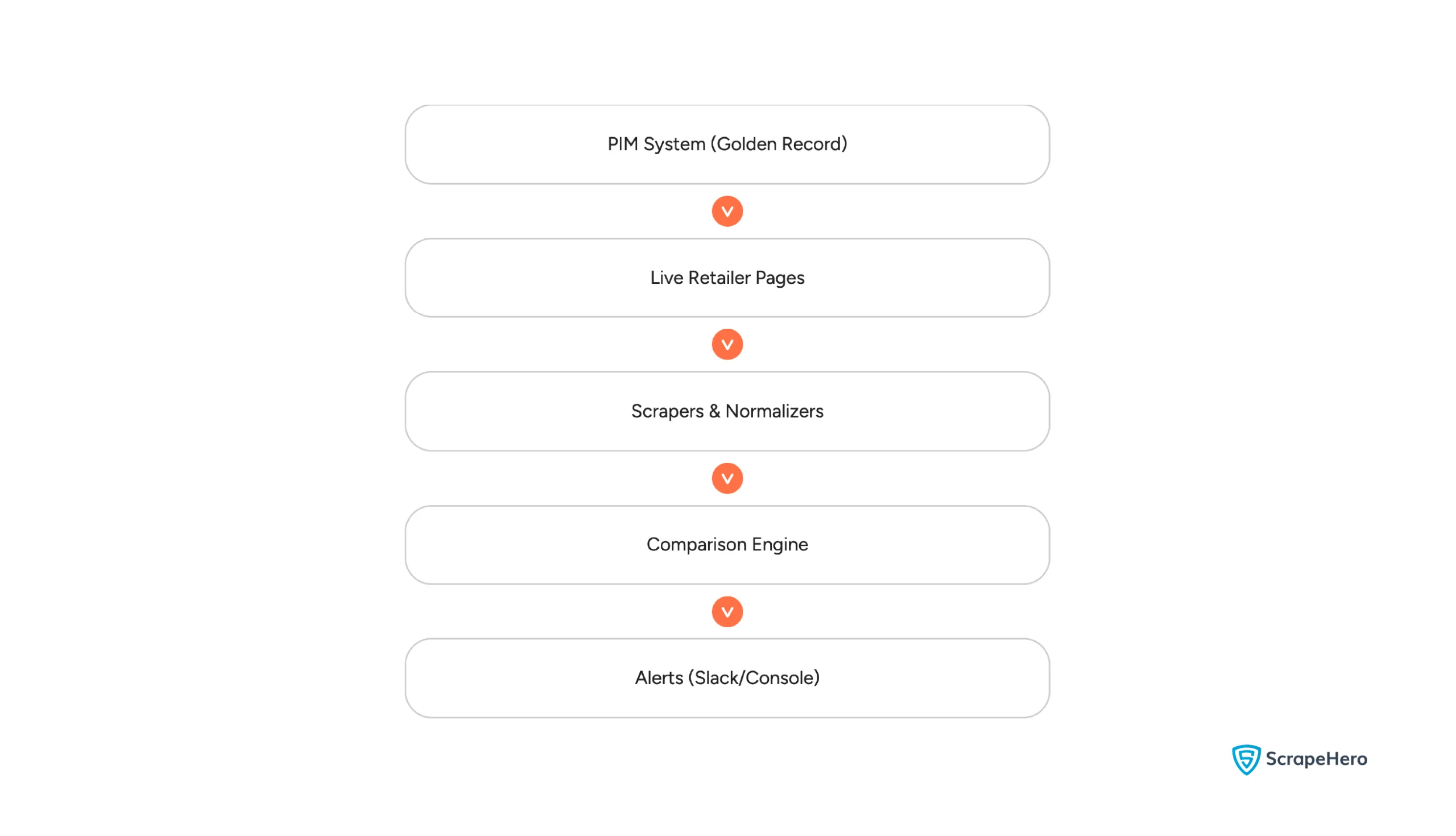
Let’s walk through the implementation step-by-step.
Step 1: Standardizing the Data Schema
If you try to compare raw HTML pages, your script will immediately fail. Every retailer structures their pages differently. Before doing any comparison, normalize live data into a consistent structure.
Define three clean Python dataclasses in a standalone script, schema.py, to act as data transfer objects:
# schema.py
from dataclasses import dataclass, field
from typing import Dict, Any, Optional
@dataclass
class NormalizedProduct:
"""Standardized representation of what a live customer sees."""
sku: str
retailer: str
title: str
price: float
currency: str
in_stock: bool
image_url: Optional[str] = None
attributes: Dict[str, Any] = field(default_factory=dict)
@dataclass
class PIMProduct:
"""The Product Information Management (PIM) golden record."""
sku: str
title: str
price: float
currency: str
in_stock: bool
image_url: Optional[str] = None
attributes: Dict[str, Any] = field(default_factory=dict)
@dataclass
class Discrepancy:
"""A detected mismatch between live retailer data and internal PIM data."""
sku: str
retailer: str
field_name: str
expected_value: Any
actual_value: Any
severity: str # 'HIGH' (price/stock), 'MEDIUM' (titles), 'LOW' (attributes)
How it works:
- NormalizedProduct standardizes what the scraper extracts. Whether the retailer is Amazon, Walmart, or Target, this ensures product content consistency.
- PIMProduct stores the internal approved record (our “source of truth”). Note the image_url and attributes fields — these feed into the engine’s image and attribute checks downstream.
- Discrepancy houses details about any mismatch found. It categorizes them by severity. Price, stock, and image issues are marked as HIGH severity because they directly hurt sales and MAP policies, while description or attribute typos are marked as MEDIUM or LOW severity.
Step 2: Parsing & Normalizing HTML Pages
Next, write the scrapers to read the live HTML and extract those standard fields. Because retailers frequently run A/B tests, you may need to try multiple selectors as fallbacks.
You can see how to structure these extraction classes in the scrapers.py file:
# scrapers.py
import re
from bs4 import BeautifulSoup
from .schema import NormalizedProduct
class BaseScraper:
def __init__(self, retailer: str):
self.retailer = retailer
def clean_price(self, raw_price: str) -> float:
"""Cleans price strings (e.g. '$1,299.99') into floats."""
if not raw_price:
return 0.0
cleaned = re.sub(r"[^\d.]", "", raw_price)
try:
return float(cleaned)
except ValueError:
return 0.0
class AmazonScraper(BaseScraper):
def __init__(self):
super().__init__("Amazon")
def parse(self, html: str, sku: str) -> NormalizedProduct:
soup = BeautifulSoup(html, "html.parser")
# 1. Parse Title
title_el = soup.select_one("#productTitle")
title = title_el.get_text(strip=True) if title_el else "Unknown Amazon Product"
# 2. Parse Price
price_str = None
for selector in ["span.a-price span.a-offscreen", "span#price_inside_buybox",
"span#newBuyBoxPrice", "span.a-color-price"]:
price_el = soup.select_one(selector)
if price_el:
price_str = price_el.get_text(strip=True)
break
price = self.clean_price(price_str)
# 3. Parse Stock
availability_el = soup.select_one("#availability")
in_stock = True
if availability_el:
availability_text = availability_el.get_text(strip=True).lower()
if "currently unavailable" in availability_text or "out of stock" in availability_text:
in_stock = False
# 4. Parse Image
image_el = soup.select_one("#landingImage")
image_url = image_el.get("src") or image_el.get("data-old-hires") if image_el else None
return NormalizedProduct(
sku=sku, retailer=self.retailer, title=title,
price=price, currency="USD", in_stock=in_stock, image_url=image_url
)
How it works:
- BaseScraper.clean_price(): Raw prices on retailer pages contain currency symbols, commas, and spaces (e.g., “$348.00” or “$ 348”). A regular expression ([^\d.]) strips away everything except digits and decimals, converting it into a clean Python float.
- AmazonScraper.parse(): This parser uses BeautifulSoup to inspect the page DOM. Because Amazon constantly changes its layout, it searches a prioritized list of four CSS selectors to extract the price, stopping at the first match.
- Availability Auditing: Instead of looking for a simple “In Stock” label, the scraper checks if negative indicators like “currently unavailable” or “out of stock” are present in the #availability element to detect stockouts.
Step 3: Designing the Comparison Engine
If you use simple string equality (live.title == pim.title) to audit product listings, your alerting channels will blow up with false alarms.
Why? Because retailers often append keywords (e.g., Amazon listing adding “- Black (2024 Version)”), format pricing decimals differently, or have slight variations in whitespace.
To solve this, a Python script, engine.py uses fuzzy string matching and pricing tolerances to verify that values match in substance, not just exact characters.
# engine.py
from difflib import SequenceMatcher
from typing import List
from .schema import NormalizedProduct, PIMProduct, Discrepancy
class ComparisonEngine:
def __init__(self, price_tolerance_pct: float = 0.5, title_similarity_threshold: float = 0.8):
self.price_tolerance_pct = price_tolerance_pct
self.title_similarity_threshold = title_similarity_threshold
def calculate_similarity(self, a: str, b: str) -> float:
"""Calculates string similarity ratio using difflib."""
if not a or not b:
return 0.0
return SequenceMatcher(None, a.lower(), b.lower()).ratio()
def compare(self, live: NormalizedProduct, pim: PIMProduct) -> List[Discrepancy]:
discrepancies = []
# 1. Fuzzy Title Match
similarity = self.calculate_similarity(live.title, pim.title)
if similarity < self.title_similarity_threshold: discrepancies.append(Discrepancy( sku=pim.sku, retailer=live.retailer, field_name="title", expected_value=pim.title, actual_value=live.title, severity="MEDIUM" )) # 2. Price Audit with Tolerance price_diff = abs(live.price - pim.price) pct_diff = (price_diff / pim.price) * 100 if pim.price > 0 else 0
if live.currency != pim.currency:
discrepancies.append(Discrepancy(
sku=pim.sku, retailer=live.retailer, field_name="currency",
expected_value=pim.currency, actual_value=live.currency, severity="HIGH"
))
elif pct_diff > self.price_tolerance_pct:
discrepancies.append(Discrepancy(
sku=pim.sku, retailer=live.retailer, field_name="price",
expected_value=f"{pim.currency} {pim.price:.2f}",
actual_value=f"{live.currency} {live.price:.2f}", severity="HIGH"
))
# 3. Stock Status Audit
if live.in_stock != pim.in_stock:
discrepancies.append(Discrepancy(
sku=pim.sku, retailer=live.retailer, field_name="in_stock",
expected_value=pim.in_stock, actual_value=live.in_stock, severity="HIGH"
))
# 4. Image URL Audit
if pim.image_url and not live.image_url:
discrepancies.append(Discrepancy(
sku=pim.sku, retailer=live.retailer, field_name="image_url",
expected_value="Image Present", actual_value="No Image/Empty selector",
severity="HIGH"
))
# 5. Attributes Audit (brand, color, size, etc.)
for attr_key, expected_val in pim.attributes.items():
actual_val = live.attributes.get(attr_key)
if actual_val is None:
discrepancies.append(Discrepancy(
sku=pim.sku, retailer=live.retailer,
field_name=f"attribute:{attr_key}",
expected_value=expected_val, actual_value="Missing", severity="LOW"
))
elif str(actual_val).lower() != str(expected_val).lower():
discrepancies.append(Discrepancy(
sku=pim.sku, retailer=live.retailer,
field_name=f"attribute:{attr_key}",
expected_value=expected_val, actual_value=actual_val, severity="LOW"
))
return discrepancies
How it works:
The engine runs five checks:
- calculate_similarity(): Uses Python’s native difflib.SequenceMatcher. It compares the live title with the PIM title and returns a ratio between 0.0 (completely different) and 1.0 (identical).
- Fuzzy Threshold: By setting title_similarity_threshold to 0.8 (80%), the engine ignores minor retailer suffix adjustments but will sound the alarm if a product name gets completely corrupted.
- Price Tolerance: The engine calculates the percentage difference between the live price and PIM price. If it falls within price_tolerance_pct (0.5%), minor rounding issues (like $348.00 vs. $347.99) are ignored. Currency mismatches get their own check and are always flagged as HIGH, regardless of the price delta.
- Image Audit: If the PIM record has an image URL but the live scraper found no image element, the engine flags it as HIGH severity — a missing product image is a direct conversion killer.
- Attributes Audit: The engine iterates over every key in pim.attributes (brand, color, size, etc.) and checks whether the live page carries a matching value. Missing or mismatched attributes are flagged as LOW severity.
Step 4: Continuous Orchestration & Alerting
Lastly, orchestrate these components in monitor.py. This class schedules the jobs, reads the target URLs, queries the PIM database for golden records, runs the audits, and routes the reports to your logging or alerting channels:
Note: The monitor.py script below illustrates the core orchestration logic. For the sake of readability, there is no boilerplate for database authentication (pim.py), Slack/logging integrations (alerts.py), and asynchronous task scheduling. Furthermore, while the extraction layer (scrapers.py) works perfectly for local testing, running it synchronously across thousands of URLs may result in IP bans.
# monitor.py
import logging
from typing import Dict, List, Optional
from .schema import Discrepancy
from .scrapers import AmazonScraper, WalmartScraper, TargetScraper
from .pim import PIMClient
from .engine import ComparisonEngine
from .alerts import AlertManager
class ContentAccuracyMonitor:
def __init__(self, pim_client: PIMClient, comparison_engine: ComparisonEngine, alert_manager: AlertManager):
self.pim_client = pim_client
self.comparison_engine = comparison_engine
self.alert_manager = alert_manager
self.scraper_registry = {
"amazon": AmazonScraper(),
"walmart": WalmartScraper(),
"target": TargetScraper()
}
def _determine_retailer(self, url: str) -> str:
url_lower = url.lower()
if "amazon" in url_lower:
return "amazon"
elif "walmart" in url_lower:
return "walmart"
elif "target" in url_lower:
return "target"
raise ValueError(f"Unsupported retailer URL: {url}")
def audit_sku_on_retailer(self, sku: str, url: str, html_content: Optional[str] = None) -> List[Discrepancy]:
try:
retailer_key = self._determine_retailer(url)
scraper = self.scraper_registry[retailer_key]
except ValueError as e:
logger.error(f"Cannot audit SKU {sku}: {e}")
return []
try:
if html_content is None:
html_content = scraper.fetch_live_html(url)
live_product = scraper.parse(html_content, sku)
except Exception as e:
# Pipeline failure is itself surfaced as a HIGH severity Discrepancy
return [Discrepancy(
sku=sku, retailer=scraper.retailer,
field_name="extraction_pipeline",
expected_value="Successful scrape",
actual_value=f"Error: {str(e)}",
severity="HIGH"
)]
pim_product = self.pim_client.get_product(sku)
if not pim_product:
return []
return self.comparison_engine.compare(live_product, pim_product)How it works:
- Tying the Pipeline Together: The imports at the top of the file represent your entire architecture coming together. The script pulls in the data contract (Discrepancy), an extraction layer (AmazonScraper, etc.), an internal database connector (PIMClient), a business logic (ComparisonEngine), and a routing system (AlertManager).
- Routing: _determine_retailer() inspects the URL string and maps it to the correct scraper in the registry. If the domain isn’t recognized, it raises a ValueError that is caught and logged — the audit continues for all other SKUs.
- Error Isolation: The scraping step is wrapped in its own try-except. If one retailer’s layout breaks the parser, the system doesn’t crash — it surfaces the failure as a HIGH severity Discrepancy with field_name: “extraction_pipeline”, keeping the failure visible in the same alerting channel as real content errors.
- Mock HTML Injection & Offline Testing: The audit_sku_on_retailer() function accepts an optional html_content parameter. By injecting pre-fetched or mock HTML locally, you can rigorously test your engine’s fuzzy matching and alerting tolerances without constantly pinging live e-commerce sites or burning through proxy credits.
Here’s an example of output you would get using the product monitoring system:
2026-06-24 18:17:01 [INFO] Starting Product Content Accuracy Audit...
2026-06-24 18:17:01 [INFO] 🔵 [LOW] SKU SKU-1001 @ Amazon | Mismatch on 'attribute:brand': Expected 'Sony', but found 'Missing'.
2026-06-24 18:17:01 [INFO] 🔵 [LOW] SKU SKU-1001 @ Amazon | Mismatch on 'attribute:color': Expected 'Black', but found 'Missing'.
2026-06-24 18:17:01 [INFO] 🔵 [LOW] SKU SKU-1001 @ Amazon | Mismatch on 'attribute:connectivity': Expected 'Bluetooth', but found 'Missing'.
2026-06-24 18:17:01 [ERROR] 🔴 [HIGH] SKU SKU-2002 @ Walmart | Mismatch on 'price': Expected 'USD 179.00', but found 'USD 149.00'.
2026-06-24 18:17:01 [INFO] 🔵 [LOW] SKU SKU-2002 @ Walmart | Mismatch on 'attribute:brand': Expected 'Patagonia', but found 'Missing'.
2026-06-24 18:17:01 [INFO] 🔵 [LOW] SKU SKU-2002 @ Walmart | Mismatch on 'attribute:color': Expected 'Black', but found 'Missing'.
2026-06-24 18:17:01 [INFO] 🔵 [LOW] SKU SKU-2002 @ Walmart | Mismatch on 'attribute:size': Expected 'Medium', but found 'Missing'.
2026-06-24 18:17:01 [ERROR] 🔴 [HIGH] SKU SKU-3003 @ Target | Mismatch on 'in_stock': Expected 'True', but found 'False'.
2026-06-24 18:17:01 [ERROR] 🔴 [HIGH] SKU SKU-3003 @ Target | Mismatch on 'image_url': Expected 'Image Present', but found 'No Image/Empty selector'.
2026-06-24 18:17:01 [INFO] 🔵 [LOW] SKU SKU-3003 @ Target | Mismatch on 'attribute:brand': Expected 'Instant Pot', but found 'Missing'.
2026-06-24 18:17:01 [INFO] 🔵 [LOW] SKU SKU-3003 @ Target | Mismatch on 'attribute:capacity': Expected '6-Quart', but found 'Missing'.
2026-06-24 18:17:01 [INFO] Audit completed. Found and alerted on 11 discrepancies.
Scaling the Product Content Monitoring System: Why Local Scraping Breaks
Building a custom comparison engine in Python gives you total control over how you verify your product content. But, fetching the raw HTML to feed that engine is an entirely different beast.
If you attempt to run this pipeline against 10,000 SKUs daily across Amazon, Walmart, and Target, your in-house extraction script will hit a brick wall:
1. IP Blocks and Rate Limits
Retailers like Amazon and Walmart have aggressive anti-bot infrastructure. If you scrape hundreds of pages from a single server IP, you will be blocked within minutes. To survive, you must build, scale, and maintain a proxy rotation network utilizing residential IPs.
2. Sophisticated Anti-Bot Shielding
Modern e-commerce sites deploy shields like Cloudflare, Akamai, or PerimeterX. These services don’t just block you; they silently serve decoy pages, puzzle CAPTCHAs, or mock HTML data. Your script might think it successfully scraped a page, but it’s actually reading a fake price served to throw off bots.
3. Dynamic JavaScript Rendering
Retailers increasingly use Single Page Applications (SPAs) where prices and stock availability are loaded via dynamic JavaScript calls after the initial DOM load. Standard HTTP requests (like requests.get()) will return blank fields. To get accurate data, you need headless browser pools (Playwright/Puppeteer), which are resource-heavy, slow, and expensive to host.
4. DOM Drift & Constant Redesigns
E-commerce layouts change constantly. Retailers update HTML structures weekly or run A/B layout tests. A CSS selector that worked on Monday (span.a-price) might break by Thursday. Your engineering team will spend 70% of their time writing regex patches and updating selectors instead of focusing on data analysis.
A Better Way: Focus on Analysis, Outsource the Collection
You shouldn’t be in the business of managing proxy networks, solving CAPTCHAs, or handling any of the technicalities that come with large-scale product content monitoring. Your engineering team’s time is better spent building the logic, identifying price violations, and fixing stockout issues.
This is where ScrapeHero comes in.
Instead of maintaining a fragile scraping pipeline, you can plug ScrapeHero’s enterprise-grade scraping APIs directly into your audit system.
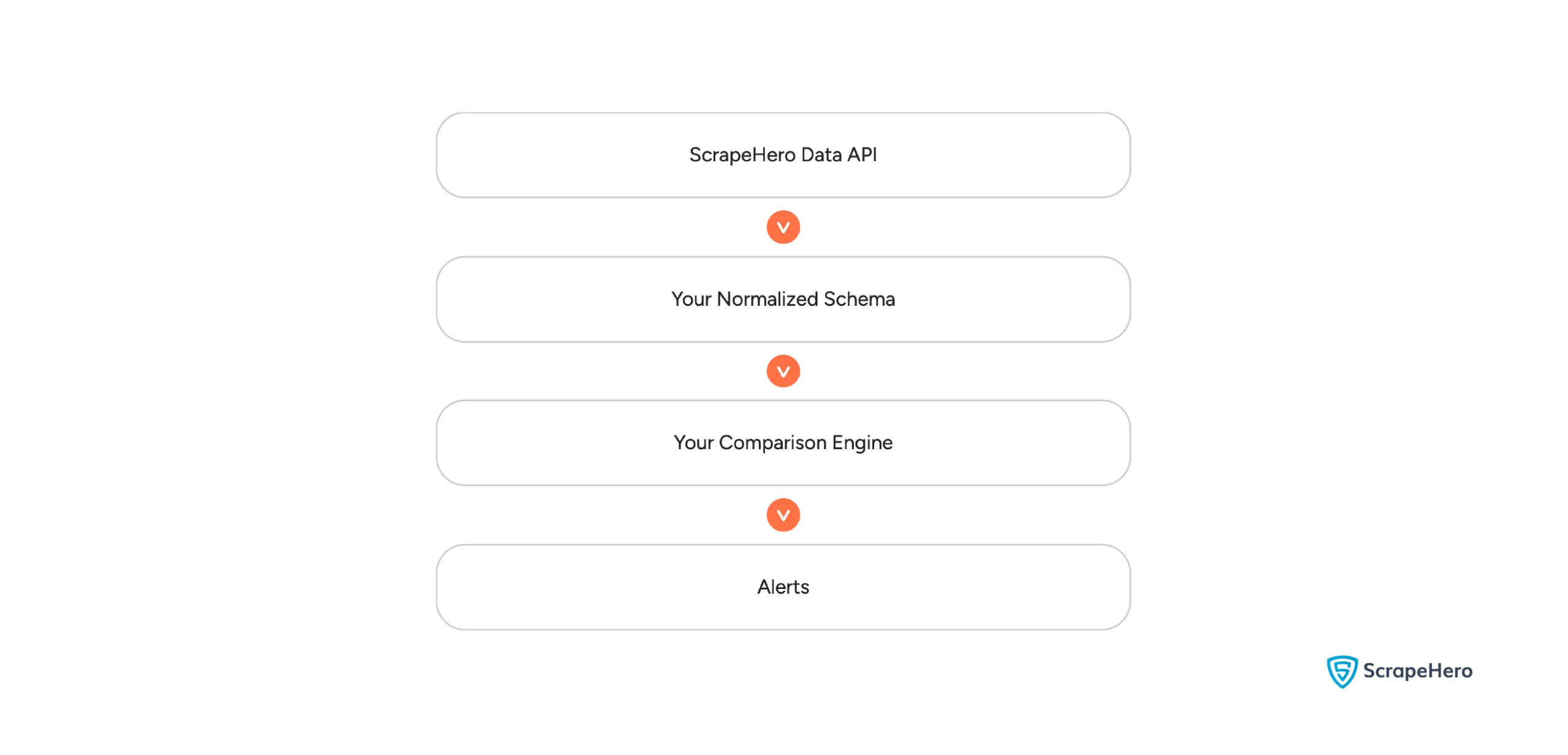
Using a web scraping service, like ScrapeHero, allows you to achieve:
- Zero Infrastructure Overhead: We handle proxy rotation, IP blocks, headless browser rendering, and CAPTCHA solving at any scale. You get clean data delivered directly to your API or S3 bucket.
- Automatic Maintenance: When Amazon or Walmart redesigns their pages, we handle the code changes. Your data flow remains uninterrupted.
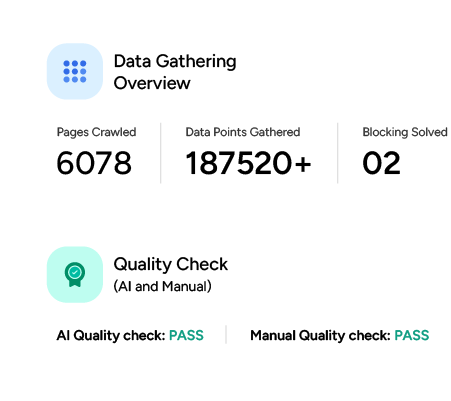
- Guaranteed Data Quality: ScrapeHero runs multi-layered post-extraction validation checks to ensure that the data you receive is exactly what is rendering on the page, preventing false alerts.
- Global Scaling: Need to audit listings in Germany, Japan, and Australia simultaneously? ScrapeHero routes requests through localized proxies to see what shoppers in specific geographic markets see.
Wrapping Up
A product content monitoring system is only as effective as the data feeding it. While building comparison logic, alerting workflows, and governance rules creates business value, maintaining reliable access to retailer data often becomes the most resource-intensive part of the project.
By separating data collection from product content analysis, teams can spend less time maintaining scraping infrastructure and more time identifying content issues, enforcing standards, and improving product performance across retail channels.
Ready to add reliable retailer data feeds to your monitoring workflow? Talk to ScrapeHero about integrating scalable, continuously updated product data into your monitoring system.