ScrapeHero Cloud offers both scrapers and APIs. Both eliminate your scraping workload, so you might wonder: which one is right for you? This article clarifies the differences. By the end, you’ll know exactly how the ScrapeHero Cloud Scraper vs. API compare—and which to choose.
- ScrapeHero Cloud Scraper and API both automate data extraction, but they are designed for different workflows.
- Choose the Cloud Scraper if you want a quick, no-code, point-and-click solution with minimal setup.
- Choose the API if you need programmatic access for apps, automations, databases, dashboards, or ETL pipelines.
- The Cloud Scraper requires little technical knowledge, while the API requires skills such as authentication, HTTP requests, response handling, and pagination.
- Scrapers and APIs may return different data fields, so compare the available data points before choosing.
- The scraper lets you request an exact number of records, while the API returns a fixed number of records per call.
- Scraper downloads are available in CSV, JSON, and Excel, whereas the API returns structured JSON that may require conversion.
- Both options use the same credit balance and pricing system, but credit consumption differs: scrapers charge per record, while APIs charge per call.
- Paid plans support more concurrent jobs or requests than the free plan, although concurrency limits depend on your subscription.
- For operations, research, sales, and content teams, the scraper is usually more convenient. Engineering, data, product, and automation teams may prefer the API.
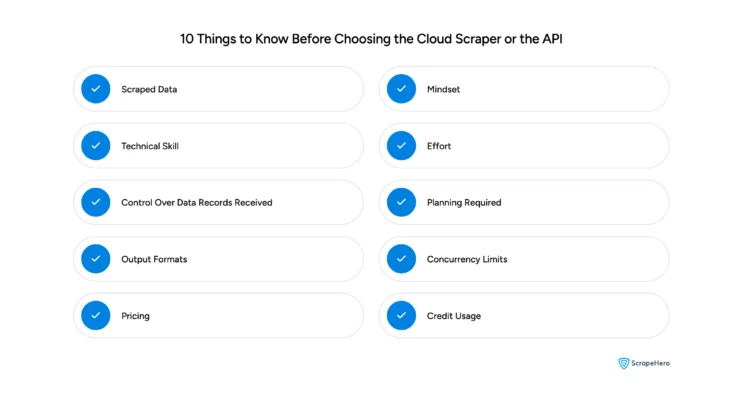
Here are 10 things you should know before choosing the Cloud Scraper or the API:
1. Scraped Data
The data returned can differ between the two.
For example, both the Google Maps Search Results Scraper and the Google Maps Search API extract data from Google Maps search results.
However, the scraper outputs 19 data points, whereas the API returns 21. The scraper doesn’t extract image count or service options, so if you need those fields, use the web scraping API.
2. Mindset
The mindset for using each product is different. The scraper is designed for users who want a guided, no-code workflow and are comfortable running scraper projects.
If you need programmatic access to integrate with an automation or backend, the API is the better fit.
In practice, the cloud scraper is ideal for web scraping for non-technical teams such as operations, research, sales, or content. The web scraping API is better for engineering, automation, data engineering, and product teams. That’s a core distinction in the ScrapeHero Cloud Scraper vs API decision.
3. Technical Skill
Using the scraper requires no technical knowledge beyond navigating the ScrapeHero Cloud interface.
The ScrapeHero API, however, requires programming or automation skills. You’ll need to handle query parameters, set up authentication, and process responses.
4. Effort
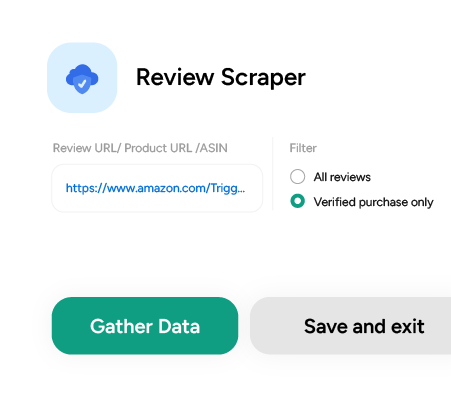
For both options, you start by finding the tool in the ScrapeHero Cloud App Store and adding it to your account. The ScrapeHero scraper requires less effort. After adding it, you only need to:
- Create a project
- Enter your input
- Set the number of records you want
- Start gathering data
These steps typically take under five minutes. With the API, after adding it to your account, you need to:
- Get your API key
- Set up a script or automation platform (such as n8n) to:
- Make an HTTP request with the required parameters
- Handle the response
- Extract the next-page URL
- Make additional requests for more records
Unlike the scraper, these steps take longer than five minutes, depending on your technical skill.
5. Control Over Data Records Received
With the scraper, you have granular control over the number of records: you can request 10, 12, 15, etc., and you’re charged only for the records you receive.
With the API, you’re still charged only for the data you receive, but the total depends on the number of API calls you make, since each call returns a fixed number of records.
6. Planning Required
To estimate credit usage with the scraper, multiply the total number of records by the credits required per record for that scraper.
With the API, first determine how many records each call returns. Then divide the total records you need by the records per call to get the number of API calls required. Finally, multiply that by the credits consumed per API call. This planning step is a key factor when weighing ScrapeHero Cloud Scraper vs API for budgeting.
7. Output Formats
The cloud scraper provides ready-to-use downloads in CSV, JSON, and Excel formats. This makes it easy for analysts, content teams, or marketers to import results into spreadsheets or BI tools without extra processing. If you need a custom format, ScrapeHero support can help.
The API returns structured JSON by design, which is standard for programmatic workflows. You’ll need to convert it to CSV or Excel if required, using libraries like Python’s pandas or Node.js’s json2csv.
If you plan to load data directly into a database, dashboard, or ETL pipeline, the API’s JSON is typically the cleaner, more flexible choice.
8. Concurrency Limits
ScrapeHero Cloud limits concurrent jobs or API calls based on your plan. Paid plans allow two concurrent jobs or calls; the free plan allows one.
This means you can run two scraper projects simultaneously or make two parallel API requests on paid tiers, enabling higher throughput for larger jobs. If you need higher concurrency, you can request custom scrapers or APIs.
9. Pricing
Pricing is the same for both. The cloud scraper and API draw from the same credit balance. New accounts receive 400 one-time credits on signup, and credits renew monthly according to your plan.
Because credits are interchangeable between scraper and API products, you can experiment with both without changing your billing setup. Keep in mind that while pricing is identical, credit consumption (per record vs. per call) affects the effective cost for a given workflow. So plan accordingly.
10. Credit Usage
Understanding credit consumption is key to controlling costs. ScrapeHero Cloud scrapers are billed per data record, so costs are proportional to the exact number of rows you download.
For APIs, credits are consumed per API call. Since each call returns a set number of records, the effective per-record cost depends on call size. Additionally, the two may scrape different sets of data points.
For example, the Amazon Search Results Scraper consumes 5 credits per record, while the Amazon Search API uses 10 credits per call and delivers more records. However, the API isn’t inherently more cost-efficient because, unlike the scraper, it doesn’t extract product descriptions from individual product pages.
Wrapping Up
Whether you need a quick point-and-click tool or a powerful programmatic solution, ScrapeHero has you covered. Your next step depends entirely on how you want to work, and on where you stand in the ScrapeHero Cloud Scraper vs API trade-off:
- For a fast, point-and-click setup: Choose ScrapeHero Cloud Scrapers to extract data in just a few clicks.
- For programmatic integration: Use ScrapeHero Cloud APIs to seamlessly feed data directly into your existing workflow.
Need custom data points or a tailored setup? Contact us today and our web scraping service will build the perfect solution for you.