ScrapeHero Cloud now has an n8n integration. If you run your workflows in n8n, you can now pull structured web data straight into them with a native node, no custom scripts or separate API clients required.
What’s New
The ScrapeHero node is live on the n8n directory. Install it once, add your API key, and you get access to the full ScrapeHero Marketplace, including scrapers for Amazon, Google, Walmart, real estate, jobs, travel, and e-commerce, from inside the n8n editor. Trigger a scrape, transform the output, and route it into any of n8n’s connected apps: a spreadsheet, a Slack channel, a database, or an AI node for further processing.
If you’ve been maintaining a separate script or API client just to get scraped data into your automations, this removes that step. The node drops into any workflow like any other n8n integration, and the JSON comes back structured, so you don’t need to write extra parsing logic to make it usable downstream.
What You Get
- One API key covers every scraper in the ScrapeHero Marketplace
- Structured JSON output that maps directly into your next node
- A native node that installs, drags, and connects like any other n8n integration
- Compatibility with n8n’s AI nodes, so you can summarize, classify, or act on scraped data without a separate step
How To Set It Up
1. Open the Nodes panel: In n8n, click the + in the top right of the editor to bring up the node search.
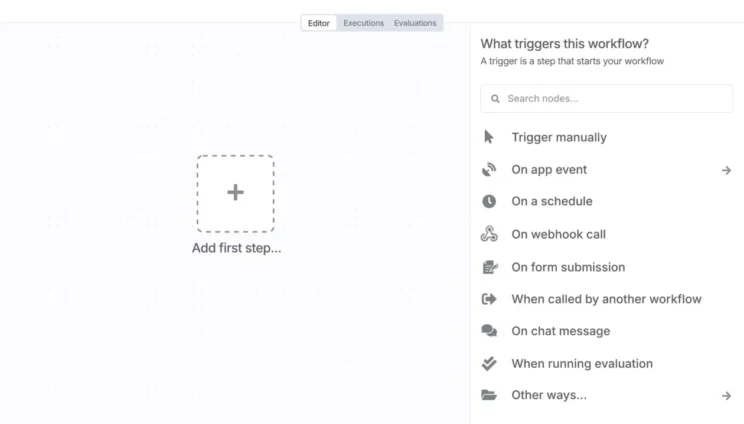
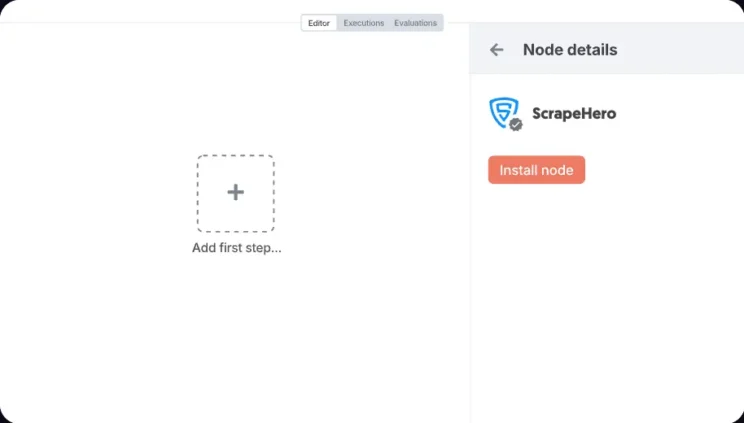
2. Search for ScrapeHero: Look for the version with the verified badge and select Install.
3. Drag the node into your workflow. Connect it to your other nodes the same way you’d connect any n8n node, then configure it with your ScrapeHero API key and the scraper you need.
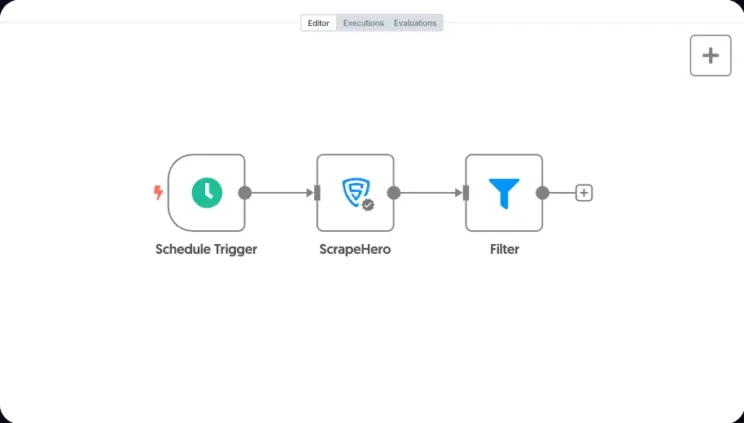
That’s it. From there, the node behaves like any other step in your pipeline: set your inputs, run the workflow, and the scraped data flows to whatever you’ve connected next.
What You Can Build With It
Price monitoring that alerts your team when a competitor drops a price. Lead enrichment that pulls company data the moment a new lead hits your CRM. Content pipelines that pull product listings into a database on a schedule.
Check out our n8n integration, and if you build a workflow with it, share it. We’re building out the use-case library and want to feature workflows from the people actually running them.
When You Need More Than the n8n Integration
The n8n integration runs on ScrapeHero Cloud’s existing marketplace, so it’s limited to the pre-built scrapers already available there: Amazon, Google Maps, Walmart, and the rest of the source list. It also assumes you’re building and maintaining the workflow yourself.
If the site you need isn’t in that list, or you’d rather not set up and maintain the workflow at all, ScrapeHero’s managed web scraping service is the option. It can extract publicly available data from anywhere on the web, not just the sources covered by prebuilt APIs, and we handle the extraction, cleaning, and delivery on the schedule and in the format your team needs. No scrapers to build, no workflow to maintain.