You know the drill. Sales fluctuate or start to dip, and you immediately ask: Why are my Amazon sales down?
You already know the Buy Box is your golden ticket to generating sales. You likely suspect you are losing it, but right now, you only see the result: a massive sales slump.
Here is the part you might not know: your Buy Box percentage drops before your massive sales slump hits. By the time your revenue dashboard shows a decline, you have already lost days of potential sales to hidden causes like fulfillment delays or slight price undercutting by competitors.
This tutorial shows you how to track buy box losses before sales decline by building a custom web scraper with Python Requests and lxml. Discover how active Amazon Buy Box monitoring targets your actual win-rate percentage rather than waiting to see a drop in total revenue.
What does it mean to lose the buy box on Amazon?
Losing the Buy Box means your product offer is no longer the default choice, but the real mistake sellers make is tracking total revenue instead of tracking the Buy Box win rate. To stop drops immediately, you need an Amazon Buy Box monitoring tool to flag suppression before your sales actually plummet.
While manual spot-checking serves as a free method for how to track buy box suppression before sales decline, it is completely unscalable. By scraping your product URLs multiple times a day or hour, you can extract exactly who holds the Buy Box at any given moment.
Here is how to build a Python scraper to monitor your Buy Box status.
Setting Up The Environment
To start Amazon buy box tracking, you must extract the HTML source code of the Amazon product page and parse the HTML. Use the Python requests library to fetch the page and lxml to parse the HTML.
Since requests and lxml are external libraries, install them via Python’s package manager pip. Open your terminal and run:
pip install requests lxml
Writing the Code
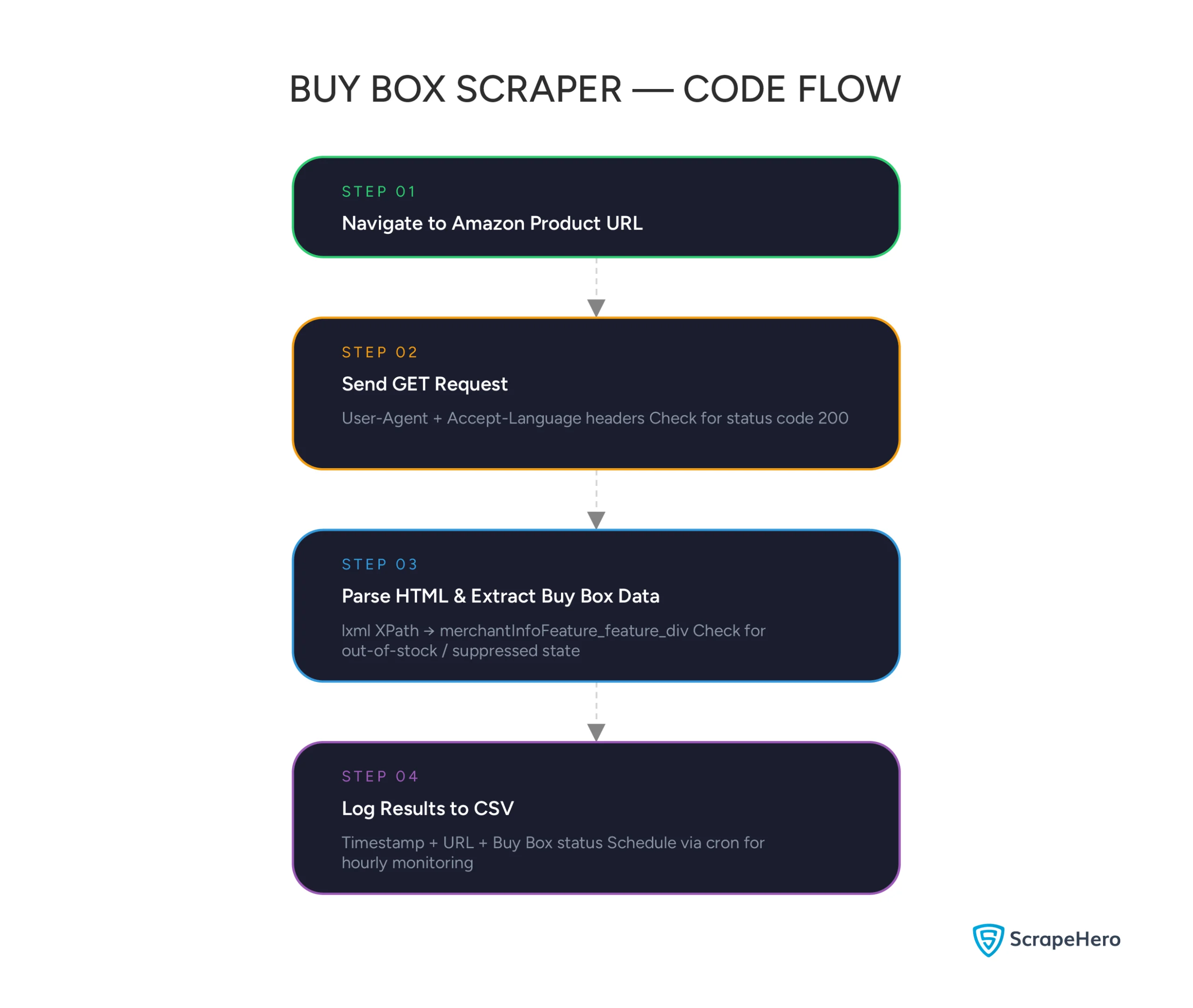
Here is the workflow to extract your Buy Box data with Python:
- Navigate to your targeted Amazon product URL.
- Send a GET Request with proper headers.
- Parse the HTML and extract the merchant info within the Buy Box.
- Save the collected status to monitor your fluctuations over time.
Here’s the complete code to track Amazon Buy Box if you want to start right away:
import requests
from lxml import html
import csv
from datetime import datetime
def check_buy_box(url):
headers = {
'User-Agent': 'Mozilla/5.0 (Windows NT 10.0; Win64; x64) AppleWebKit/537.36 (KHTML, like Gecko) Chrome/115.0.0.0 Safari/537.36',
'Accept-Language': 'en-US, en;q=0.5'
}
response = requests.get(url, headers=headers)
# Check the Response Status Code
if response.status_code != 200:
return f"Failed to retrieve page: Status {response.status_code}"
tree = html.fromstring(response.content)
# Check if the product is out of stock entirely
out_of_stock = tree.xpath('//div[@id="availability"]//span[contains(@class, "a-color-price")]/text()')
if out_of_stock and 'currently unavailable' in out_of_stock[0].lower():
return "Out of Stock"
# Extract the merchant info from the Buy Box
merchant_info = tree.xpath('//div[@id="merchantInfoFeature_feature_div"]//text()')
merchant_text = ', '.join(list({s for i in merchant_info if (s := i.strip()) and s not in ['Sold by', 'Shipper / Seller']})).strip()
if merchant_text:
return merchant_text
else:
return "Buy Box Suppressed / Unknown"
if __name__ == '__main__':
# Add your ASIN links here
urls_to_track = [
'https://www.amazon.com/dp/B08F7PTF53',
# Add more URLs
]
timestamp = datetime.now().strftime("%Y-%m-%d %H:%M:%S")
with open('buy_box_log.csv', 'a', newline='', encoding='utf-8') as file:
writer = csv.writer(file)
# Write headers if file is empty
# writer.writerow(["Timestamp", "URL", "Buy Box Status"])
for url in urls_to_track:
status = check_buy_box(url)
print(f"{timestamp} | {url} | {status}")
writer.writerow([timestamp, url, status])
1. Import the Required Packages
Create a new Python file and start by importing the necessary modules. Use the built-in csv and datetime libraries for logging.
import requests
from lxml import html
import csv
from datetime import datetime
2. Send a Request to the Website
Amazon uses advanced anti-bot mechanisms. To significantly increase your chances of a successful HTTP response, pass a valid User-Agent and Accept-Language in your request headers.
def check_buy_box(url):
headers = {
'User-Agent': 'Mozilla/5.0 (Windows NT 10.0; Win64; x64) AppleWebKit/537.36 (KHTML, like Gecko) Chrome/115.0.0.0 Safari/537.36',
'Accept-Language': 'en-US, en;q=0.5'
}
response = requests.get(url, headers=headers)
# Check the Response Status Code
if response.status_code != 200:
return f"Failed to retrieve page: Status {response.status_code}"3. Parse the Response and Extract Buy Box Data
Once you receive a successful response (Status 200), convert the HTML content into an lxml tree object. This conversion allows you to use XPath to target specific elements on your page.
Amazon usually stores the seller information within the merchant-info div inside the Buy Box. Checking if your item is entirely out of stock is also recommended.
tree = html.fromstring(response.content)
# Check if the product is out of stock entirely
out_of_stock = tree.xpath('//div[@id="availability"]//span[contains(@class, "a-color-price")]/text()')
if out_of_stock and 'currently unavailable' in out_of_stock[0].lower():
return "Out of Stock"
# Extract the merchant info from the Buy Box
merchant_info = tree.xpath('//div[@id="merchantInfoFeature_feature_div"]//text()')
merchant_text = ', '.join(list({s for i in merchant_info if (s := i.strip()) and s not in ['Sold by','Shipper / Seller']})).strip()
if merchant_text:
return merchant_text
else:
return "Buy Box Suppressed / Unknown"
4. Track and Log the Results
To visualize your tracking aspect (which answers the core question of tracking your Buy Box losses before your sales decline occurs), wrap your script logic in a loop and log your results to a CSV file.
if __name__ == '__main__':
# Add your ASIN links here
urls_to_track = [
'https://www.amazon.com/dp/B08F7PTF53',
# Add more URLs
]
timestamp = datetime.now().strftime("%Y-%m-%d %H:%M:%S")
with open('buy_box_log.csv', 'a', newline='', encoding='utf-8') as file:
writer = csv.writer(file)
# Write headers if file is empty
# writer.writerow(["Timestamp", "URL", "Buy Box Status"])
for url in urls_to_track:
status = check_buy_box(url)
print(f"{timestamp} | {url} | {status}")
writer.writerow([timestamp, url, status])What Next: By scheduling your Python script (e.g., via cron jobs) to run hourly, you can now generate an Amazon Buy Box Monitoring Software that sends alerts when your merchant_text changes from your company name to a competitor, or to “Suppressed”.
Why Use a Web Scraping Service?
While the Python script above works well for a handful of ASINs, Amazon’s aggressive anti-scraping measures, CAPTCHAs, IP bans, and frequent layout changes, quickly break simple bots.
To monitor thousands of ASINs across multiple zip codes, you need a rotating proxy network, CAPTCHA solvers, and constantly updated parsers.
That’s where ScrapeHero comes in. As a leading fully managed web scraping service, we handle the complexities of Amazon data extraction so you can focus on adjusting your pricing and protecting your Buy Box.
FAQs
Being the only seller doesn’t guarantee Buy Box eligibility. The most common causes are
1. Pricing violations (your product is listed cheaper on another marketplace like Walmart)
2. Poor seller metrics such as a high order defect or late shipment rate, fulfillment issues that put your delivery promise at risk, and listing quality problems like missing images or incomplete descriptions.
Check your Account Health dashboard and cross-marketplace pricing first. These are the most frequent culprits.
Yes. Unauthorized sellers or “hijackers” jumping on your ASIN will instantly alter your merchant-info extracted by your scraper. If unauthorized sellers price items even slightly lower, stealing your Buy Box happens. Fast, automated Buy box alerts (triggered by your script checking every hour) are critical for your fast Buy Box Suppression Recovery.
See our guide on monitoring third-party sellers on Amazon for a no-code approach to catching hijackers.
The Buy Box isn’t always a winner-take-all scenario. Amazon rotates it among eligible sellers based on a mix of factors: proximity of inventory to the customer, estimated delivery time, Prime eligibility, and current FBA warehouse demand. Since these conditions shift constantly throughout the day, daily tracking captures far more than weekly spot-checks.
For private label brands selling unique ASINs, a “good” win rate should be 95% to 100%. Any drop below 95% is an immediate red flag requiring your intervention.