MAP violation detection requires continuously monitoring retailer pricing and comparing advertised prices against approved MAP thresholds. While manual checks may work for a handful of products, they quickly become impractical across multiple retailers and large product catalogs.
This tutorial shows you how to build a basic MAP violation detection scraper in Python that extracts retailer pricing, normalizes the data, compares it against MAP, and generates automated violation alerts and reports.
How Does a MAP Monitoring Scraper Work?
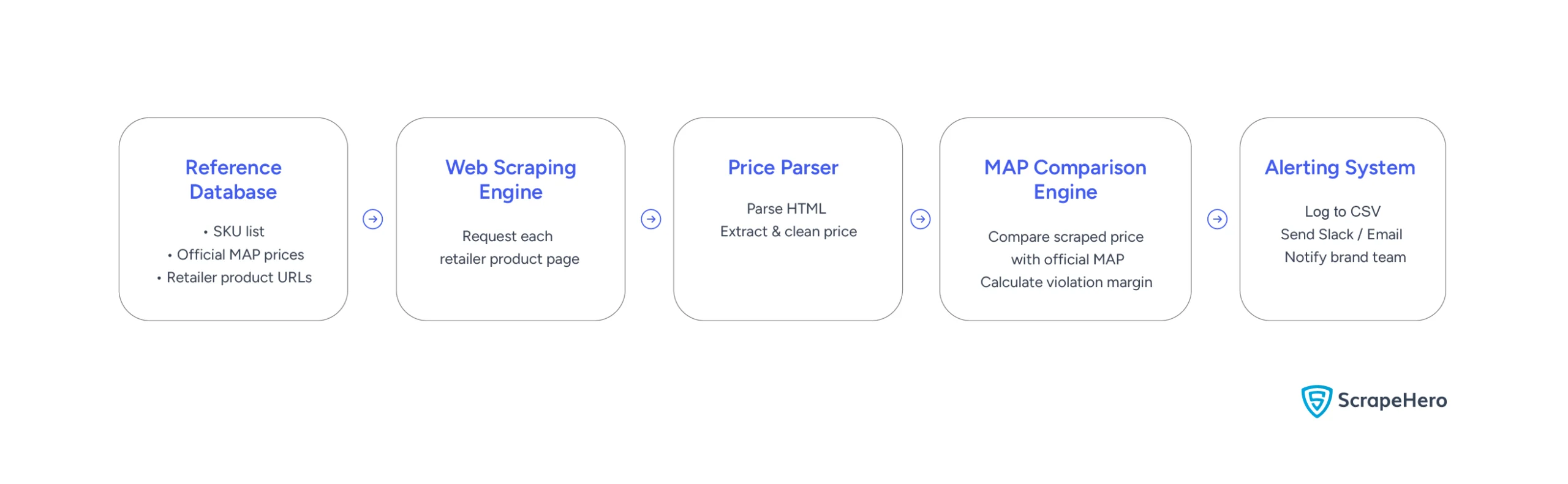
At a high level, an automated MAP violation detection tool follows a simple five-step data workflow:
- Reference Database: Maintain a record of your SKUs, their official MAP prices, and the product URLs of the retail sites you want to monitor.
- Web Scraping Engine: Programmatically request each retailer’s product page.
- Price Parser: Parse the raw HTML page, locate the price element, and clean up currency formatting.
- MAP Comparison Engine: Compare the extracted price with the allowed MAP. If the scraped price is lower than the MAP, calculate the violation margin.
- Alerting System: Log the violation to a CSV report and instantly send an alert (like a Slack notification or email) to your brand protection team.
Let’s walk through how to build a lightweight script to detect MAP violations across marketplaces.
How to Detect Map Violation: Step-by-Step Python Tutorial
1. Set Up the Product Directory
Every MAP monitoring run starts with a list of products to check. Create a CSV file named products_map.csv containing the product SKU, its approved MAP price, the retailer to monitor, and the corresponding product URL.
A single SKU can appear multiple times because each retailer has its own product page. During the scan, the scraper processes each row independently, compares the advertised price against the configured MAP, and flags any violations.
sku,name,map_price,retailer,url
SKU-SH-101,Pro-Level Noise Cancelling Headphones,199.99,SoundWholesale,https://www.soundwholesale.com/item/pro-headphones-101
SKU-SH-101,Pro-Level Noise Cancelling Headphones,199.99,MegaRetailer,https://www.megaretailer.com/products/pro-headphones-sh101
SKU-SH-102,UltraFit Sport Smartwatch,149.99,GizmoGalaxy,https://www.gizmogalaxy.com/products/ultrafit-sport-watch
SKU-SH-102,UltraFit Sport Smartwatch,149.99,DiscountTech,https://www.discounttech.com/sports/ultrafit-smartwatch
SKU-SH-103,EcoShield Stainless Steel Water Bottle,29.99,EcoWilderness,https://www.ecowilderness.com/gear/ecoshield-bottle
SKU-SH-103,EcoShield Stainless Steel Water Bottle,29.99,QuickShop,https://www.quickshop.com/ecoshield-water-bottle-silver
The product directory tells the scraper what to monitor. Next, configure simulation mode, which provides sample retailer pages for testing before scraping live websites.
2. Configure Simulation Mode
Before scraping live retailer websites, test the scraper against a controlled set of HTML pages. This script uses simulation mode, which loads mock retailer pages instead of making HTTP requests. It lets you verify that the parsing logic works as expected without relying on network connectivity or changing website layouts.
Begin by defining a dictionary of mock HTML pages. Each entry represents a retailer product page and contains the HTML the scraper will parse during simulation mode.
# Mock HTML data for simulation mode
# Enables running the script immediately without network dependency.
MOCK_HTML_PAGES = {
"https://www.soundwholesale.com/item/pro-headphones-101": """
<html>
<body>
<div class="product-container">
<h1 class="product-title">Pro-Level Noise Cancelling Headphones</h1>
<div class="price-container">
<span class="wholesale-price">$189.99</span>
</div>
</div>
</body>
</html>
""",
"https://www.megaretailer.com/products/pro-headphones-sh101": """
<html>
<body>
<main>
<h1>Pro-Level Noise Cancelling Headphones</h1>
<div id="pricing-element">
<span class="price-val">$205.00</span>
</div>
</main>
</body>
</html>
""",
"https://www.gizmogalaxy.com/products/ultrafit-sport-watch": """
<html>
<body>
<section class="details">
<h2 class="title">UltraFit Sport Smartwatch</h2>
<span class="current-price">$135.00</span>
</section>
</body>
</html>
""",
"https://www.discounttech.com/sports/ultrafit-smartwatch": """
<html>
<body>
<div class="content">
<div class="product-name">UltraFit Sport Smartwatch</div>
<div class="discount-price">$149.99</div>
</div>
</body>
</html>
""",
"https://www.ecowilderness.com/gear/ecoshield-bottle": """
<html>
<body>
<span class="price">$29.99</span>
</body>
</html>
""",
"https://www.quickshop.com/ecoshield-water-bottle-silver": """
<html>
<body>
<div class="product-card">
<div class="item-price">$24.99</div>
</div>
</body>
</html>
"""
}
Next, define a CSS selector for each retailer that identifies the HTML element containing the advertised price. During scraping, the parser uses these selectors to extract the price from the corresponding HTML page.
import os
import re
import csv
import sys
import time
import argparse
from datetime import datetime
from bs4 import BeautifulSoup
import requests
# Define selector mapping for different retailers
# Demonstrates the selector maintenance challenge in multi-retailer tracking.
RETAILER_SELECTORS = {
"SoundWholesale": "span.wholesale-price",
"MegaRetailer": "span.price-val",
"GizmoGalaxy": "span.current-price",
"DiscountTech": "div.discount-price",
"EcoWilderness": "span.price",
"QuickShop": "div.item-price"
}
In production, maintaining these selectors becomes one of the biggest challenges. Retailers frequently redesign product pages or rename HTML classes, so even small layout changes can prevent the scraper from locating the correct price until the selector is updated.
Before you can tell a web scraper what to click or extract, you need to find the element’s exact identifier hidden in the website’s code. Here is the standard workflow using Google Chrome:Pro-Tip: How to Find HTML Selectors Using the “Inspect” Tool
3. Fetch and Parse Product Prices
The scraper now has everything it needs to begin monitoring prices from retailer pages.
The next step is to extract prices. This step retrieves the HTML for each retailer, locates the price using the configured CSS selector, and converts the extracted text into a numeric value that it can compare against the product’s MAP price.
Before comparing prices, the scraper first normalizes the extracted text into a consistent numeric format. This is the role of the clean_price() function.
def clean_price(raw_price_str):
"""
Cleans raw price strings extracted from HTML (e.g. '$199.99 USD' or ' $99 ')
and converts them to float.
"""
if not raw_price_str:
return None
clean_str = re.sub(r'[^\d.]', '', raw_price_str)
try:
return float(clean_str)
except ValueError:
return None
The clean_price() function removes currency symbols, whitespace, and other non-numeric characters before converting the value to a floating-point number. This ensures prices from different retailers can be compared consistently.
Next, write a fetch_price() function that combines the rest of the workflow.
The fetch_price() function can run in simulation and live modes. In simulation mode, the scraper loads HTML from the MOCK_HTML_PAGES dictionary. When you run the script with the –live flag, it instead sends an HTTP request to the retailer’s website using a browser-like user agent.
Note: HTTP requests work well for websites that return their product data in the initial HTML response. Sites that render prices with JavaScript typically require a headless browser such as Playwright or Selenium, which we’ll discuss later.
def fetch_price(url, retailer, simulate=True):
"""
Fetches the price from the given URL.
Uses simulated HTML pages if simulate is True, otherwise makes live HTTP requests.
"""
selector = RETAILER_SELECTORS.get(retailer)
if not selector:
print(f"[-] No selector configured for retailer: {retailer}")
return None
if simulate:
# Simulation Mode: Returns mock HTML to ensure code runs out-of-the-box
time.sleep(0.5)
html_content = MOCK_HTML_PAGES.get(url)
if not html_content:
print(f"[-] Simulation URL not found: {url}")
return None
soup = BeautifulSoup(html_content, 'html.parser')
else:
# Live Scraping Mode (Requires network and target server availability)
headers = {
"User-Agent": "Mozilla/5.0 (Windows NT 10.0; Win64; x64) AppleWebKit/537.36 (KHTML, like Gecko) Chrome/120.0.0.0 Safari/537.36"
}
try:
response = requests.get(url, headers=headers, timeout=10)
response.raise_for_status()
soup = BeautifulSoup(response.text, 'html.parser')
except Exception as e:
print(f"[-] HTTP error occurred while scraping {url}: {e}")
return None
price_element = soup.select_one(selector)
if price_element:
raw_price = price_element.get_text()
return clean_price(raw_price)
return None
The fetch_price() function combines all of the components configured so far. It loads the retailer page, selects the appropriate CSS selector, extracts the advertised price, and returns a normalized value ready for comparison.
Now that the scraper can retrieve prices, compare them against the configured MAP policy and generate a violation report.
4. Detect MAP Violations and Generate Reports
After extracting a product’s advertised price, compare it against the configured MAP price. If the advertised price falls below the threshold, calculate the price difference, record the violation, and generate an alert.
#send alerts
def send_alert(sku, product_name, retailer, map_price, scraped_price, url):
deviation = map_price - scraped_price
percent_below = (deviation / map_price) * 100
print("\n" + "="*60)
print("🚨 [ALERT] MAP VIOLATION DETECTED")
print(f"Product: {product_name} ({sku})")
print(f"Retailer: {retailer}")
print(f"MAP Policy: ${map_price:.2f}")
print(f"Advertised: ${scraped_price:.2f} (Under by ${deviation:.2f} / {percent_below:.1f}%)")
print(f"Retailer Link: {url}")
print("="*60 + "\n")
Finally, the main() function ties the entire workflow together. It reads the product directory, checks each retailer page, compares the extracted price against the MAP policy, and logs any violations to a CSV report.
In simulation mode, alerts are printed to the console. In a production environment, you could replace these with Slack notifications, emails, or other alerting systems.
#main function
def main():
parser = argparse.ArgumentParser(description="MAP Violation Detector Scraper")
parser.add_argument("--csv", default="products_map.csv", help="Path to input products CSV")
parser.add_argument("--live", action="store_true", help="Run in live scraping mode")
args = parser.parse_args()
simulate = not args.live
if not os.path.exists(args.csv):
print(f"[-] Error: Input CSV file not found.")
sys.exit(1)
violations = []
total_checked = 0
with open(args.csv, mode='r', encoding='utf-8') as f:
reader = csv.DictReader(f)
for row in reader:
sku = row['sku']
name = row['name']
map_val = clean_price(row['map_price'])
retailer = row['retailer']
url = row['url']
total_checked += 1
print(f"[*] Checking {retailer} for {name} ({sku})...")
scraped_price = fetch_price(url, retailer, simulate=simulate)
if scraped_price is None:
print(f" [-] Failed to extract price.")
continue
# Compare Scraped Price to MAP Policy
if scraped_price < map_val:
deviation = map_val - scraped_price
percent_below = (deviation / map_val) * 100
violation_record = {
"sku": sku,
"name": name,
"retailer": retailer,
"map_price": map_val,
"scraped_price": scraped_price,
"deviation": round(deviation, 2),
"percent_below": round(percent_below, 2),
"url": url,
"timestamp": datetime.now().strftime("%Y-%m-%d %H:%M:%S")
}
violations.append(violation_record)
send_alert(sku, name, retailer, map_val, scraped_price, url)
else:
print(f" [+] Compliant price: ${scraped_price:.2f}")
# Output to Violations CSV Report
if violations:
fieldnames = ["sku", "name", "retailer", "map_price", "scraped_price", "deviation", "percent_below", "url", "timestamp"]
with open("map_violations_report.csv", mode='w', newline='', encoding='utf-8') as rf:
writer = csv.DictWriter(rf, fieldnames=fieldnames)
writer.writeheader()
writer.writerows(violations)
print(f"\n[+] Logged {len(violations)} MAP violations to 'map_violations_report.csv'.")
if __name__ == "__main__":
main()
The resulting report provides a centralized record of every detected violation, including the product, retailer, advertised price, MAP price, deviation, and timestamp.
5. Run the Full Script
Run the script in simulation mode to validate the workflow using the mock retailer pages:
python map_detector.py --csv products_map.csv
Once you’ve replaced the mock pages with real retailer URLs and selectors, add the –live flag to scrape live websites:
python map_detector.py --csv products_map.csv --live
The script above works well for a small, controlled set of retailers with simple HTML. The next section covers what happens when you try to run this same approach against dozens of retailers with modern anti-bot protection.
Challenges of Scaling a DIY MAP Monitor
The tutorial demonstrates the core components of a MAP monitoring scraper. Running the same approach at production scale introduces additional engineering challenges.
1. The Anti-Bot Wall
Most top-tier retailers use sophisticated anti-bot platforms. A standard Python script using basic HTTP requests will typically trigger 403 errors or CAPTCHAs and fail outright. Getting past this in production generally requires:
- Headless browser automation that can render JavaScript the way a real browser would.
- Fingerprint and stealth patching to avoid signals that flag automated traffic, such as automation-specific browser flags, unusual WebGL configurations, and inconsistent user-agent strings.
- Rotating proxy networks, typically residential or mobile IP pools, to avoid getting rate-limited or blocked at the IP level.
Anti-bot systems are updated frequently, which turns an in-house scraper into an ongoing maintenance commitment rather than a one-time build.
2. The Selector Maintenance Problem
The RETAILER_SELECTORS mapping created earlier works well for a small set of retailers.
In production, however, ecommerce sites frequently redesign their pages. If a retailer changes a class name or restructures its price container, the scraper silently returns None for that product until someone notices and fixes the selector.
The more retailers you track, the more frequently this happens, and the more ongoing engineering attention it demands.
3. Localization and Geographic Discrepancies
Marketplaces often show different prices based on zip code or delivery location. A product might be compliant when crawled from one location and in violation for shoppers browsing from another. Capturing these discrepancies requires geo-targeted crawling, which adds another layer of infrastructure most in-house scrapers aren’t built to handle.
These operational challenges often determine whether it makes sense to maintain a scraper in-house or use a managed data provider.
Buy vs. Build: Choosing Automated MAP Monitoring
Maintaining a web crawling framework in-house pulls engineering time away from your core product. The tradeoffs generally look like this:
| Cost Factor | Build (In-House Scraping) | Buy (Managed Data-as-a-Service) |
|---|---|---|
| Proxy Infrastructure | Ongoing cost for residential/mobile IP pools | Included in service |
| Engineering Time | Recurring time spent fixing broken selectors and anti-bot bypasses | Minimal to none |
| Infrastructure | Servers to host and scale headless browser clusters | Handled by provider |
| Data Quality | Gaps when scrapers silently fail | Validated, monitored data delivery |
Whether you build or buy depends largely on scale. For a handful of retailers, an in-house scraper may be sufficient. At enterprise scale, maintaining reliable data collection typically becomes the greater challenge, which is why many organizations choose a managed web crawling service instead.
Scraping publicly available product pages for pricing data is generally permissible, and courts have repeatedly affirmed that collecting publicly accessible information does not violate anti-hacking statutes like the CFAA. That said, retailers’ terms of service may restrict automated access, and how you collect, store, and use the data still matters. If you’re monitoring at scale or across many retailers, it’s worth having your legal team review your specific approach, or working with a web crawling service that already builds compliance into its collection process.Is It Legal to Scrape Retailer Pages for MAP Monitoring?
Wrapping Up
The Python scraper in this tutorial shows the core mechanics of MAP violation detection and can work well for small-scale projects or internal proof-of-concepts.
As monitoring expands across more retailers, however, the challenge often shifts from detecting violations to maintaining reliable data collection. Anti-bot protections, selector changes, proxy management, and geographic pricing variations can quickly become ongoing operational work.
For organizations that need continuous MAP monitoring without dedicating engineering resources to crawler maintenance, a web scraping service can provide an alternative approach. Instead of operating scraping infrastructure internally, teams receive structured pricing data through APIs while the provider handles maintenance.
ScrapeHero helps brands collect pricing data across retailers for MAP enforcement, competitive intelligence, and brand monitoring initiatives. Data can be delivered in CSV, JSON, database exports, or custom APIs depending on operational requirements. Contact ScrapeHero today to handle the data collection while your team focuses on analysis and action.
FAQs
Not reliably. The tutorial uses Python’s requests library, which only retrieves the initial HTML returned by the server. Retailers that load prices with JavaScript or protect their sites with anti-bot systems typically require headless browser automation, proxy rotation, or other advanced scraping techniques.
You can schedule the script to run automatically using tools such as cron on Linux or Task Scheduler on Windows. In production, many teams also replace console alerts with Slack notifications, email alerts, or integrations with ticketing and monitoring platforms.
Building an in-house scraper works well for prototypes, internal tools, or monitoring a small number of retailers. As the number of monitored sites grows, ongoing selector maintenance, anti-bot mitigation, and infrastructure management often become the primary challenges, making a managed data service a more practical option.