If you are evaluating your pricing intelligence infrastructure in 2026, you have probably already ruled out manual monitoring and off-the-shelf dashboards. You are now at the real decision: native APIs or web scraping?
Both work. The question is what they actually return and whether that data is sufficient for the pricing decisions you need to make.
Below is a comprehensive pricing intelligence comparison of both methods to help you weigh the pros and cons.
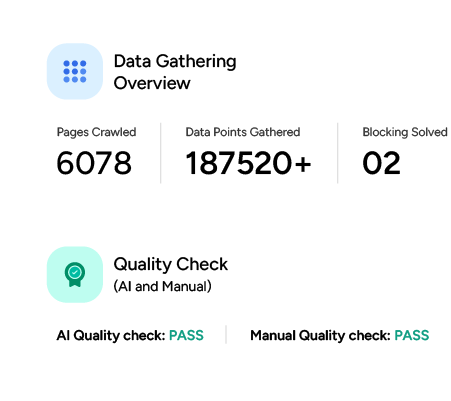
Web Scraping vs. Native API: The Difference
- Native APIs like Amazon’s SP-API give you structured, authenticated access to marketplace data. Fast, reliable, officially supported.
- Web scraping extracts exactly what a consumer sees on the page: the live storefront, not the vendor database.
The gap between those two things is where most pricing intelligence pipelines run into trouble. This article shows you the gap by comparing the SP-API request.
What Amazon SP-API actually returns
Here is a standard SP-API call fetching competitive pricing for an ASIN:
import requests
url = "https://sellingpartnerapi-na.amazon.com/products/pricing/v0/competitivePrice?ItemType=Asin&Asins=B09G9HD6PD&MarketplaceId=ATVPDKIKX0DER"
headers = {
"accept": "application/json",
"Authorization": "Bearer YOUR_ACCESS_TOKEN" # LWA access token required
}
response = requests.get(url, headers=headers)
print(response.text)
The above code uses the requests library to make an HTTP request to the getcompetitivepricing endpoint of the SP-API.
A typical response of this request looks like this:
{
"ASIN": "B09G9HD6PD",
"status": "Success",
"Product": {
"CompetitivePricing": {
"CompetitivePrices": [
{
"CompetitivePriceId": "1",
"Price": {
"LandedPrice": { "Amount": 249.99, "CurrencyCode": "USD" },
"ListingPrice": { "Amount": 249.99, "CurrencyCode": "USD" },
"Shipping": { "Amount": 0.00, "CurrencyCode": "USD" }
},
"belongsToRequester": true
}
],
"NumberOfOfferListings": [
{ "Count": 14, "condition": "New" }
]
}
}
}
Note: Amazon has transitioned the technical name of the Buy Box to the Featured Offer. You will see this reflected as featuredBuyingOptions in the SP-API.
This single call gives you list price and landed price. Useful, but for a complete pricing intelligence picture, you need several more data points.
Here is where each one actually lives across the SP-API ecosystem:
| Data point | Available via API? | Endpoint |
|---|---|---|
| Price | ✅ Yes | getCompetitivePricing |
| Buy Box winner (SellerId) | ✅ Yes | getCompetitiveSummary or getListingOffers |
| Shipping (landed price) | ✅ Yes | getCompetitivePricing |
| Specific delivery promise | ⚠️ Partial | Orders API or Merchant Fulfillment API—for existing orders only |
| In-stock status | ✅ Yes | Fulfillment Outbound API or Inventory API |
| Active coupon string | ❌ No | Not reliably available via any SP-API endpoint |
The honest take is this: APIs cover the requirements on paper, but availability is not the same as scalability. By checking the ‘API’ box, the table above glides over a massive engineering delta: the difference between a successful GET request and a robust, high-throughput pipeline.
The rate limit problem at SKU scale
SP-API rate limits apply per endpoint. The getCompetitivePricing endpoint allows 0.5 requests per second with a burst of 1, 1,800 requests per hour. getCompetitiveSummary, getListingOffers, and the Inventory API each carry their own separate limits.
If you need all six data points per SKU, you are not making one API call per SKU, you are making three or four. The rate limit problem does not just remain; it multiplies.
Run the math on price and Buy Box alone:
| SKUs | Regions | Requests needed (hourly refresh) | Time required at SP-API limits |
|---|---|---|---|
| 1,000 | 1 | 1,000 | 33 minutes |
| 10,000 | 1 | 10,000 | 5.5 hours |
| 10,000 | 4 | 40,000 | 22 hours |
| 50,000 | 4 | 200,000 | 111 hours |
Hourly refresh on 10,000 SKUs across four regions requires 40,000 requests per hour. SP-API gives you 1,800. And that assumes no other API calls are competing for the same rate limit budget.
Batch endpoints reduce call volume but do not close this gap at enterprise scale.
Hit by API rate limits? Our price monitoring service gets you the data without the restrictions
What web scraping returns on the same product
Here’s a request-based scraper that extracts necessary pricing details. Start by importing the necessary packages.
import requests
from lxml import html
import csv
import json
from datetime import datetime
These imports cover the core functionality needed for the scraper:
- requests fetches the raw HTML from Amazon product pages
- lxml parses the HTML and lets you extract data using XPath
- csv and json handle saving the scraped data to files
- datetime captures timestamps so each scrape entry is traceable
Next, define a function that accepts an Amazon product URL and returns the key pricing data points.
def scrape_product_pricing(url: str) -> dict:
headers = {
'User-Agent': 'Mozilla/5.0 (Windows NT 10.0; Win64; x64) AppleWebKit/537.36 (KHTML, like Gecko) Chrome/115.0.0.0 Safari/537.36',
'Accept-Language': 'en-US,en;q=0.9',
'Accept': 'text/html,application/xhtml+xml,application/xml;q=0.9,image/avif,image/webp,image/apng,*/*;q=0.8',
'Accept-Encoding': 'gzip, deflate, br',
'Referer': 'https://www.amazon.com/',
'DNT': '1',
'Connection': 'keep-alive',
'Upgrade-Insecure-Requests': '1'
}
response = requests.get(url, headers=headers)
if response.status_code != 200:
return {"error": f"Failed to retrieve page: Status {response.status_code}"}
tree = html.fromstring(response.text)
with open("treee.html","w") as f:
f.write(response.text)
# Price
price_whole = tree.xpath('//span[contains(@class,"a-price-whole")]/text()')
price_fraction = tree.xpath('//span[contains(@class,"a-price-fraction")]/text()')
price = price_whole[0].strip() +"."+ price_fraction[0].strip() if price_fraction and price_whole else None
# Buy Box winner (merchant name)
merchant_info = tree.xpath('//div[@id="merchantInfoFeature_feature_div"]//text()')
buybox_winner = ', '.join(list({s for i in merchant_info if (s := i.strip()) and s not in ['Sold by','Shipper / Seller']})).strip()
# Coupon
coupon = tree.xpath('//span[contains(@class,"couponLabelText")]/text()')
coupon = coupon[0].strip() if coupon else None
# Shipping
shipping = tree.xpath('//div[@id="mir-layout-DELIVERY_BLOCK"]//text()')
shipping = ' '.join(s.strip() for s in shipping if s.strip()) or None
# In stock
out_of_stock = tree.xpath('//div[@id="availability"]//span[contains(@class,"a-color-price")]/text()')
in_stock = not (out_of_stock and 'currently unavailable' in out_of_stock[0].lower())
return {
"price": price,
"buybox_winner": buybox_winner,
"coupon": coupon,
"shipping": shipping,
"in_stock": in_stock
}
The function sends a GET request to the product URL with browser-like headers to reduce the chance of being blocked. If the request succeeds, it parses the response HTML using lxml and extracts five data points:
- price: The current listed price of the product
- buybox_winner: The default seller customers buy from when they click Add to Cart or Buy Now
- coupon: Any discount coupon currently available on the product page
- shipping: Amazon’s promised delivery timeframe
- in_stock: Whether the item is currently available for purchase
Finally, the __main__ block ties everything together.
if __name__ == '__main__':
urls_to_track = [
"https://www.amazon.com/Litfun-Memory-Slippers-Outdoor-Chestnut/dp/B0F7XG35GF/",
# Add more URLs
]
timestamp = datetime.now().strftime("%Y-%m-%d %H:%M:%S")
with open('pricing_log.csv', 'a', newline='', encoding='utf-8') as file:
writer = csv.writer(file)
writer.writerow(["Timestamp", "URL", "Price", "Buy Box Winner", "Coupon", "Shipping", "In Stock"])
for url in urls_to_track:
data = scrape_product_pricing(url)
print(f"\n{url}")
print(json.dumps(data, indent=2))
writer.writerow([
timestamp,
url,
data.get("price"),
data.get("buybox_winner"),
data.get("coupon"),
data.get("shipping"),
data.get("in_stock"),
])
This block iterates over a list of Amazon product URLs. For each URL, it calls scrape_product_pricing(), prints the result to the console, and appends a timestamped row to a CSV file, giving you a running log of price and availability data across all tracked products.
Scraping vs. Native APIs: The 2026 Landscape
In 2026, the “Scraping vs. Native API” debate for competitive pricing intelligence reached a tipping point. While APIs offer a sanitized, structured feed, web scraping provides the “visual truth.” It captures real-time pricing, regional variations, and dynamic discounts exactly as a consumer sees them—data points often “smoothed over” in official API responses.
However, the choice is no longer just about data quality; it’s about a fundamental shift in the economics of data access.
The Death of the “Free” Native Tier
Before comparing technical merits, we must address the recent shift in the baseline: **The Amazon SP-API is no longer a free lunch for third-party developers.**
As of January 31, 2026, Amazon implemented a $1,400 annual subscription fee for SP-API access. More critically, as of April 30, 2026, usage-based fees apply to GET call volume. For a high-frequency pricing tool, these costs compound aggressively:
- The Pro Tier Trap: A developer on the Pro tier ($1,000/month for 25M calls) who exceeds their limit by just 3M calls faces $1,200 in overages.
- The Total Bill: That’s $2,200 per month just for the right to request data, before a single cent is spent on the infrastructure to process it.
Native API access now carries a heavy “data tax” on top of its inherent technical limitations.
The Build vs. Buy Dilemma
If the rising cost of APIs pushes you toward scraping, you face a second fork in the road: In-House Engineering vs. Managed Services.
1. The Hidden Costs of Building In-House
Building a scraper seems cost-effective on paper, but the “line items” tell a different story.
| Cost Component | Estimated Monthly Cost |
|---|---|
| Residential Proxy Pool (Enterprise) | $500 – $2,000+ |
| Cloud Infrastructure | $300 – $1,000+ |
| Engineering Maintenance | 20–40% of one FTE |
The engineering time is the true cost. Anti-bot systems at Amazon, Walmart, and Target update continuously. Every update is a potential “silent failure” in your pricing data. This maintenance burden doesn’t scale linearly; it compounds as you add more SKUs and retailers.
2. Managed Scraping (Data-as-a-Service)
A managed pricing service shifts the burden of proxy rotation, anti-bot circumvention, and parser maintenance to a specialist. You receive a structured feed (Price, Buy Box, promotions, availability) delivered with API-level reliability but without the API-level restrictions.
The Verdict
You are ultimately trading infrastructure control for engineering capacity.
For teams whose core competency is pricing strategy rather than data plumbing, offloading the scraping tax to a managed provider is the only way to remain competitive in 2026.
See how ScrapeHero helped a heavy-duty truck parts distributor stay ahead on pricing.
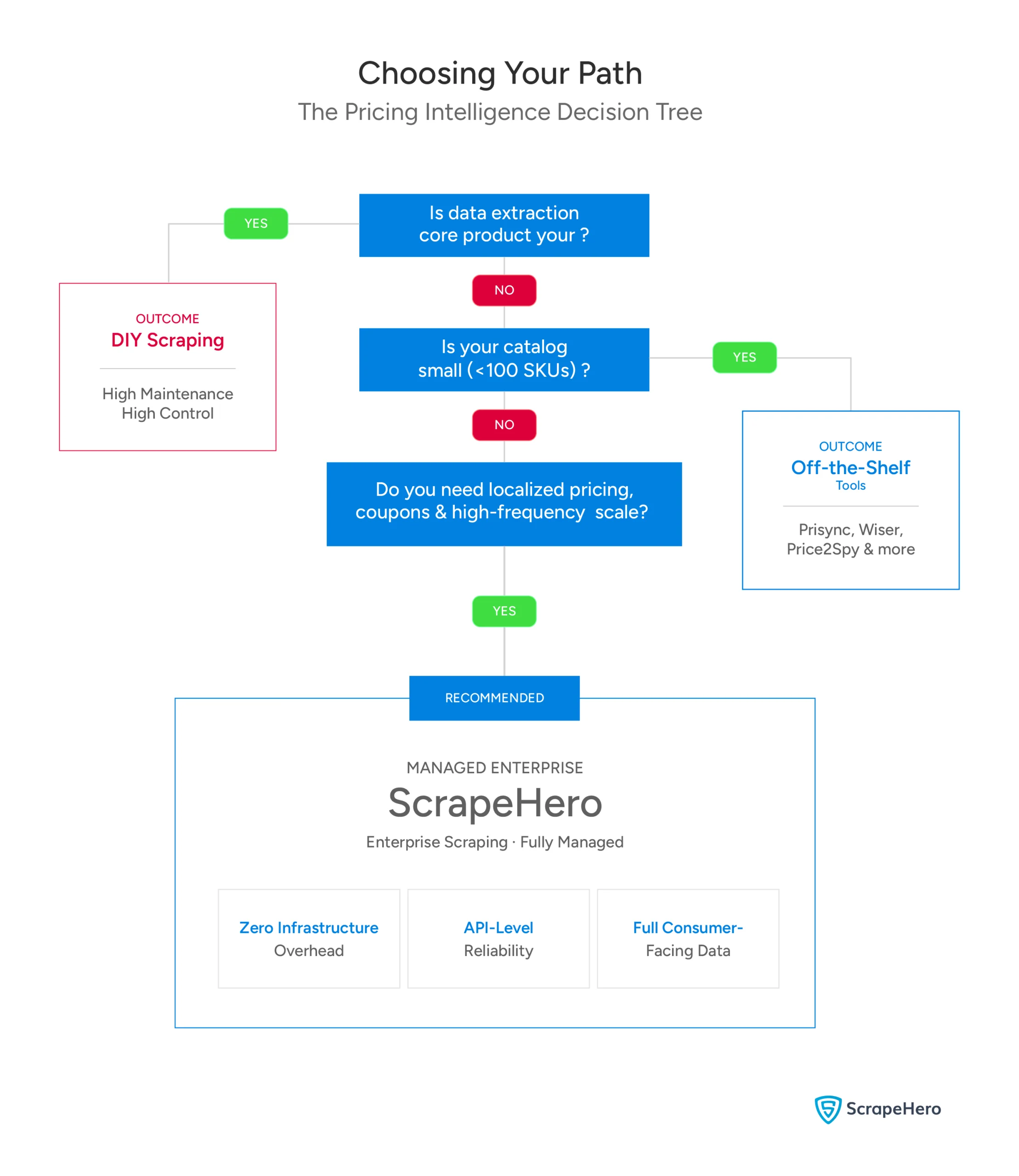
Choosing the Right Approach
- Off-the-shelf price monitoring tools (e.g., Prisync): Right for smaller retailers tracking a fixed competitor list. Not designed for raw data feeds or custom algorithm inputs.
- DIY scraping infrastructure: Right if data extraction is your core product, you have dedicated infrastructure engineers, and you are prepared for ongoing anti-bot maintenance as a permanent operational cost.
- Managed enterprise scraping (ScrapeHero): Right for businesses that need consumer-facing pricing data at scale (Buy Box, promotions, localized pricing) without the infrastructure overhead.
Why Use a Web Scraping Service for Pricing Intelligence
As the comparisons above show, APIs leave gaps in coupon visibility and delivery data, and rate limits make hourly refresh unworkable at scale, even before factoring in the SP-API cost shift. Building in-house closes those gaps but trades them for a permanent maintenance burden.
ScrapeHero is a managed web scraping service that delivers the consumer-facing pricing data your strategy actually requires without the infrastructure overhead landing on your engineering team.
Talk to ScrapeHero—get the data your competitors already have.