Arxiv.org is a free, open-access preprint repository hosting research across physics, mathematics, computer science, and more. You can scrape it using Python’s requests library and BeautifulSoup with no authentication required.
This article shows you exactly how to do that, and how to use the Arxiv API as an alternative.
Data Scraped from Arxiv.org
The tutorial will scrape the articles’
- Topic
- Authors
- Abstract
- PDF link
You can get this information from their search results page.
The Environment
The tutorial shows web scraping Arxiv using Python. The code uses Python requests to send the HTTP requests to arxiv.org and BeautifulSoup to parse the results.
You can install both these libraries using pip.
pip install beautifulsoup4 requestsWeb Scraping Arxiv: The Code
First, write the import statements. You need to import the external library Python requests, the module BeautifulSoup from bs4, and the module json from Python standard library.
The json module lets you write the scraped results into a JSON file.
import requests
from bs4 import BeautifulSoup
import json
After writing the import statements, you can use the Python requests to retrieve the HTML content. To do so, use the get() method to retrieve HTML data from the URL.
query = input("What do you want to search for on Arxiv.org ")
response = requests.get(f"https://arxiv.org/search/?query={query}&searchtype=all&source=header")
The response will contain the HTML data. Pass that to the BeautifulSoup for parsing; it will create an object.
soup = BeautifulSoup(response.text)Extract data from the created object.
You can use the find method to get a single element that BeautifulSoup finds first. Use the find_all method to find all the elements matching the criteria.
Find the li tags with the arxiv-result class. This tag element will contain the details of the article. Then, extract sub-elements or child elements using the same method.
articles = soup.find_all("li",attrs={"class":"arxiv-result"})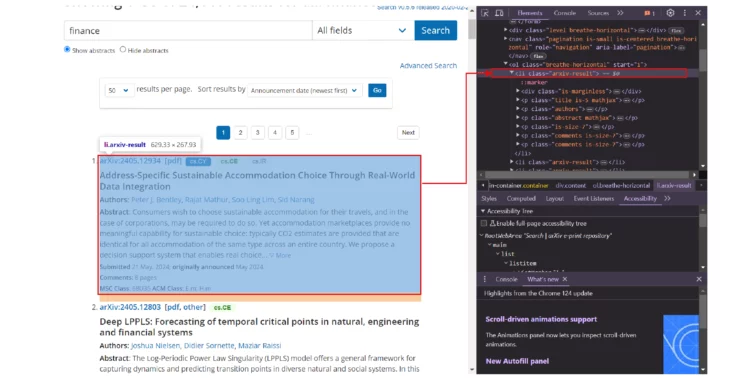
Loop through all the articles and extract the required information.
- Name from a p tag with the class title

rawTopic = article.find("p", attrs={"class": "title"}).text- Abstract from a span tag with the class abstract-full
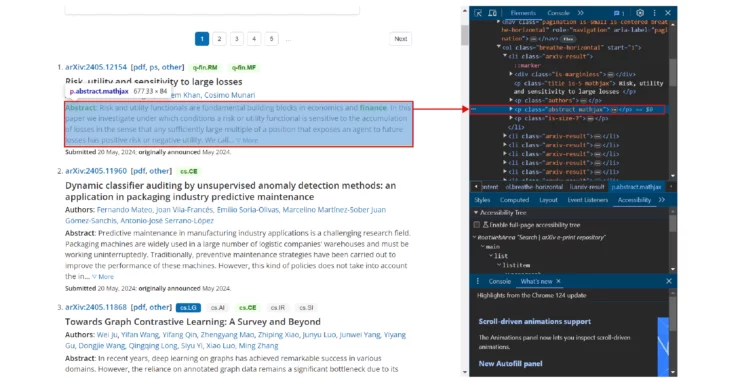
rawFullAbstract = abstract.find("span",{"class":"abstract-full"}).text- Authors using the class authors
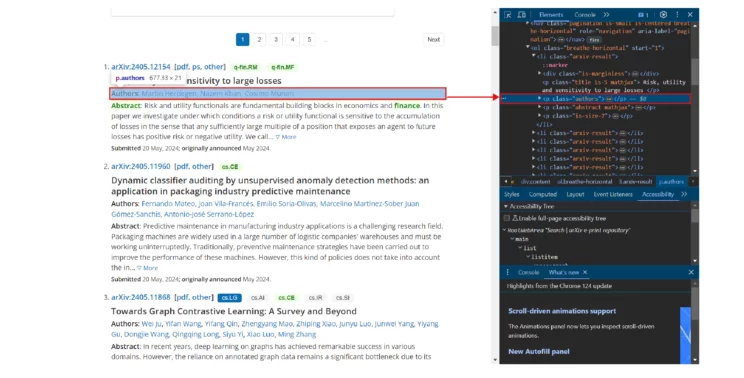
authors = article.find("p", {"class": "authors"}).text.split()[1:]
The PDF link is inside an anchor tag, but the tag does not have a class. However, you can select the specific anchor tag using its relative location. The anchor tag is inside a span tag inside a p tag inside a div tag. Therefore, chain the tags to select the required anchor tag and extract the href attribute.
pdfURL = article.div.p.span.a['href']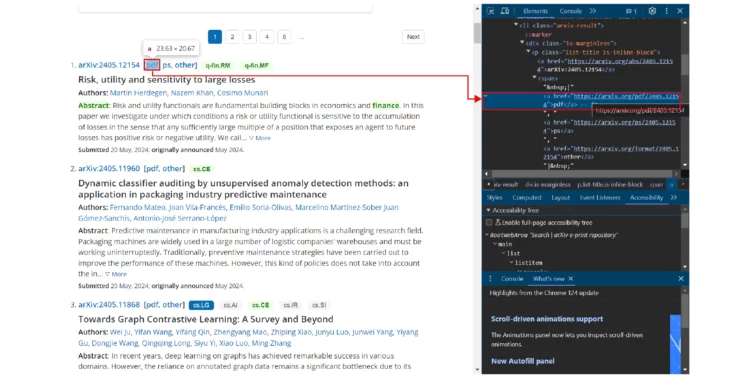
Append the extracted information to an array at the end of every loop.
arxivArticle= {
        "Topic": topic,
        "Abstract": fullAbstract,
        "PDF": pdfURL,
        "Authors": authors
    }
    articleInfo.append(arxivArticle)
After the loop ends, save this array to a JSON file.
with open("arxiv.json","w") as jsonFile:
    json.dump(articleInfo,jsonFile,indent=4)
Here is the complete code for web scraping Arxiv articles.
import requests
from bs4 import BeautifulSoup
import json
query = input("What do you want to search for on Arxiv.org")
response = requests.get(f"https://arxiv.org/search/?query={query}&searchtype=all&source=header")
soup = BeautifulSoup(response.text)
articles = soup.find_all("li", attrs={"class": "arxiv-result"})
articleInfo = []
for article in articles:
    rawTopic = article.find("p", attrs={"class": "title"}).text
    topic = rawTopic.replace("\n", "").strip()
    abstract = article.find("p", attrs={"class": "abstract"})
    rawFullAbstract = abstract.find("span", {"class": "abstract-full"}).text
    fullAbstract = rawFullAbstract.replace("\n", "").strip()
    pdfURL = article.div.p.span.a['href'],
    authors = article.find("p", {"class": "authors"}).text.split()[1:]
    arxivArticle = {
        "Topic": topic,
        "Abstract": fullAbstract,
        "PDF": pdfURL,
        "Authors": authors
    }
    articleInfo.append(arxivArticle)
with open("arxiv.json", "w") as jsonFile:
    json.dump(articleInfo, jsonFile, indent=4)
The results of scraping arxiv.org will be something like this.
[
    {
        "Topic": "A Novel Method for Drawing a Circle Tangent to Three Circles Lying on a Plane by Straightedge, Compass, and Inversion Circles",
        "Abstract": "In this paper, we present a novel method to draw a circle tangent to three given circles lying on a plane...",
        "PDF": "http://arxiv.org/pdf/1906.00068v1",
        "Authors": [
            "Ahmad Sabihi"
        ]
    },
    {
        "Topic": "Generalization of Apollonius Circle",
        "Abstract": "Apollonius of Perga, showed that for two given points A, B in the Euclidean plane...",
        "PDF": "http://arxiv.org/pdf/2105.03673v1",
        "Authors": [
            "Ömer Avcı",
            "Ömer Talip Akalın",
            "Faruk Avcı",
            "Halil Salih Orhan"
        ]
    }
]
Extracting Using APIs
To extract data from Arxiv, the site also provides APIs. The process is similar to scraping their search results page, but two things will change:
1. The URL to which you’ll make the HTTP request will be the API endpoint.
http://export.arxiv.org/api/query?search_query=all:{query}
2. The response structure will be different. Details of each artice will be inside an entry tag; each detail will be inside the corresponding tag.
<entry>
  <id>http://arxiv.org/abs/1409.5175v1</id>
  <updated>2014-09-18T02:08:39Z</updated>
  <published>2014-09-18T02:08:39Z</published>
  <title>Colorful Associahedra and Cyclohedra</title>
  <summary>Every n-edge colored n-regular graph G naturally gives rise to a simple
abstract n-polytope...</summary>
  <author><name>Gabriela Araujo-Pardo</name></author>
  <link href="http://arxiv.org/abs/1409.5175v1" rel="alternate" type="text/html"/>
  <link href="http://arxiv.org/pdf/1409.5175v1" rel="related" title="pdf" type="application/pdf"/>
</entry>
Because the data is XML, use features=”xml” as an argument when passing the response text to the BeautifulSoup constructor.
xmlSoup = BeautifulSoup(apiResponse.text,features="xml")Then, as before, you can find the tags.
- Locate the entry tags to find all the tags containing articles.
- Iterate through the tags.
- Extract each data point.
- Save them in a JSON file
apiArticles = xmlSoup.find_all("entry")
articlesFromAPI = []
for article in apiArticles:
    title = article.find("title").text
    summary = article.find("summary").text
    pdfLink = article.find("link", attrs={"title": "pdf"})['href']
    authors = article.find_all("name")
    authorList = []
    for author in authors:
        authorList.append(author.text)
Finally, append the extracted data to an array and save the array to a JSON file.
articlesFromAPI.append(
    {
        "Topic": " ".join(title.split()),
        "Abstract": " ".join(summary.split()),
        "PDF": pdfLink,
        "Authors": authorList
    }
)
with open("arxivFromAPI.json", "w") as jsonFile:
    json.dump(articlesFromAPI, jsonFile, indent=4, ensure_ascii=False)
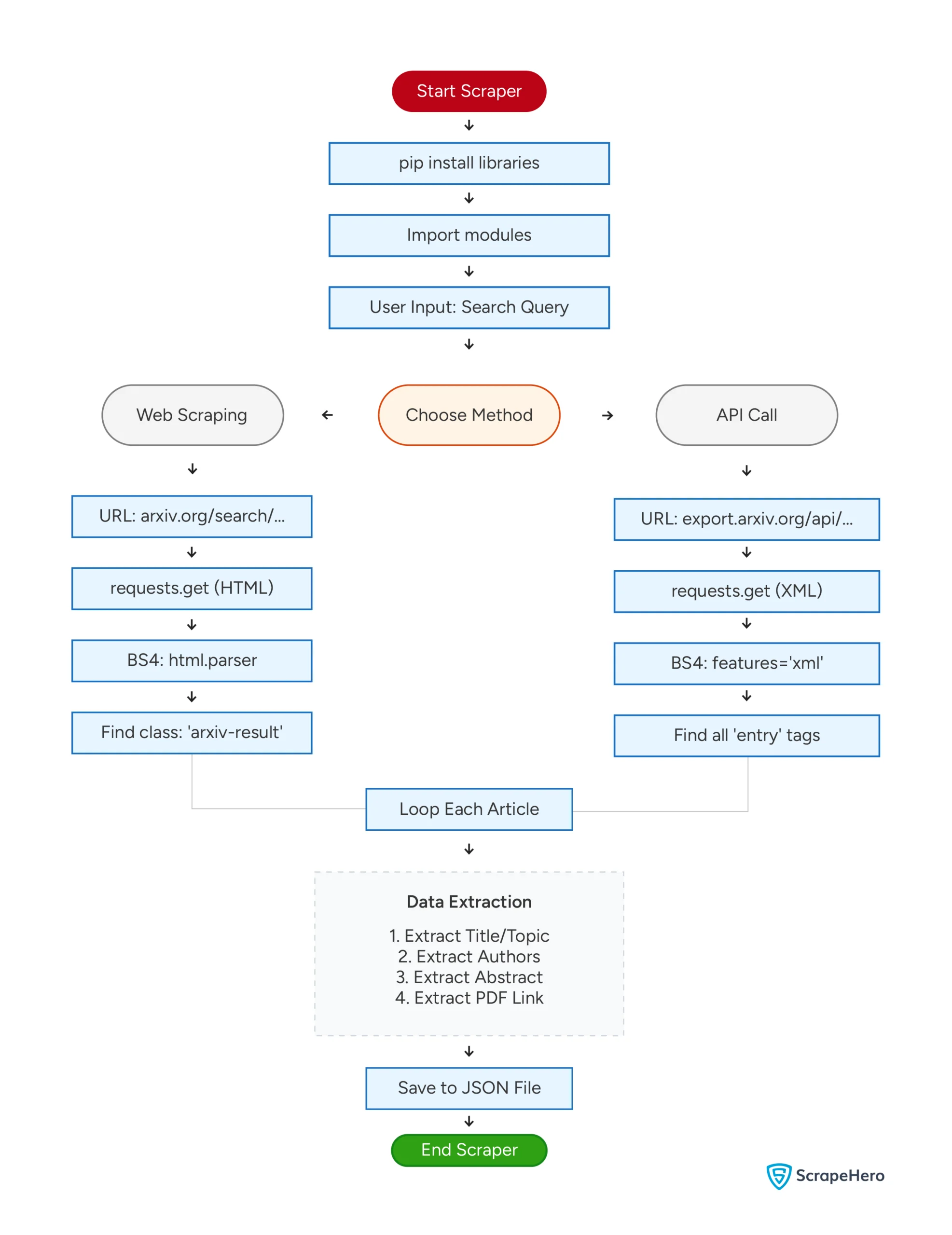
Here’s a flowchart showing both the methods mentioned above.
What’s New with Arxiv in 2026
Arxiv has changed more in the past year than in nearly a decade, and those changes directly affect how you write a scraper.
The biggest shift is Arxiv’s rollout of an official HTML rendering layer for papers. Since late 2023, Arxiv has been converting PDFs into HTML5 pages using a tool called LaTeXML, and by 2026, a large share of new submissions have a native HTML version accessible at https://arxiv.org/html/{paper_id}.
This is significant for scrapers: if you are building a pipeline to extract full paper text rather than just abstracts, you can now skip PDF parsing entirely and scrape the HTML version directly with BeautifulSoup.
The second important development is the Arxiv API usage surge.
With LLM training pipelines and RAG (Retrieval-Augmented Generation) systems becoming mainstream, teams are hitting the API rate limits far more frequently.
Arxiv’s legacy API (v1, atom-feed based) still works but is throttled at three requests per second. A widely adopted workaround is pairing the Arxiv API with the arxiv Python package, which handles retries and rate limiting automatically:
import arxiv
client = arxiv.Client()
search = arxiv.Search(query="large language models", max_results=50)
for result in client.results(search):
    print(result.title, result.pdf_url)
This wrapper is now the recommended starting point for most research scraping workflows because it handles pagination and backoff without any custom code.
The direct HTML scraping approach covered earlier in this article still has its place when you need fields not exposed through the API, such as submission history, comment counts, or subject-category tags.
Code Limitations
The code can scrape research paper details from arxiv.org using the search results URL or their API. Either way, you may have to alter the code in the future, as arxiv.org can change the website’s structure or the API endpoint.
Changing the website structure may require you to analyze their search results page again to find the tags and attributes of the data you want to scrape.
If they change the endpoint, you must use a new one, which also requires altering the code.
Wrapping Up
You can extract data from arxiv.org using Python requests. You don’t have to use headers, and arxiv.org also provides APIs.
Either web scraping Arxiv.org or using their APIs can provide the required information. However, web scraping can also provide any information available on the website. Meanwhile, APIs can only get you the information they intend to deliver.
Though this code can extract data from arxiv.org, you may need to update it whenever arxiv.org changes its website structure or the API URL. Moreover, the code only gets the name, the abstract, the authors, and the pdf link. If you need more information, you must change the code accordingly.
Or, you can use ScrapeHero Services. ScrapeHero is an enterprise-grade web scraping service. Let us know what and how much data you need, and we will build a high-quality Arxiv.org scraper for you.
Frequently Asked Questions
No. Both the Arxiv HTML search pages and the Arxiv API are publicly accessible without any login or API key. You can send requests directly using Python’s requests library or the official arxiv Python package.
The Arxiv search page supports up to 200 results per page using the size parameter in the URL. The Arxiv API supports pagination through start and max_results parameters, with a recommended maximum of 2,000 results per query for large-scale retrieval.
If you initialize BeautifulSoup without specifying a parser, it may produce inconsistent results across environments. Specify the parser explicitly to avoid this:
soup = BeautifulSoup(response.text, “lxml”)
Using lxml instead of html.parser is faster for large pages and can also improve parsing reliability.