Google now has a specific section for short videos, which includes Instagram reels. That means you can scrape the search results and understand which kind of videos get surfaced. Don’t know how? Here’s a tutorial that uses Python Playwright to monitor Instagram Reels on SERP.
Start by setting up the environment.
Setting Up the Environment to Monitor Instagram Reels on SERP
The code in this tutorial uses Playwright for web scraping. So the environment set up just includes installing it. First, install the Playwright library.
pip install playwright
Then, install the Playwright browser.
playwright install
Details Scraped from Instagram Reels
This Instagram reel scraper extracts three data points from Google Search results. It collects
- The video title
- The video creator
- The video URL
The script
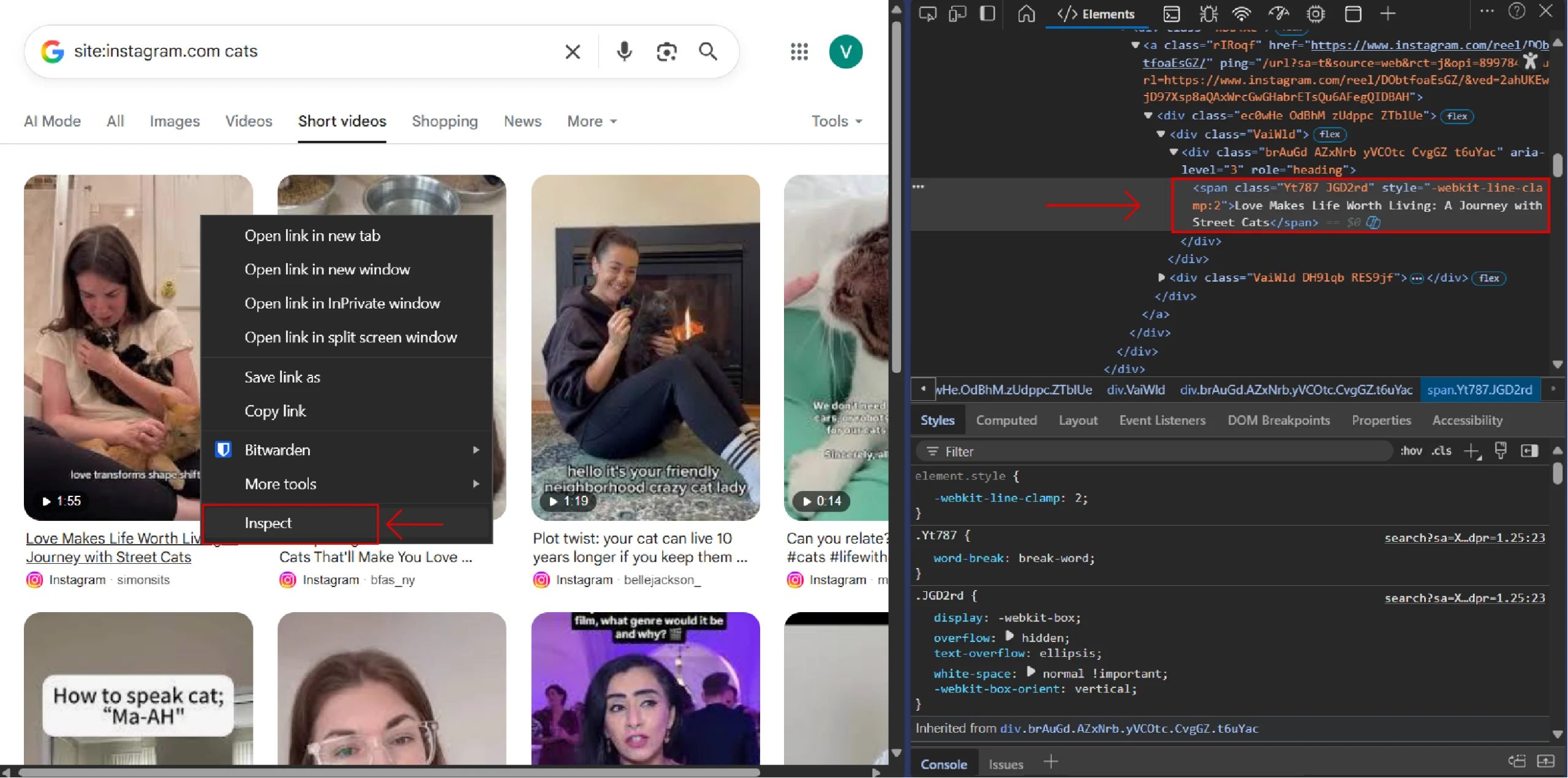
- Identifies video links by their HTML role attribute
- Parses the aria-label attribute to separate the title and creator
You can find these attributes using your browser’s developer tools. Right-click a web page element and select “Inspect”.
The Code to Monitor Instagram Reels on SERP
Here’s the complete script to build an Instagram reel scraper.
"""
Google AI Overview Scraper using Playwright
Scrapes AI Overview sections from Google Search results
"""
from playwright.sync_api import sync_playwright
import json
import time
import os
import random
from typing import Dict, List
class GoogleAIOverviewScraper:
def __init__(self, headless: bool = False):
"""
Initialize the scraper
Args:
headless: Whether to run browser in headless mode
"""
self.headless = headless
self.playwright = None
self.browser = None
self.context = None
self.page = None
def start(self):
"""Start the browser"""
user_data_dir = os.path.join(os.getcwd(), "../user_data")
if not os.path.exists(user_data_dir):
os.makedirs(user_data_dir)
user_agent='Mozilla/5.0 (Windows NT 10.0; Win64; x64) AppleWebKit/537.36'
self.playwright = sync_playwright().start()
self.context = self.playwright.chromium.launch_persistent_context(
headless=False,
user_agent=user_agent,
user_data_dir=user_data_dir,
viewport={'width': 1920, 'height': 1080},
java_script_enabled=True,
locale='en-US',
timezone_id='America/New_York',
permissions=['geolocation'],
# Mask automation
bypass_csp=True,
ignore_https_errors=True,
channel="msedge",
args=[
'--disable-blink-features=AutomationControlled',
'--disable-dev-shm-usage',
'--no-sandbox',
'--disable-gpu',
'--disable-setuid-sandbox'
]
)
self.page = self.context.new_page()
def close(self):
"""Close the browser"""
if self.page:
self.page.close()
if self.context:
self.context.close()
if self.browser:
self.browser.close()
if self.playwright:
self.playwright.stop()
def search_and_extract_ai_overview(self, query: str) -> Dict:
"""
Search Google and extract AI Overview if present
Args:
query: Search query string
Returns:
Dictionary containing AI Overview data and metadata
"""
result = {
'query': query,
'ai_overview_present': False,
'ai_overview_text': None,
'ai_overview_sources': [],
'timestamp': time.strftime('%Y-%m-%d %H:%M:%S')
}
try:
# Navigate to Google
search_url = f"https://www.google.com/search?q={query.replace(' ', '+')}"
self.page.goto(search_url, wait_until='networkidle')
# Wait a bit for AI Overview to load
time.sleep(2)
# Try to find AI Overview section
# Google's AI Overview typically appears in specific containers
# Click "Show more" if it exists to expand the AI overview
try:
show_more_button = self.page.get_by_role('button',name='Show more')
if show_more_button:
self.page.wait_for_timeout(random.randrange(1000,3000))
show_more_button.click()
# Wait a moment for the content to expand
time.sleep(1)
except Exception as e:
print(f"couldn't find show more button: {e}")
# If "Show more" button is not found, just continue
pass
ai_overview_selector = '.kCrYT'
try:
elements = self.page.query_selector_all(ai_overview_selector)
ai_overview_element = elements[1]
except Exception as e:
print(e)
if ai_overview_element:
result['ai_overview_present'] = True
# Extract the main AI Overview text
text_content = ai_overview_element.inner_text()
result['ai_overview_text'] = text_content.strip()
# Try to extract sources/citations
source_links = ai_overview_element.query_selector_all('a[href]')
sources = []
for link in source_links:
href = link.get_attribute('href')
text = link.inner_text().strip()
if href and text:
sources.append({
'text': text,
'url': href
})
result['ai_overview_sources'] = sources
else:
print(f"No AI Overview found for query: {query}")
except Exception as e:
result['error'] = str(e)
print(f"Error scraping AI Overview: {e}")
return result
def scrape_multiple_queries(self, queries: List[str]) -> List[Dict]:
"""
Scrape AI Overviews for multiple queries
Args:
queries: List of search queries
Returns:
List of dictionaries containing results for each query
"""
results = []
for i, query in enumerate(queries):
print(f"Processing query {i+1}/{len(queries)}: {query}")
result = self.search_and_extract_ai_overview(query)
results.append(result)
# Add delay between requests to avoid rate limiting
if i < len(queries) - 1:
time.sleep(3)
return results
def main():
"""Main function to demonstrate usage"""
# Example queries that might trigger AI Overview
queries = [
"what is artificial intelligence",
"how does machine learning work",
"what is deep learning",
"what is ChatGPT",
"what are neural networks",
"how does AI image generation work",
"what is natural language processing",
"what is computer vision",
"what is reinforcement learning",
"what are language models"
]
scraper = GoogleAIOverviewScraper(headless=False)
try:
# Start the browser
scraper.start()
# Scrape AI Overviews
results = scraper.scrape_multiple_queries(queries)
# Save results to JSON file
output_file = 'ai_overview_results.json'
with open(output_file, 'w', encoding='utf-8') as f:
json.dump(results, f, indent=4, ensure_ascii=False)
print(f"\nResults saved to {output_file}")
# Print summary
print("\n=== Summary ===")
for result in results:
status = "Found" if result['ai_overview_present'] else "Not Found"
print(f"Query: {result['query']}")
print(f"AI Overview: {status}")
if result['ai_overview_present']:
print(f"Text length: {len(result['ai_overview_text'])} characters")
print(f"Sources: {len(result['ai_overview_sources'])}")
print("-" * 50)
finally:
# Close the browser
scraper.close()
if __name__ == "__main__":
main()
The script begins by importing necessary modules:
- The sync_playwright module controls the browser
- The json module saves data
- The random module allows you to generate a random number
- The ‘os’ module lets you interact with the system
from playwright.sync_api import sync_playwright
import json
import random
import os
Then, the code creates a directory for user data, which stores browser profiles. Persistent contexts use this data to mimic a real user.
user_data_dir = os.path.join(os.getcwd(), "../user_data")
if not os.path.exists(user_data_dir):
os.makedirs(user_data_dir)
The script then launches a Playwright browser with a persistent context, which is configured to appear human. For instance, the code sets:
- User agent
- Viewport
- Location settings
with sync_playwright() as p:
browser = p.chromium.launch(headless=False)
user_agent = "Mozilla/5.0 (Windows NT 10.0; Win64; x64) AppleWebKit/537.36 (KHTML, like Gecko) Chrome/120.0.0.0 Safari/537.36"
context = p.chromium.launch_persistent_context(
headless=False,
user_agent=user_agent,
user_data_dir=user_data_dir,
viewport={'width': 1920, 'height': 1080},
java_script_enabled=True,
locale='en-US',
timezone_id='America/New_York',
permissions=['geolocation'],
bypass_csp=True,
ignore_https_errors=True,
channel="msedge",
args=[
'--disable-blink-features=AutomationControlled',
'--disable-dev-shm-usage',
'--no-sandbox',
'--disable-gpu',
'--disable-setuid-sandbox'
]
)
Websites often detect a Playwright browser by looking for specific automation indicators. Therefore, the above code sets arguments ( such as –disable-dev-shm-usage and –disable-gpu) to remove those indicators.
Next, the code creates a new browser page. It defines a search term for Instagram videos about cats, and navigates to the Google homepage.
page = context.new_page()
search_term = 'site:instagram.com cats eating food'
search_url = f'https://www.google.com'
page.goto(search_url)
After reaching the homepage, the script locates the Google search box element. It uses the ARIA role ‘combobox’ and the name ‘Search’ to identify the element. Then, it types the search term using the fill() method and presses Enter using the press() method.
search_box = page.get_by_role('combobox',name='Search')
search_box.fill(f'{search_term}')
page.wait_for_timeout(random.randrange(1000,3000))
search_box.press('Enter')
page.wait_for_timeout(random.randrange(1000,3000))The code also waits for one to three seconds after each action to mimic a human interaction.
After the search results load, the script clicks the ‘Short videos’ tab, which refines the results to show only video content.
short_videos_button = page.get_by_role('link',name='Short videos')
short_videos_button.click()
The code then simulates scrolling to load more videos. It uses a loop to perform five scroll actions, and each scroll is followed by a wait time.
for _ in range(5):
page.mouse.wheel(0,300)
page.wait_for_timeout(2000)
After that, the script locates the main content area containing the videos and finds all link elements within this area. These links represent the individual videos.
video_div = page.get_by_role('main')
videos = video_div.get_by_role('link').all()
video_details = []
print(f'{len(videos)} videos found')
From each link element, the code extracts
- The URL
- The aria-label attribute
From the aria-label attribute, the code gets the title and the creator by splitting the string.
for video in videos:
try:
url = video.get_attribute('href')
description = video.get_attribute('aria-label')
title = description.split('by')[0].strip()
creator = description.split('by')[1].split('on')[0].strip()
if url and title and creator:
video_details.append(
{
'title':title,
'creator':creator,
'url':url
}
)
print(f"extracted {title}")
except:
continue
Finally, the script saves the extracted data to a JSON file.
with open('instagram_video.json', 'w') as f:
json.dump(video_details, f, indent=4)
Code Limitations
This code can help you track Instagram reels in Google search results. However, there are a few limitations:
- Changes to the HTML may break the selectors: If Google changes the HTML structure, the scraper may not be able to locate the elements as the selectors rely on the HTML structure.
- No techniques to handle anti-scraping measures: The script does not use techniques like rate limiting or proxy rotation, making it unsuitable for large-scale operations.
Wrapping Up: Why Use a Web Scraping Service
Web scraping at scale presents significant challenges. The code above works for basic Instagram reel ranking analysis but isn’t production-ready. Your selectors break when sites change their HTML. You need rate limiting, proxy rotation, and anti-bot protection.
Building a production solution requires serious infrastructure: retry logic, proxy pools, JavaScript rendering, and legal compliance. Most teams spend far more time maintaining scraping infrastructure than they expect.
ScrapeHero is an enterprise-grade web scraping service that handles dynamic content, anti-bot systems, and data consistency. Instead of building and maintaining infrastructure, focus your resources on analyzing data and driving business decisions.
FAQs
A persistent context stores browser data like cookies, local storage, and session information across multiple runs. This makes the scraper appear more like a real user to Google’s anti-bot systems, reducing the chances of being blocked or flagged as automated traffic.
ARIA roles are more stable than CSS selectors because they describe an element’s purpose rather than its styling or position. Google is less likely to change ARIA roles since they’re important for accessibility, making them more reliable for web scraping than class names or IDs that can change frequently.
No. The script lacks anti-scraping measures like IP rotation, request rate limiting, and CAPTCHA handling. Running it at scale will trigger Google’s bot detection systems, resulting in blocks or rate limits. You’d need to add proxy rotation, implement delays between requests, and handle CAPTCHAs for large-scale scraping.