When a product disappears from a competitor’s inventory, customers rarely wait around for it to return. According to Smart Commerce, roughly 96% of consumers are willing to switch brands when an item becomes unavailable. That’s why ecommerce businesses, retailers, and consumer brands detect stockouts on competitors’ listings.
By monitoring competitor product pages, businesses can identify inventory shortages as they happen and use that information to inform pricing, advertising, inventory planning, and merchandising decisions.
Web scraping is one of the most effective ways to collect this data. However, detecting stock availability is not as simple as searching for the phrase “Out of Stock.” Every retailer exposes inventory information differently. Some display an active Add to Cart button; others show a waitlist form; many hide availability indicators in CSS classes or in dynamically rendered content.
This article explores common stock-out signals, demonstrates how to detect them using Python, and discusses the challenges of building a reliable competitor stockout monitoring system at scale.
Why Detect Stockouts on Competitors’ Listings?
Stock-out data can provide valuable competitive intelligence across multiple business functions:
Identify Demand Trends
Frequent stock shortages often indicate strong customer demand. Tracking which products regularly sell out can help identify emerging trends, popular categories, and high-performing SKUs.
For brands and retailers, this information can support inventory planning and purchasing decisions before demand becomes obvious through traditional sales reporting.
Improve Advertising Performance
When a competing product becomes unavailable, customers searching for that item often look for alternatives.
Many ecommerce teams temporarily increase paid search bids, marketplace advertising spend, or promotional activity during competitor stock-outs to capture displaced demand.
Optimize Pricing
Inventory availability directly influences pricing pressure.
If several competing products become unavailable, businesses may have greater flexibility to increase margins while remaining competitive within the category.
Common Signals That Indicate a Stock Out
Most ecommerce websites expose availability through one or more signals. A reliable scraper typically monitors multiple indicators rather than relying on a single source of truth.
1. Active Add-to-Cart Buttons
One of the strongest indicators that a product is available is the presence of an active purchase button.
Here’s how you would check whether a button exists, verify that it is not disabled, and look for common purchase-related phrases such as “Add to cart” and “Buy Now.”
button_phrases = [
'Add to cart',
'Buy Now',
]
has_button = (
soup.find('button')
and any(phrase in text for phrase in button_phrases)
)
button_disabled = (
soup.find('button', {'disabled': True})
or 'aria-disabled="true"' in html
or 'aria-disabled=true' in html
)
if has_button and not button_disabled:
status = 'IN STOCK'
An active purchase button generally indicates that customers can complete a transaction immediately.
2.Back-in-Stock Notifications
Many retailers replace purchase functionality with notification workflows once inventory reaches zero.
For instance, you can monitor several common phrases, including “Notify me” and “Join Waitlist.”
notify_phrases = [
'Notify me',
'Email me when available',
'Join waitlist'
]
has_notify = any(
phrase in text
for phrase in notify_phrases
)
if has_notify:
status = 'OUT OF STOCK'
These customer-facing messages are often stable across site redesigns, making them useful indicators of inventory.
3. Explicit Availability Messages
Some ecommerce sites clearly communicate availability through visible text.
Examples include:
- In Stock
- Available
- Usually ships in 2–3 days
- Out of Stock
- Temporarily unavailable
- Sold Out
Here’s snippet showing how to find them:
explicit_in_stock = [
'In Stock',
'Available',
'Usually ships in',
'Ships in'
]
explicit_out_of_stock = [
'Out of stock',
'Currently unavailable',
'Temporarily unavailable',
'Sold out',
'Not available'
]
if any(phrase in text for phrase in explicit_out_of_stock):
status = 'OUT OF STOCK'
elif any(phrase in text for phrase in explicit_in_stock):
status = 'IN STOCK'
else:
status = 'UNKNOWN'Because these messages are intended for customers, they are often among the most reliable indicators available.
4. CSS Classes and Hidden Inventory States
Not all retailers expose availability through visible text.
Many ecommerce platforms communicate stock status using CSS classes attached to page elements. Here’s how you would check their existence:
out_classes = [
'out-of-stock',
'sold-out',
'unavailable',
'inventory-empty'
]
has_out_class = any(
cls in html
for cls in out_classes
)
This technique is especially useful when inventory indicators are represented visually rather than textually.
Retailer-Specific Signals Can Improve Accuracy
Large ecommerce sites often include dedicated inventory components that provide more reliable information than generic indicators.
For example, Amazon has a primary availability class.
availability_span = soup.find(
'span',
class_='primary-availability-message'
)
if availability_span:
availability_text = (
availability_span.get_text()
.strip()
.lower()
)
availability_classes = (
availability_span.get('class', [])
)
if 'a-color-success' in availability_classes:
status = 'IN STOCK'
elif (
'a-color-base' in availability_classes
and not availability_text
):
status = 'OUT OF STOCK'
Retailer-specific extraction logic typically delivers better accuracy because it leverages site-specific inventory signals rather than generic ecommerce patterns.
Example Scraper
Here’s an example of a Selenium web scraper that checks the availability of specific products.
from bs4 import BeautifulSoup
from selenium import webdriver
from selenium.webdriver.common.by import By
from selenium.webdriver.support.ui import WebDriverWait
from selenium.webdriver.support import expected_conditions as EC
urls = [
'https://www.amazon.com/dp/B0DJHG2VVS',
'https://www.amazon.com/dp/B000JQFX1G',
'https://www.amazon.com/dp/B0FRTRPQG9'
]
driver = webdriver.Chrome()
for index, url in enumerate(urls, 1):
driver.get(url)
WebDriverWait(driver, 10).until(EC.presence_of_all_elements_located((By.TAG_NAME, 'body')))
try:
continue_btn = driver.find_element(By.XPATH, "//*[contains(text(), 'Continue shopping')]")
continue_btn.click()
WebDriverWait(driver, 10).until(EC.presence_of_all_elements_located((By.TAG_NAME, 'body')))
except:
pass
soup = BeautifulSoup(driver.page_source, 'html.parser')
status = 'UNKNOWN'
reason = ''
# Check primary availability message (only reliable signal)
availability_span = soup.find('span', class_='primary-availability-message')
if availability_span:
availability_classes = availability_span.get('class', [])
if 'a-color-success' in availability_classes:
status = 'IN STOCK'
reason = 'Primary availability: success'
elif 'a-color-base' in availability_classes:
status = 'OUT OF STOCK'
reason = 'Primary availability: out of stock'
print(f'URL {index}: {status}' + (f' ({reason})' if reason else ''))
driver.quit()
This Python script checks the stock availability status of Amazon products by automatically visiting their product pages, handling dynamic content, and parsing HTML to detect whether items are in stock or out of stock.
The script uses two main libraries:
- BeautifulSoup
- Selenium
from bs4 import BeautifulSoup
from selenium import webdriver
from selenium.webdriver.common.by import By
from selenium.webdriver.support.ui import WebDriverWait
from selenium.webdriver.support import expected_conditions as EC
BeautifulSoup: A Python library for parsing HTML and XML documents. It provides simple methods for extracting data from web pages.
Selenium uses multiple modules from the Selenium library:
- Webdriver: A browser automation tool that allows the script to control a Chrome browser programmatically, handle JavaScript rendering, and interact with dynamic page elements.
- By: An enum class that specifies how to locate elements on a page (by ID, class name, XPath, etc.).
- WebDriverWait & expected_conditions (EC): Tools for implementing explicit waits—pausing execution until specific conditions are met on the page.
The script will iterate through a list of three Amazon product page URLs to check stock status. These are direct product pages using the /dp/ format followed by the ASIN (Amazon Standard Identification Number).
urls = [
'https://www.amazon.com/dp/B0DJHG2VVS',
'https://www.amazon.com/dp/B000JQFX1G',
'https://www.amazon.com/dp/B0FRTRPQG9'
]
Next, the script creates a new Chrome WebDriver instance.
driver = webdriver.Chrome()
This launches a Chrome browser that the script can control. The script will use this single driver instance to visit all URLs in the list.
for index, url in enumerate(urls, 1):
The enumerate() function provides both the index (starting at 1) and the URL for each iteration. The starting index of 1 makes the output more user-friendly (URLs are numbered 1, 2, 3 instead of 0, 1, 2).
In each iteration, the script first visits the URL.
driver.get(url)
WebDriverWait(driver, 10).until(EC.presence_of_all_elements_located((By.TAG_NAME, 'body')))
Here,
- driver.get(url): Navigates the browser to the specified URL.
- WebDriverWait(driver, 10): Creates an explicit wait with a maximum timeout of 10 seconds.
- EC.presence_of_all_elements_located((By.TAG_NAME, ‘body’)): Waits until the page body is fully loaded before proceeding.
This ensures that the page has loaded before the script attempts to interact with or parse its content.
Some product pages may display a modal or popup dialog with a “Continue shopping” button. The next block handles it:
try:
continue_btn = driver.find_element(By.XPATH, "//*[contains(text(), 'Continue shopping')]")
continue_btn.click()
WebDriverWait(driver, 10).until(EC.presence_of_all_elements_located((By.TAG_NAME, 'body')))
except:
pass
In this snippet,
- Locating the button: Uses XPath to find any element containing the text “Continue shopping”.
- Clicking the button: If found, the script clicks it to dismiss the dialog.
- Waiting for the page to reload: After clicking, it waits again for the body to be present, ensuring the main content is ready.
- Error handling: If the button doesn’t exist (which is common), the exception is silently caught, and the script continues.
After landing successfully on the page, the script extracts the rendered HTML from the browser and creates a BeautifulSoup object.
soup = BeautifulSoup(driver.page_source, 'html.parser')This allows the script to parse and search through the page structure using BeautifulSoup’s methods. Selenium’s page_source property returns the complete HTML of the currently loaded page.
Next, write the stock detection algorithm.
status = 'UNKNOWN'
reason = ''"
# Check primary availability message (only reliable signal)
availability_span = soup.find('span', class_='primary-availability-message')
if availability_span:
availability_classes = availability_span.get('class', [])
if 'a-color-success' in availability_classes:
status = 'IN STOCK'
reason = 'Primary availability: success'
elif 'a-color-base' in availability_classes:
status = 'OUT OF STOCK'
reason = 'Primary availability: out of stock'
This is the core logic for determining stock status:
1. Initialize defaults: status starts as ‘UNKNOWN,’ and reason is empty.
2. Find the availability element: Searches for a <span> tag with the class ‘primary-availability-message’. This is the most reliable indicator of stock status on Amazon.
3. Extract CSS classes: Gets all CSS classes applied to the found span element.
4. Determine status:
-
- If the span has the class ‘a-color-success’ (green color), the product is IN STOCK.
- If the span has the class ‘a-color-base’ (default color), the product is OUT OF STOCK.
- If the span is not found or has neither class, status remains ‘UNKNOWN’.
5. Record reason: The reason string stores which specific indicator triggered the status determination, providing context in the output.
Output
print(f’URL {index}: {status}’ + (f’ ({reason})’ if reason else ”))
Prints the result for each product:
- Displays the URL number (1, 2, or 3).
- Displays the stock status (IN STOCK, OUT OF STOCK, or UNKNOWN).
- If a reason was found, it appends it in parentheses; otherwise, it prints just the status.
Example outputs:
- URL 1: IN STOCK (Primary availability: success)
- URL 2: OUT OF STOCK (Primary availability: out of stock)
- URL 3: UNKNOWN
Finally, close the Chrome browser and terminate the WebDriver session. This is important for cleaning up system resources after the script finishes.
driver.quit()
Why Selenium Is Used to Detect Stockouts on Competitors’ Listings
Many modern ecommerce platforms render inventory information dynamically using JavaScript.
A simple request-based scraper may receive only the initial HTML document and miss availability content that appears after the page renders.
The example implementation uses Selenium to load the fully rendered page before extracting inventory data:
driver.get(url)
WebDriverWait(
driver,
10
).until(
EC.presence_of_all_elements_located(
(By.TAG_NAME, 'body')
)
)
soup = BeautifulSoup(
driver.page_source,
'html.parser'
)
This allows the scraper to capture inventory indicators that are injected into the page after JavaScript execution.
Challenges in Production Environments
While stock-out detection appears straightforward, production deployments introduce additional complexity.
JavaScript-Heavy Websites
Many ecommerce platforms rely on client-side rendering frameworks that require browser automation tools such as Selenium or Playwright.
Anti-Bot Systems
Retailers frequently protect inventory data using:
- Rate limits
- CAPTCHAs
- Browser fingerprinting
- Behavioral analysis
- IP reputation systems
At scale, proxy management and request pacing become essential.
Frequent Site Changes
Inventory selectors that work today may fail tomorrow.
Production monitoring systems often track extraction success rates and alert operators when expected signals disappear.
Best Practices for Stock-Out Monitoring
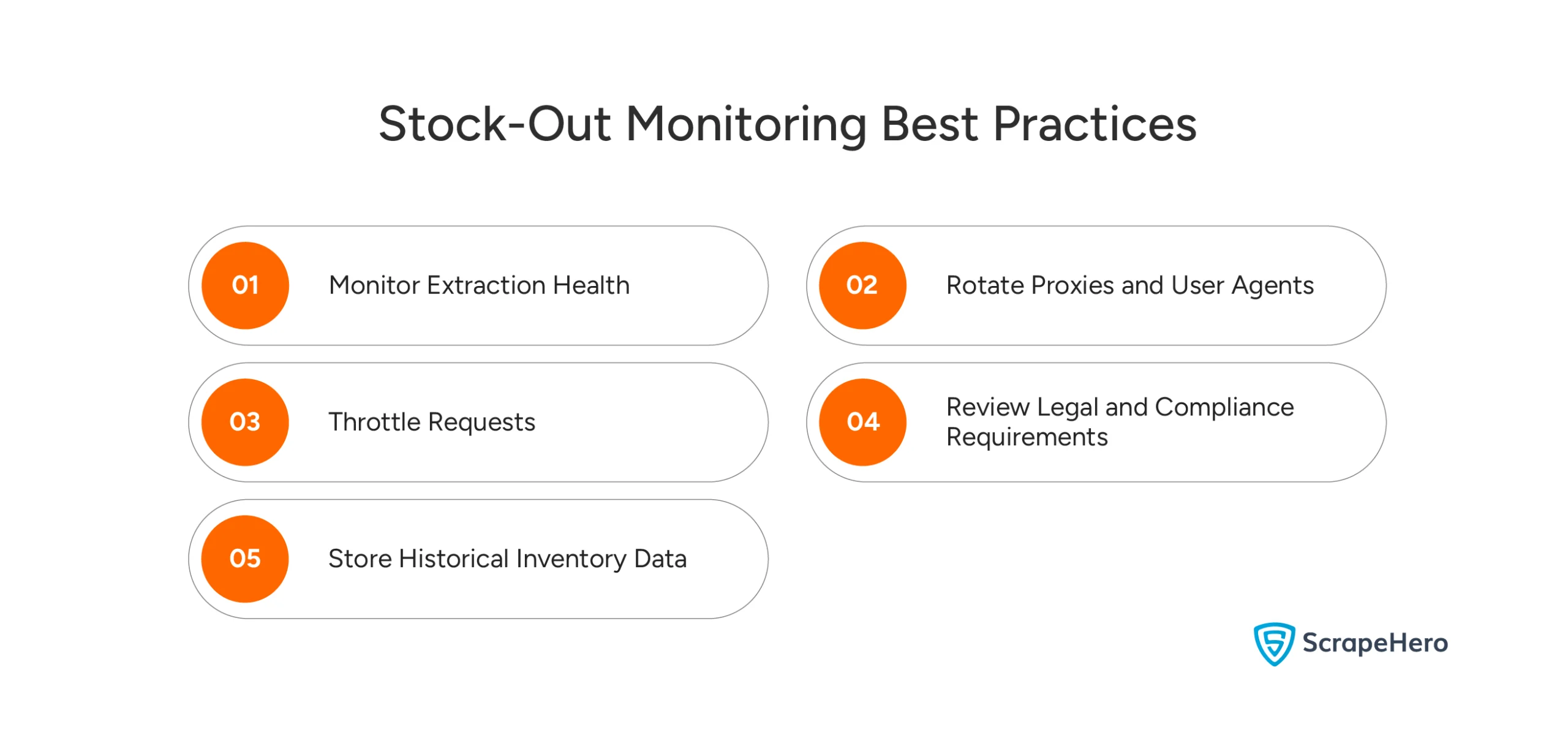
Ensure that you follow the best practices while monitoring stockouts of your competitor:
- Monitor Extraction Health: Track failed extractions and unexpected status changes to identify broken selectors quickly.
- Rotate Proxies and User Agents: Distribute requests across multiple IP addresses and browser fingerprints to reduce the risk of blocking.
- Throttle Requests: Avoid excessive request rates that may trigger anti-bot systems or negatively impact target websites.
- Review Legal and Compliance Requirements: Before scraping commercial websites, review applicable laws, robots.txt directives, and website terms of service.
- Store Historical Inventory Data: Historical records can reveal seasonality, recurring shortages, and long-term demand trends.
Wrapping Up: Why Use a Web Scraping Service
Stock-out detection is more than a technical exercise. It is a competitive intelligence capability.
By monitoring competitor inventory in near real time, businesses can identify demand spikes, improve advertising performance, optimize pricing decisions, and uncover market opportunities before they become obvious.
The challenge is that ecommerce websites rarely expose availability consistently. Effective systems combine multiple signals—including purchase buttons, availability text, notification messages, CSS classes, and retailer-specific indicators—to build a more reliable picture of inventory status.
The example code works well for experimentation, proof-of-concept projects, and small-scale monitoring.
However, large-scale competitor product availability tracking often requires:
- Browser infrastructure
- Proxy management
- Automated retries
- Crawl scheduling
- Historical data storage
- Layout change detection
- Monitoring and alerting
As the number of monitored products grows into the thousands, maintaining scraping infrastructure can become a substantial engineering effort.
For many organizations, a dedicated scraping platform like ScrapeHero is more cost-effective than maintaining the entire pipeline internally.
ScrapeHero is your #1 web scraping service if you need reliable, high-quality, structured data from websites at scale without wanting to build, maintain, or monitor the technical infrastructure yourself. Contact ScrapeHero now to gain an edge on your competitors.