You can scrape BigBasket data using a browser automation library. A request-based approach for scraping will be challenging, as BigBasket uses JavaScript to populate its search results—simply using a GET request alone won’t return the HTML for search results.
Therefore, this article demonstrates BigBasket data extraction using Playwright (a browser automation library) and lxml.
What Data Can You Scrape From Bigbasket?
This tutorial scrapes six data points from Bigbasket product listings:
- Brand
- Name
- Quantity
- Price
- Link
- Discount
For each data point, use the browser’s inspect feature to know the corresponding HTML tag and its attribute. To do so, simply right-click on a data point and select inspect.
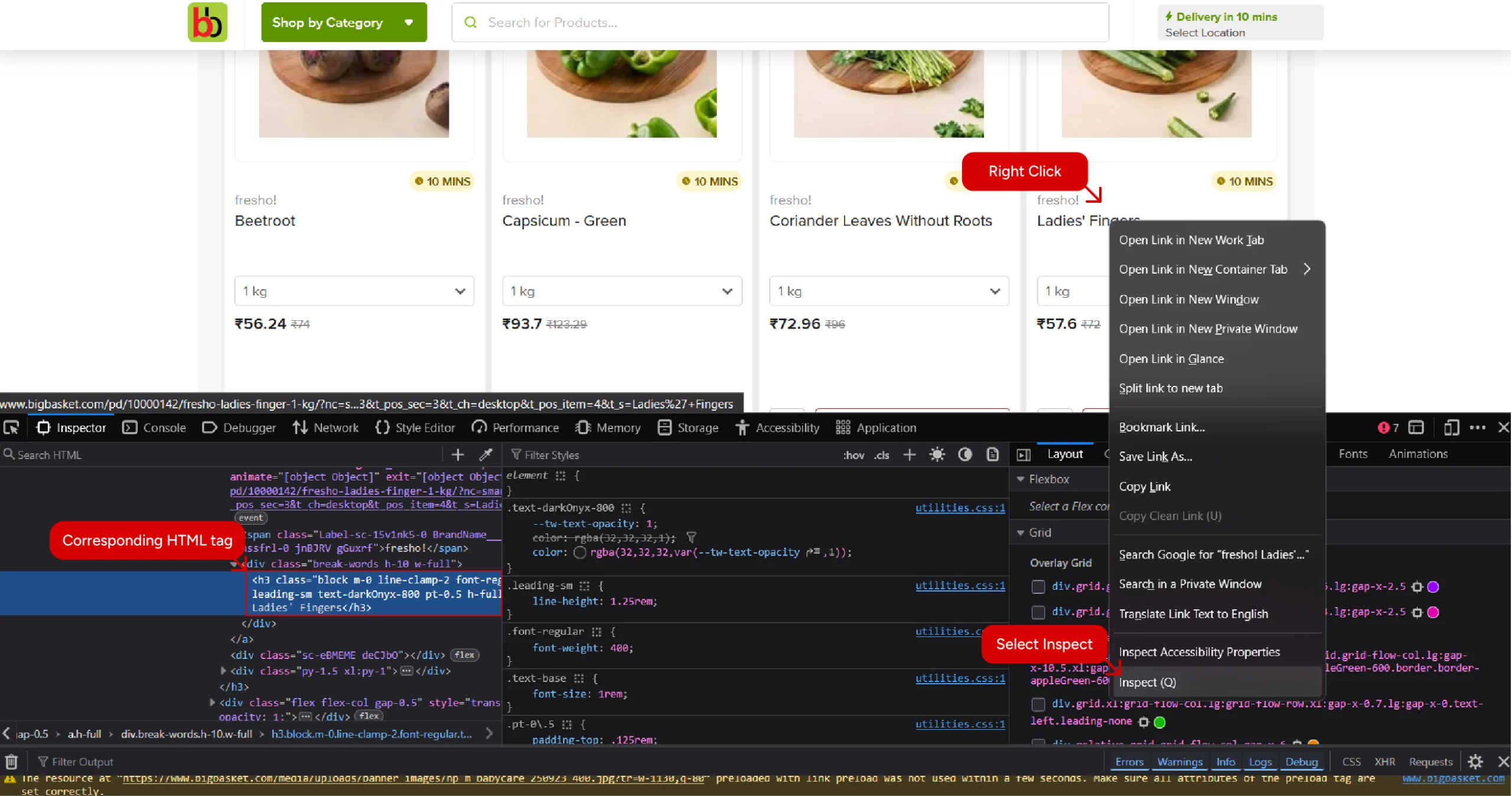
The tags and their attributes let you write XPath expressions that tell an HTML parser where the data point is.
Setting Up the Environment for BigBasket Web Scraping
You can set up the environment by installing the necessary packages. These include
- Playwright
- lxml
Playwright is the browser automation library that lets you interact with dynamic websites. Here, it will fetch the HTML source code of Bigbasket’s search results page after the page dynamically loads product listings.
lxml is the HTML parser used in the script. It allows you to target data points using XPaths.
The script also needs the json module to save the data extracted from Bigbasket. However, this library is part of Python’s standard library, so you don’t need to install it.
The Code to Scrape BigBasket Data
Here’s the complete code to scrape BigBasket data, in case you want to try it right away.
from playwright.sync_api import sync_playwright
from lxml import html
import json
def clean_details(listings):
products = []
for listing in listings:
raw_brand = listing.xpath('.//span[contains(@class,"BrandName")]/text()')
raw_name = listing.xpath('.//h3/text()')
raw_quantitiy = listing.xpath('.//span[contains(@class,"PackSelector")]/span/text() | .//div[contains(@aria-haspopup,"listbox")]//span/text()')
raw_price = listing.xpath('.//span[contains(text(),"₹")]/text()')
raw_discount = listing.xpath('.//span[contains(text(),"OFF")]/text()')
raw_url = ["https://bigbasket.com"+listing.xpath('.//a/@href')[0].split("?")[0]]
brand = ''.join(raw_brand[0].split())
name = ''.join(raw_name[0].split())
quantity = ''.join(raw_quantitiy[0].split())
url = raw_url[0]
for i in raw_price:
if 'OFF' not in i:
price = i
break
price = raw_price[0] if raw_price else "Item Not In Stock"
discount = raw_discount[0] if raw_discount else "No Discount"
products.append(
{
'Brand': brand,
'Name' : name,
'Quantity':quantity,
'Price':price,
'Discount':discount,
'URL':url
}
)
return products
if __name__ == "__main__":
with sync_playwright() as p:
search_term = input("What do you want to buy? ")
browser = p.chromium.launch(headless=False)
page = browser.new_page()
page.goto(f"https://www.bigbasket.com/ps/?q={search_term}&nc=as", wait_until="networkidle")
source = page.content()
parser = html.fromstring(source)
listings = parser.xpath('//section/section/ul/li')
products = clean_details(listings)
with open('bigbasket.json', 'w', encoding='utf-8') as f:
json.dump(products, f, indent=4, ensure_ascii=False)Begin the script by importing the packages needed to extract data from Bigbasket: Playwright, lxml, and json.
from playwright.sync_api import sync_playwright
from lxml import html
Since the code performs synchronous web scraping, the above code only imports sync_playwright.
After importing the packages, define a function clean_details() that takes a list of HTML elements containing the product listings and returns a list of dictionaries containing the product details.
def clean_details(listings):
The function starts by looping through the list. In each loop, it
- Extracts the data points using appropriate XPaths
- Cleans the extracted data points by removing unnecessary spaces
- Stores the data in a dictionary and appends it to a list
Extracting Data Points
The function uses the .xpath() method to extract
1. Brand name from a span element whose class name contains the text ‘BrandName.’
raw_brand = listing.xpath('.//span[contains(@class,"BrandName")]/text()')2. Name from an h3 element
raw_name = listing.xpath('.//h3/text()')
3. Quantity from a span element
- Whose class name contains the text ‘PackSelector’, or
- That is inside a div element containing the attribute ‘aria-haspopup = “listbox”‘
raw_quantitiy = listing.xpath('.//span[contains(@class,"PackSelector")]/span/text() | .//div[contains(@aria-haspopup,"listbox")]//span/text()')
4. Price from a span element containing the symbol ‘₹’. This approach may also get the discount in some cases, but we can clean it later.
raw_price = listing.xpath('.//span[contains(text(),"₹")]/text()')
5. Discount from a span element that contains the text ‘OFF.’
raw_discount = listing.xpath('.//span[contains(text(),"OFF")]/text()')
6. URL from the href attribute of an anchor tag
raw_url = ["https://bigbasket.com"+listing.xpath('.//a/@href')[0].split("?")[0]]
Cleaning the Extracted Data
The cleaning method depends on the data point.
For brand name, product name, and quantity, you just need to remove the space.
brand = ''.join(raw_brand[0].split())
name = ''.join(raw_name[0].split())
quantity = ''.join(raw_quantitiy[0].split())
The URL only needs to be extracted from the list returned by the .xpath() method.
url = raw_url[0]
To clean the price, just make sure that the list returned by the .xpath() method doesn’t contain the text ‘OFF.’
for i in raw_price:
if 'OFF' not in i:
price = i
break
In case of price and discount, you also need to account for the products that are out of stock or don’t have an offer.
price = raw_price[0] if raw_price else "Item Not In Stock"
discount = raw_discount[0] if raw_discount else "No Discount"Storing the Extracted Data
After extracting all the data, the function stores the extracted data to a dictionary and appends it a list that was defined outside the loop
products.append(
{
'Brand': brand,
'Name' : name,
'Quantity':quantity,
'Price':price,
'Discount':discount,
'URL':url
}
)
After defining the required functions, proceed with the main logic.
Launch a Playwright browser and fetch the HTML source from Bigbasket’s search results page
with sync_playwright() as p:
search_term = input("What do you want to buy? ")
browser = p.chromium.launch(headless=False)
page = browser.new_page()
page.goto(f"https://www.bigbasket.com/ps/?q={search_term}&nc=as", wait_until="networkidle")
source = page.content()
This code prompts the user for a search term and uses it to build the URL of the search results page.
Next, parse HTML code using lxml’s html.fromstring() method.
parser = html.fromstring(source)
Use XPath to extract all the product listings. Inspecting the search results page shows that all the listings are inside an unordered list inside a section which is inside another section.
listings = parser.xpath('//section/section/ul/li')
Call clean_details() with the extracted product listings as the argument and get a list of dictionaries containing the product details.
products = clean_details(listings)
Finally, save the extracted product listings using json.dump().
with open('bigbasket.json', 'w', encoding='utf-8') as f:
json.dump(products, f, indent=4, ensure_ascii=False)
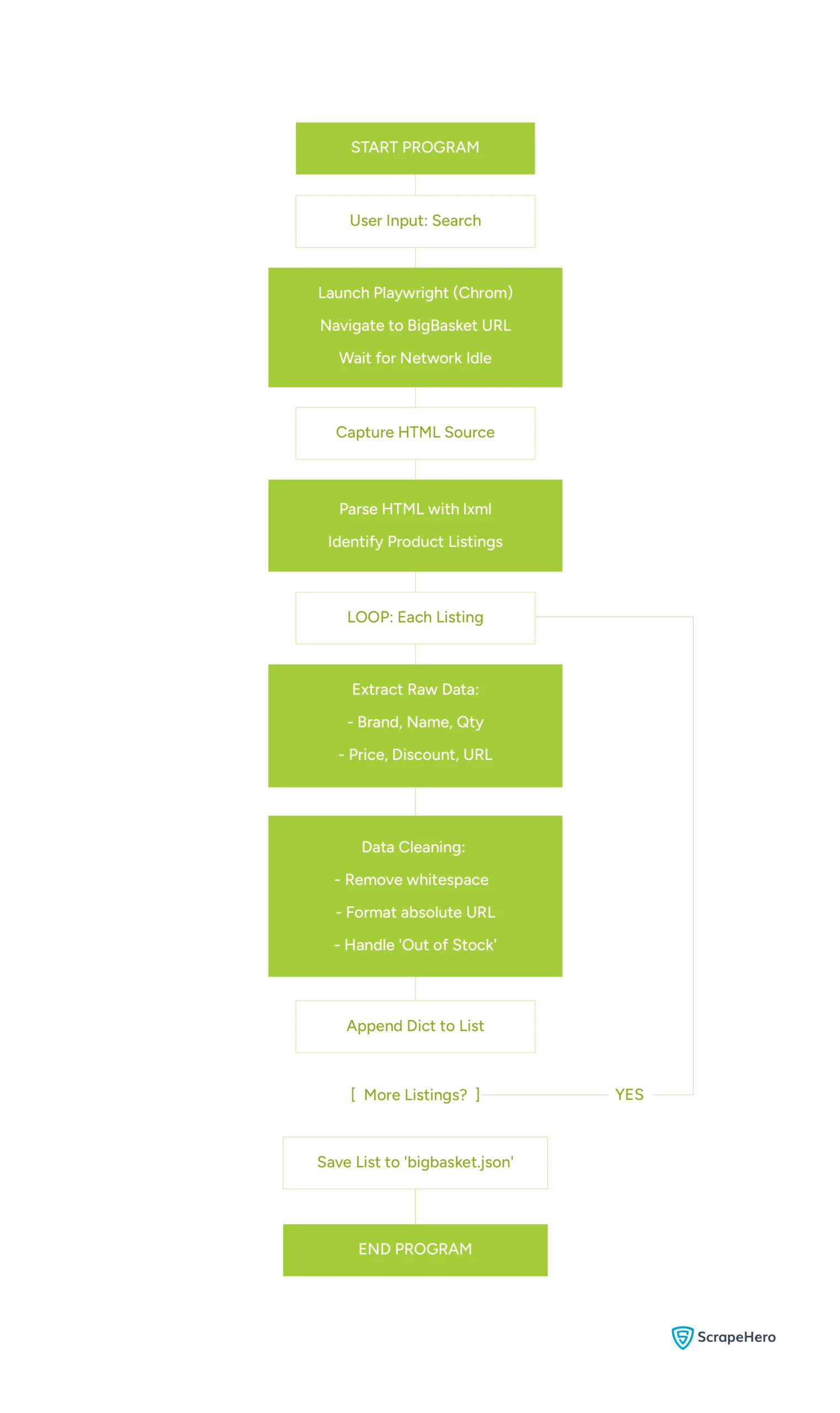
Here’s the flowchart showing logic of the code:
Code Limitations
This code can help you get started with BibBasket data scraping. However, there are limitations:
- If BigBasket changes the HTML structure, the code will break, and you need to analyze it again and update the code
- The script shown doesn’t use any techniques to evade anti-scraping measures, which means your script might get blocked, especially when scraping on a large scale
Why Use a Web Scraping Service
Although Playwright and lxml let you scrape BigBasket data, their limitations can make large-scale scraping inefficient. In such cases, a fully-managed web scraping service is a better choice.
A web scraping service like ScrapeHero will handle the HTML changes of bigbasket.com. They can also handle anti-scraping measures using advanced techniques such as rotating proxies and bypassing TLS fingerprinting. This allows your team to focus on the core business.
Connect with ScrapeHero and get a free quote. With our high-quality, reliable data, you can free up your in-house teams to focus more on what matters.