Best Buy has a highly dynamic website, making it challenging to extract data using request-based methods. However, you can perform web scraping Best Buy using browser automation libraries like Selenium.
This article discusses Best Buy data scraping using Python Selenium and BeautifulSoup.
Data Scraped From Best Buy
This tutorial will scrape the following product details from Best Buy.
- Name
- Model
- SKU
- Price
- Description
- Review Details
- Features
- Specifications
- URL
With the exception of the URL (which is pulled from the search results), all other data points are extracted directly from the individual product page.
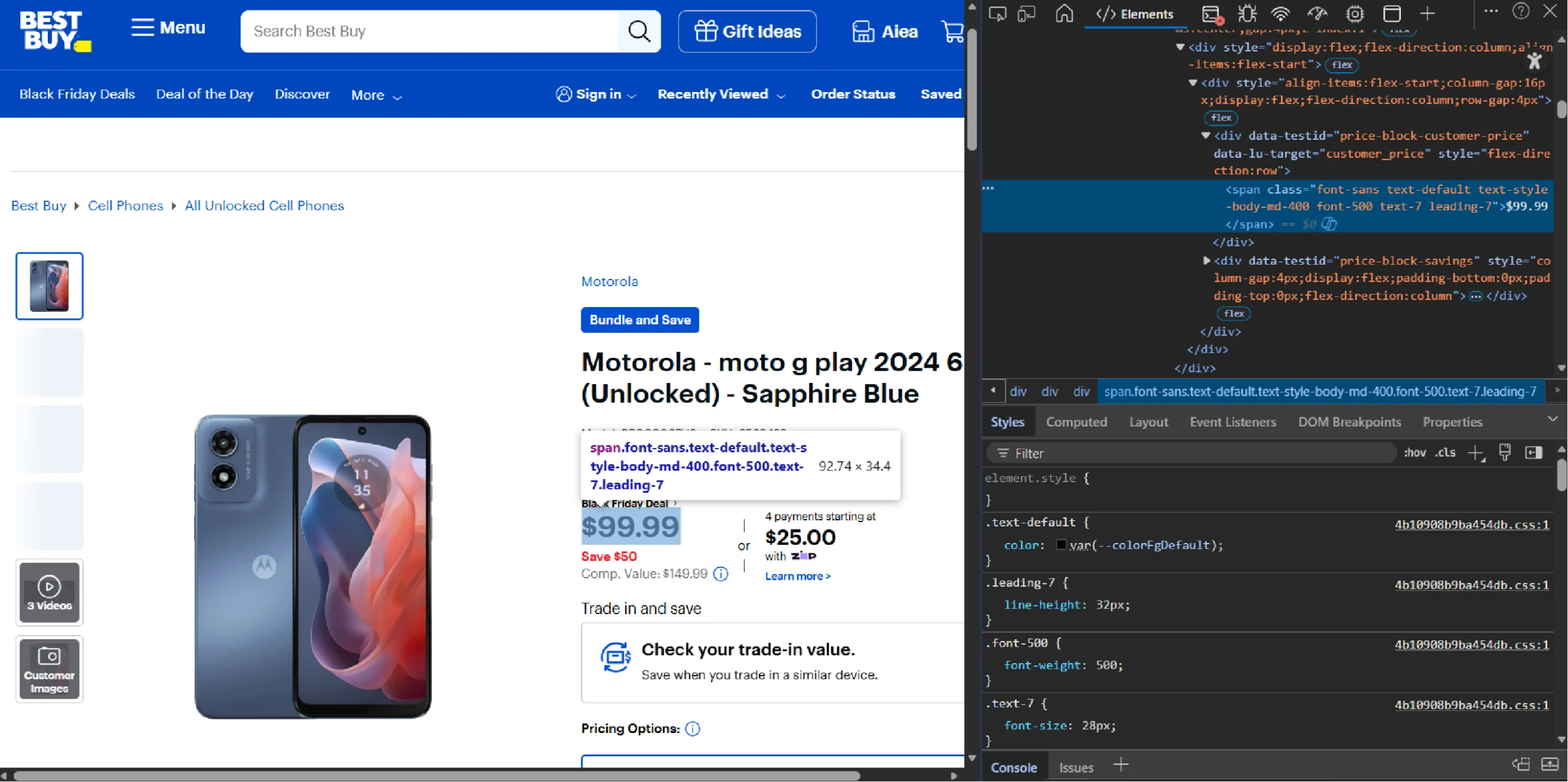
The code uses specific selectors to locate each data point. These selectors depend on the HTML tags holding the data points and their attributes, which you can find by using the browser’s inspect feature.
For instance, to find the HTML tag holding the product price, right click on it and select Inspect.
Web Scraping Best Buy: The Environment
To execute this scraper, the code relies on the following external libraries:
- Selenium Python: This library automates a web browser (Chrome), allowing you to render JavaScript and interact with dynamic elements like the ‘Choose Country’ popup.
- BeautifulSoup: BeautifulSoup lets you extract the required information very efficiently through its intuitive methods.
You can install the Python packages with PIP.
pip install selenium beautifulsoup4
You also need a couple of packages inside the Python standard library. These do not require installation:
- The re module: This module helps you handle regex. It allows you to search for a string with a specific pattern.
- The json module: This module lets you convert JSON strings to JSON objects and save these objects to a JSON file.
- The time module: The time module has the sleep method that lets you pause the script when required.
Web Scraping Best Buy: The Code
If you’re in a hurry, here’s the complete code to scrape Best Buy.
from selenium import webdriver
from selenium.webdriver.common.action_chains import ActionChains
from selenium.webdriver.common.by import By
from bs4 import BeautifulSoup as bs
import re
import json
from time import sleep
def parsePage(url):
browser = webdriver.Chrome()
browser.get(url)
sleep(3)
if "Choose a country" in browser.find_element(By.TAG_NAME,'h1').text:
print("selecting a country")
browser.find_element(By.CLASS_NAME,'us-link').click()
for _ in range(5):
ActionChains(browser).scroll_by_amount(0, 500).perform()
sleep(1)
response = browser.page_source
soup = bs(response, "lxml")
browser.quit()
return soup
def getUrls(soup):
product_grid = soup.find('ul',{'class':'product-grid-view-container'})
products = product_grid.find_all('li',{'class':'product-list-item'})
urls = []
for product in products:
try:
anchorTag = product.find('a',{'class':'product-list-item-link'})
rawUrl = anchorTag['href']
url = rawUrl if "https://" in rawUrl else "https://bestbuy.com"+rawUrl
urls.append(url)
except:
continue
return urls
def get_specifications(page):
product_specifications = re.findall(r'{"__typename":"ProductSpecification","displayName".*?}',page.prettify())
specifications = {}
try:
for specification in product_specifications:
specification_json = json.loads(specification)
for item in specification_json:
specifications[specification_json['displayName']] = specification_json['value']
except:
specifications = None
return specifications
def get_features(page):
product_features = re.findall(r'{"__typename":"ProductFeature".*?}',page.prettify())
features = set()
try:
for feature in product_features:
feature_json = json.loads(feature)
features.add(feature_json['description'])
features = list(features)
except:
features = None
return features
def get_review_details(page):
product_review_infos = re.findall(r'{"__typename":"ProductReviewInfo".*?}',page.prettify())
try:
review_info = json.loads(product_review_infos[0])
del review_info['__typename']
except:
review_info = None
return review_info
def fromProductPage(urls):
bestBuyProducts = []
for url in urls[:1]:
print(f"extracting from {url}")
page = parsePage(url)
name = page.find('h1',{'class':'h4'}).text
disclaimer = page.find('div',{'class':'disclaimer'})
model = disclaimer.div.text.split(':')[1].strip()
sku = disclaimer.div.find_next_sibling('div').text.split(':')[1].strip() if disclaimer.div.find_next_sibling('div') else None
price = page.find('div',{'data-testid':"price-block-customer-price"})
description = page.find('div',{'id':'anchor-product-details'})
review_info = get_review_details(page)
features = get_features(page)
specifications = get_specifications(page)
bestBuyProducts.append(
{
"Name":name if name else None,
"Model":model if name else None,
"SKU":sku if sku else None,
"Price":price.span.text if price else None,
"Description":description.text.replace('About This Item','') if description else None,
"review_details": review_info,
"Features":features,
"Specifications":specifications,
"Product URL":url
}
)
return bestBuyProducts
product = input("What do you want to buy?")
pages = input("How many pages do you want to scrape?")
pageData = {}
for cp in range(int(pages)):
url = f'https://www.bestbuy.com/site/searchpage.jsp?id=id=pcat17071&cp={cp+1}&st={product}'
#search_term = "washing machine"
try:
soup = parsePage(url)
except Exception as e:
print(f"only {cp} pages exist")
print(e)
break
urls = getUrls(soup)
allProductDetails = fromProductPage(urls)
pageData[f"page {cp}"] = allProductDetails
with open("bestBuy.json","w") as f:
json.dump(pageData,f,indent=4,ensure_ascii=False)
The code starts by importing necessary packages:
- BeautifulSoup from the bs4 library
from bs4 import BeautifulSoup as bs
Import three modules from Selenium:
- webdriver to control the browser
- ActionChains to interact with the webpage
- By to specify the selectors while locating elements
from selenium import webdriver
from selenium.webdriver.common.action_chains import ActionChains
from selenium.webdriver.common.by import By
- re and json.
import re
import json
- sleep from time.
from time import sleepNext, the script defines six functions:
- parsePage()
- getUrls()
- get_specifications()
- get_features()
- get_review_details()
- fromProductPage()
parsePage()
The function accepts the URL of a Best Buy search results page and uses Selenium to go to the page.
browser = webdriver.Chrome()
browser.get(url)
sleep(3)
In the above code, the sleep() method allows the webdriver to wait for three seconds before proceeding to the next step. This gives time for dynamic elements to load properly.
Best Buy frequently employs a geolocation splash screen, prompting users to select a region (US or Canada) before accessing content
The function uses an if-statement to do so.
if "Choose a country" in browser.find_element(By.TAG_NAME,'h1').text:
print("selecting a country")
browser.find_element(By.CLASS_NAME,'us-link').click()
Choosing a country will take you to the search results page. However, since Best Buy uses lazy loading, you need to scroll the page to load results.
So the function uses a for-loop and the ActionChains() method to scroll five times.
for _ in range(5):
ActionChains(browser).scroll_by_amount(0, 500).perform()
sleep(1)
You can now use the page_source attribute of the webdriver to get the search results page’s HTML.
response = browser.page_sourceNext, the function parses the response text using BeautifulSoup, creating a BeautifulSoup object.
soup = bs(response, "lxml")
Finally, the function returns this BeautifulSoup object.
return soup
getUrls()
The function getUrls() accepts a BeautifulSoup object. This object contains the parsed HTML source code from which you can extract URLs.
From this object, find an unordered list with the class ‘product-grid-view-container.’
product_grid = soup.find('ul',{'class':'product-grid-view-container'})
Then, find all the li tags having the class ‘product-list-item’; the li tags with this class hold the product information, including URLs. You can use BeautifulSoup’s find_all() method to get these tags.
products = soup.find_all('li',{'class':‘product-list-item’})
The find_all() method gives you the tags as a list. You can iterate through this list to find URLs.
for product in products:
To find a URL:
- Locate the anchor tag with the class ‘product-list-item-link’
- Extract the URL from the ‘href’ attribute of the anchor tag
anchorTag = product.find(‘a’,{‘class’:’product-list-item-link’})
rawUrl = anchorTag['href']
The extracted URL would be relative. That means you need to make them absolute by prefixing “https://bestbuy.com.”
url = rawUrl if "https://" in rawUrl else "https://bestbuy.com"+rawUrlNext, append the cleaned URL to an array.
urls.append(url)
Finally, getUrls() returns the extracted URLs.
get_specifications()
This function accepts a BeautifulSoup object and returns a dict containing product specifications.
The product specifications are dynamically displayed using JavaScript. However, they are available inside a script tag as a JSON string.
Inspecting the script tag shows that the JSON string containing the product specifications has a specific structure, meaning you can extract it using regex.
product_specifications = re.findall(r'{"__typename":"ProductSpecification","displayName".*?}',page.prettify())
You can now extract the specifications from it.
The function loops through strings extracted using regex. And in each iteration, it
- Converts the JSON string into a JSON object.
- Iterates through each item of the JSON object and stores the specification and its value in a specifications dict declared outside the loop.
for specification in product_specifications:
specification_json = json.loads(specification)
for item in specification_json:
specifications[specification_json['displayName']] = specification_json['value']
get_features()
This function also accepts a BeautifulSoup object, but it returns a list containing product features.
Similar to get_specifications(), get_features() also uses regex to get the JSON strings.
product_features = re.findall(r'{"__typename":"ProductFeature".*?}',page.prettify())
The function iterates through the JSON strings extracted using regex and in each iteration, it
- Converts the JSON string to an object
- Adds the value of the key description to a set defined outside the loop
for feature in product_features:
feature_json = json.loads(feature)
features.add(feature_json['description'])
However, since you can’t save set objects in a JSON file, the function converts the set to a list.
features = list(features)
get_review_details()
get_review_details() also accepts a BeautifulSoup object and returns a dictionary containing review details.
The function extracts product rating and the review count from the JSON string using regex similar to get_specifications() or get_features().
product_review_infos = re.findall(r'{"__typename":"ProductReviewInfo".*?}',page.prettify())
Then, it converts the string into a JSON object and removes unnecessary keys.
review_info = json.loads(product_review_infos[0])
del review_info['__typename']
fromProductPage()
The function fromProductPage() accepts the list of product URLs extracted from getUrls() and returns a dictionary containing the product details.
To do so, fromProductPage() iterates through the list, and in each iteration, the function:
1. Calls parsePage() with a URL as the argument; this returns a BeautifulSoup object, which will have all the required details.
page = parsePage(url)
2. Extracts name, model number, SKU, price, and description using the appropriate selectors.
name = page.find('h1',{'class':'h4'}).text
disclaimer = page.find('div',{'class':'disclaimer'})
model = disclaimer.div.text.split(':')[1].strip()
sku = disclaimer.div.find_next_sibling('div').text.split(':')[1].strip() if disclaimer.div.find_next_sibling('div') else None
price = page.find('div',{'data-testid':"price-block-customer-price"})
description = page.find('div',{'id':'anchor-product-details'})
3. Extracts review details, features, and description by calling the functions defined above.
review_info = get_review_details(page)
features = get_features(page)
specifications = get_specifications(page)
4. Stores the extracted data in a dict and appends that dict to a dictionary, which it later returns.
bestBuyProducts.append(
{
"Name":name if name else None,
"Model":model if name else None,
"SKU":sku if sku else None,
"Price":price.span.text if price else None,
"Description":description.text.replace('About This Item','') if description else None,
"review_details": review_info,
"Features":features,
"Specifications":specifications,
"Product URL":url
}
)
The next part uses the functions defined above at appropriate times.
The script prompts the user to enter the search term and the number of pages they want to scrape.
product = input("What do you want to buy?")
pages = input("How many pages do you want to scrape?")
Then, the code runs a loop for a number of times that is equal to the number of pages the user wants to scrape. In each iteration, the code
- Builds a URL with the current page number
- Calls parsePage() to get a BeautifulSoup object for the URL.
- Gets a list of URLs by calling getUrls()
- Extracts product details by calling the fromProductpage() function
- Saves the extracted details as a value in a dictionary defined outside the loop with the page number as the key
pageData = {}
for cp in range(int(pages)):
url = f'https://www.bestbuy.com/site/searchpage.jsp?id=id=pcat17071&cp={cp+1}&st={product}'
#search_term = "washing machine"
try:
soup = parsePage(url)
except Exception as e:
print(f"only {cp} pages exist")
print(e)
break
urls = getUrls(soup)
allProductDetails = fromProductPage(urls)
pageData[f"page {cp}"] = allProductDetails
Finally, the script finishes by saving the extracted details in a JSON file.
with open("bestBuy.json","w") as f:
json.dump(pageData,f,indent=4,ensure_ascii=False)
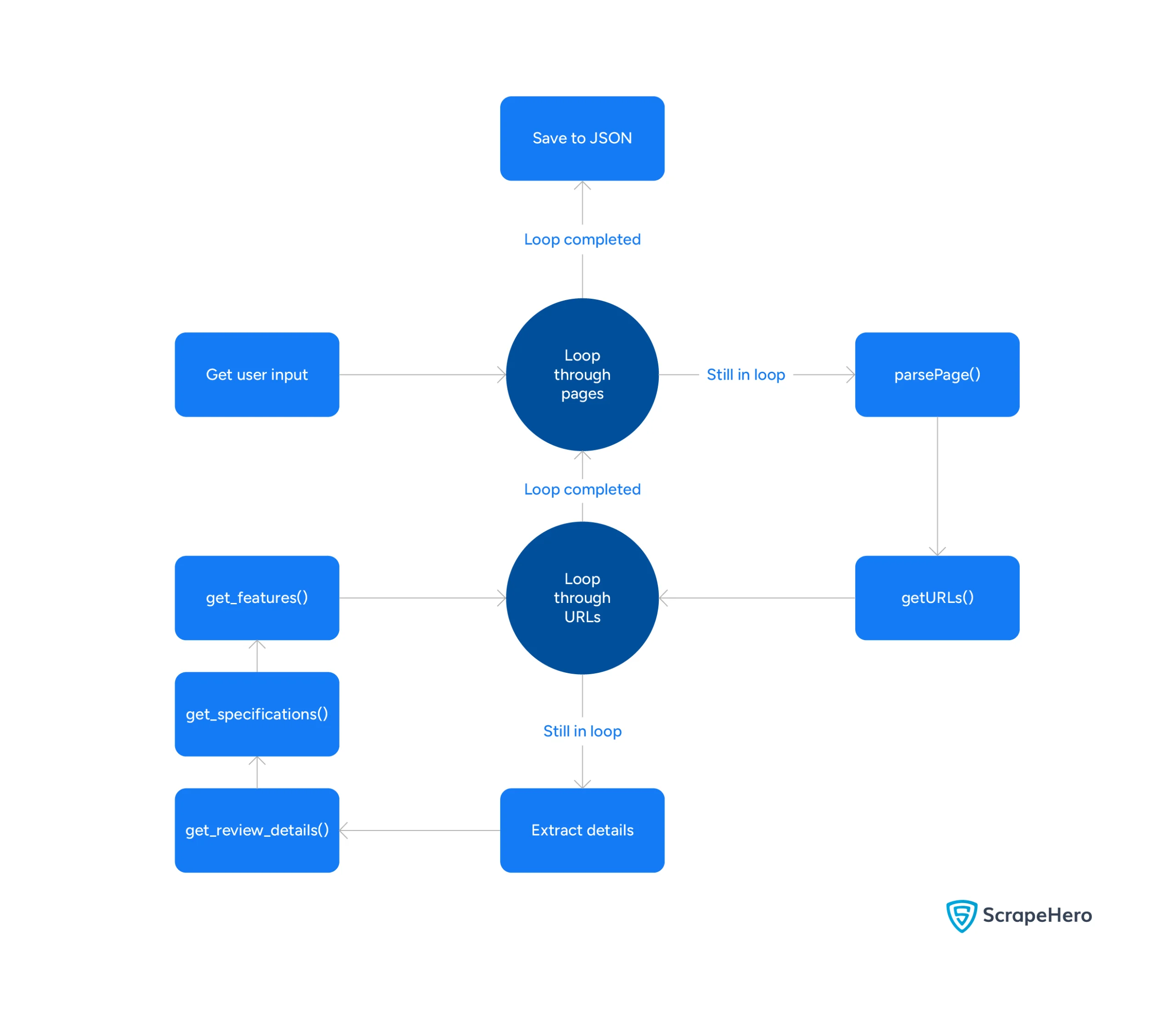
Here’s a flowchart showing the code flow.
Code Limitations
The code shown in this tutorial can scrape product details from Best Buy. However, it does have some limitations:
- Does not scrape review text: The product reviews exist on a different page; this scraper does not scrape them.
- Not appropriate for large-scale web scraping: Large-scale web scraping requires advanced techniques like proxy rotation to bypass anti-scraping measures. This code doesn’t use those techniques.
- May require code updates: Best Buy may change its HTML structure anytime, requiring you to update the code to reflect the changes in regex pattern and BeautifulSoup selectors.
Why Use a Web Scraping Service?
Web scraping Best Buy with Python is possible using BeautifulSoup, Python requests, re, and json. Python requests library manages HTTP requests, while json, BeautifulSoup, and re, handle extracting information.
However, you may need to add additional code if you want to scrape product reviews or use the code for large-scale web scraping. Moreover, the code needs to be updated whenever Bestbuy.com changes its HTML structure.
But you don’t need to build your own Best Buy web scraper using Python. ScrapeHero can do that for you; in fact, we can build web scrapers for any e-commerce website, including Walmart, Amazon, and eBay.
ScrapeHero is a fully managed enterprise-grade web scraping service. We can build high-quality web scrapers and crawlers to fulfill your data needs.