Tripadvisor is a popular site for comparing prices and other details of hotels; it hosts details of hotels. Therefore, Tripadvisor data scraping can give you insights into your competitors. You can use the information to improve the amenities and features of your hotels or set competitive prices.
Tripadvisor.com, however, is a dynamic website, so the requests library is not ideal for the purpose.
Solution: Use automated browsers like Selenium.
This tutorial shows how to scrape Tripadvisor data using Selenium and lxml.
Set Up the Environment for Tripadvisor Data Scraping
Install the necessary packages on your system to use the code.
The code needs Python Selenium to get the source code from the hotel page and lxml to parse and extract the necessary data.
The Python package manager, pip, can install both Selenium and lxml.
pip install selenium lxml
Data Extracted from Tripadvisor
This tutorial will teach you how to scrape Tripadvisor and get these details from a hotel page:
- Name
- Address
- Ratings
- Review count
- Overall Rating
- Amenities
- Room features
- Room Types
- Rank
- Hotel URL
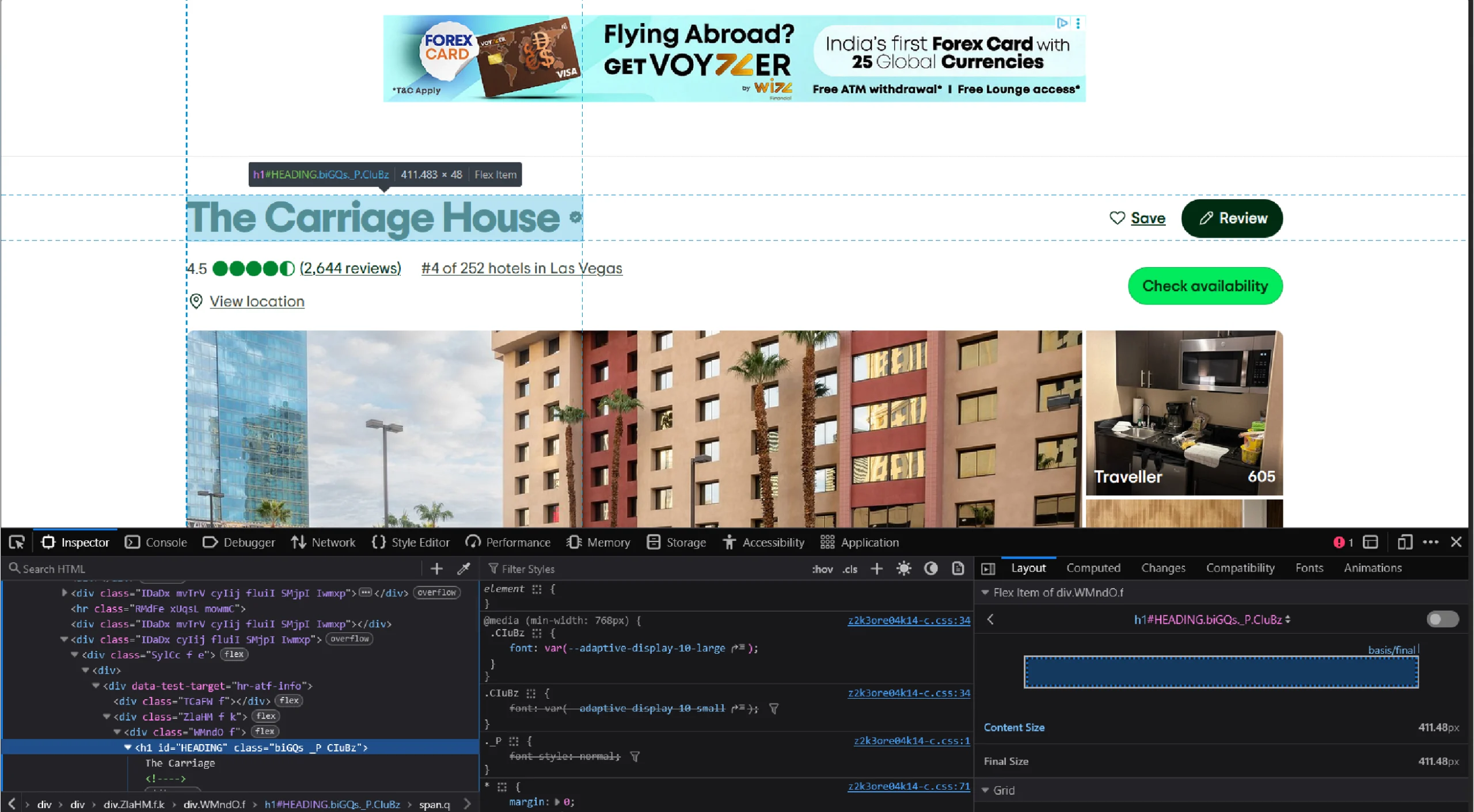
The above data points will be inside specific HTML tags; you need to analyze the Tripadvisor hotel page to understand them to create XPaths. These XPaths help HTML parsers (lxml in this case) locate the tags.
Just right click on each data point and click ‘Inspect’ to analyze the code.
Tripadvisor Data Scraping: The code
Here’s the complete code for Tripadvisor scraping that you can copy and paste.
from lxml import html
import json
import argparse
from selenium import webdriver
from selenium.webdriver.common.keys import Keys
from selenium.webdriver.common.by import By
from time import sleep
def process_request(url):
driver = webdriver.Chrome()
driver.get(url)
sleep(4)
htmls = driver.find_element(By.TAG_NAME,"html")
sleep(3)
htmls.send_keys(Keys.END)
sleep(10)
response = driver.page_source
parser = html.fromstring(response, url)
return process_page(parser, url)
def clean(text):
if isinstance(text, list):
text = ' '.join(text)
return ' '.join(text.strip().split())
def process_page(parser, url):
XPATH_NAME = '//h1[@id="HEADING"]//text()'
XPATH_RANK = "//div[@id='ABOUT_TAB']//div[contains(text(),'#')]/text()"
XPATH_AMENITIES = '//div[contains(text(),"Property amenities")]/following::div[1]//text()'
XPATH_ROOM_FEATURES = '//div[@data-test-target="hr-about-group-room_amenities"]/following::div[1]//text()'
XPATH_OFFICIAL_DESCRIPTION = '//div[@data-automation="aboutTabDescription"]//text()'
XPATH_ROOM_TYPES = '//div[contains(text(),"Room types")]/following::div[1]//text()'
XPATH_FULL_ADDRESS_JSON = "//div[@id='LOCATION']//span/text()"
XPATH_RATING ="//svg[@data-automation='bubbleRatingImage']/title/text()"
XPATH_USER_REVIEWS = "//div[@id='REVIEWS']//div[text()='Excellent']/ancestor::div[4]//text()"
XPATH_REVIEW_COUNT = "//div[@id='ABOUT_TAB']//div[@data-automation='bubbleReviewCount']//text()"
raw_name = parser.xpath(XPATH_NAME)
raw_rank = parser.xpath(XPATH_RANK)
raw_amenities = parser.xpath(XPATH_AMENITIES)
raw_room_features = parser.xpath(XPATH_ROOM_FEATURES)
raw_official_description = parser.xpath(XPATH_OFFICIAL_DESCRIPTION)
raw_room_types = parser.xpath(XPATH_ROOM_TYPES)
raw_address = parser.xpath(XPATH_FULL_ADDRESS_JSON)
raw_rating = parser.xpath(XPATH_RATING)
raw_review_count = parser.xpath(XPATH_REVIEW_COUNT)
raw_userRating = parser.xpath(XPATH_USER_REVIEWS)
room_types = clean(raw_room_types)
name = clean(raw_name).split('Someone')[0]
rank = clean(raw_rank).split()[0]
amenities = clean(raw_amenities)
official_description = clean(raw_official_description)
address = clean(raw_address[0])
newRoomFeatures = clean(raw_room_features)
rating = raw_rating[0].split()[0]
userRating = clean(raw_userRating).split()
review_count = clean(raw_review_count).replace('(', '').replace(')', '').replace('reviews','').strip()
ratings = {
'Excellent': userRating[1],
'Good': userRating[3],
'Average': userRating[5],
'Poor': userRating[7],
'Terrible': userRating[9]
}
amenity_dict = {'Hotel Amenities': amenities}
room_types = {'Room Types':room_types}
data = {
'address': address,
'ratings': ratings,
'amenities': amenity_dict,
'official_description': official_description,
'room_types': room_types,
'rating': rating,
'review_count': review_count,
'name': name,
'rank': rank,
'highlights': newRoomFeatures,
'hotel_url': url
}
return data
if __name__ == '__main__':
parser = argparse.ArgumentParser()
parser.add_argument('url', help='Tripadvisor hotel url')
args = parser.parse_args()
url = args.url
scraped_data = process_request(url)
if scraped_data:
print("Writing scraped data")
with open('tripadvisor_hotel_scraped_data.json', 'w') as f:
json.dump(scraped_data, f, indent=4, ensure_ascii=False)
The first step is to write import statements. These will allow you to use methods from various libraries, including lxml and Selenium.
Besides selenium and lxml, this tutorial uses three modules: json, argparse, and sleep.
Here are all the libraries and modules imported into this code:
- lxml for parsing the source code of a website
- json for handling JSON files
- argparse to push arguments from the command line
- sleep to instruct the program to wait a certain amount of time before moving on to the next step
- By, webdriver, and Keys from Selenium to interact with the page
from lxml import html
import json
import argparse
from selenium import webdriver
from selenium.webdriver.common.keys import Keys
from selenium.webdriver.common.by import By
from time import sleep
This code has three defined functions:
- clean() removes unnecessary spaces.
- process_request() takes the URL as the argument, visits the website, and returns the page source.
- process_page() parses the source code, extracts the details, and returns the data.
Request Processing and Page Navigation
process_request() takes a URL and visits the webpage using Selenium WebDriver.
def process_request(url):
driver = webdriver.Chrome()
driver.get(url)
sleep(4)
htmls = driver.find_element(By.TAG_NAME,"html")
sleep(3)
htmls.send_keys(Keys.END)
sleep(10)
This code uses webdriver.Chrome() to launch the Selenium browser and the get() method to visit the page.
Since the page uses lazy loading, you need to scroll to load details such as reviews and ratings. To do so, the above code simulates pressing the ‘END’ key.
You can then use Selenium’s page_source attribute to get the source code. The process_request() also parses the code using lxml and returns the function process_page().
response = driver.page_source
parser = html.fromstring(response, url)
return process_page(parser, url)
Data Cleaning
The clean() function removes extra whitespace from extracted text elements.
def clean(text):
if isinstance(text, list):
text = ' '.join(text)
return ' '.join(text.strip().split())
XPath Definitions and Data Extraction
process_page() takes the url and the parsed data as arguments and uses XPaths for data extraction.
Finding the XPaths can be challenging; you must analyze the webpage’s HTML code and figure it out based on the location and attributes of your element.
Ensure that when you build an XPath, you use a static class. Tripadvisor uses JavaScript to display certain elements, and these have dynamic classes. These classes differ for each hotel. Therefore, building the XPath from the element’s position is better.
For example, say your required data is a text inside a span, and the span is inside a div that is inside another. Then, you can use “//div/div/span/text()” to extract the data.
After determining the XPaths, store them in a variable, making it easy to update whenever they change.
def process_page(parser, url):
XPATH_NAME = '//h1[@id="HEADING"]//text()'
XPATH_RANK = "//div[@id='ABOUT_TAB']//div[contains(text(),'#')]/text()"
XPATH_AMENITIES = '//div[contains(text(),"Property amenities")]/following::div[1]//text()'
XPATH_ROOM_FEATURES = '//div[@data-test-target="hr-about-group-room_amenities"]/following::div[1]//text()'
XPATH_OFFICIAL_DESCRIPTION = '//div[@data-automation="aboutTabDescription"]//text()'
XPATH_ROOM_TYPES = '//div[contains(text(),"Room types")]/following::div[1]//text()'
XPATH_FULL_ADDRESS_JSON = "//div[@id='LOCATION']//span/text()"
XPATH_RATING ="//svg[@data-automation='bubbleRatingImage']/title/text()"
XPATH_USER_REVIEWS = "//div[@id='REVIEWS']//div[text()='Good']/ancestor::div[4]//text()"
XPATH_REVIEW_COUNT = "//div[@id='ABOUT_TAB']//div[@data-automation='bubbleReviewCount']//text()"
Here, the code gets:
- Name from an h1 tag
- Rank from a div tag that has the text ‘#’
- Amenities from div tag that is the sibling of another div tag with the text ‘Property amenities’
- Room features from a div tag that is the sibling of another div tag with the attribute data-test-target=”hr-about-group-room_amenities”
- Description from a div element with the attribute data-automation=”aboutTabDescription”
- Room types from a div element that is a sibling of another div element with the text ‘Room types’
- Address from a span element inside a div element with ID ‘LOCATION’
- Rating from an SVG element with the attribute data-automation=’bubbleRatingImage’
- Review distribution from the fourth ancestor of a div element with the text ‘Good’
- Review count from a div element with the attribute data-automation=’bubbleReviewCount’
Now, you can use these variables in the xpath() method to extract the corresponding data point.
raw_name = parser.xpath(XPATH_NAME)
raw_rank = parser.xpath(XPATH_RANK)
raw_amenities = parser.xpath(XPATH_AMENITIES)
raw_room_features = parser.xpath(XPATH_ROOM_FEATURES)
raw_official_description = parser.xpath(XPATH_OFFICIAL_DESCRIPTION)
raw_room_types = parser.xpath(XPATH_ROOM_TYPES)
raw_address = parser.xpath(XPATH_FULL_ADDRESS_JSON)
raw_rating = parser.xpath(XPATH_RATING)
raw_review_count = parser.xpath(XPATH_REVIEW_COUNT)
raw_userRating = parser.xpath(XPATH_USER_REVIEWS)
Data Processing and Storage
After extracting each data point, process_page() cleans the data using the clean() function
room_types = clean(raw_room_types)
name = clean(raw_name).split('Someone')[0]
rank = clean(raw_rank).split()[0]
amenities = clean(raw_amenities)
official_description = clean(raw_official_description)
address = clean(raw_address[0])
newRoomFeatures = clean(raw_room_features)
rating = raw_rating[0].split()[0]
userRating = clean(raw_userRating).split()
review_count = clean(raw_review_count).replace('(', '').replace(')', '').replace('reviews','').strip()
The USER_RATING XPath gets the text content of the element holding the rating count distributed into Excellent, Good, Average, Poor, and Terrible.
Then, the code splits the text, and uses appropriate indices to scrape Tripadvisor review count distribution and store them in a dictionary.
ratings = {
'Excellent': userRating[1],
'Good': userRating[3],
'Average': userRating[5],
'Poor': userRating[7],
'Terrible': userRating[9]
}
After that, process_page stores the cleaned data as an object and returns it.
amenity_dict = {'Hotel Amenities': amenities}
room_types = {'Room Types':room_types}
data = {
'address': address,
'ratings': ratings,
'amenities': amenity_dict,
'official_description': official_description,
'room_types': room_types,
'rating': rating,
'review_count': review_count,
'name': name,
'rank': rank,
'highlights': newRoomFeatures,
'hotel_url': url
}
return data
Main Execution
Finally, use json.dump to write the extracted data as a JSON file.
if __name__ == '__main__':
parser = argparse.ArgumentParser()
parser.add_argument('url', help='Tripadvisor hotel url')
args = parser.parse_args()
url = args.url
scraped_data = process_request(url)
if scraped_data:
print("Writing scraped data")
with open('tripadvisor_hotel_scraped_data.json', 'w') as f:
json.dump(scraped_data, f, indent=4, ensure_ascii=False)
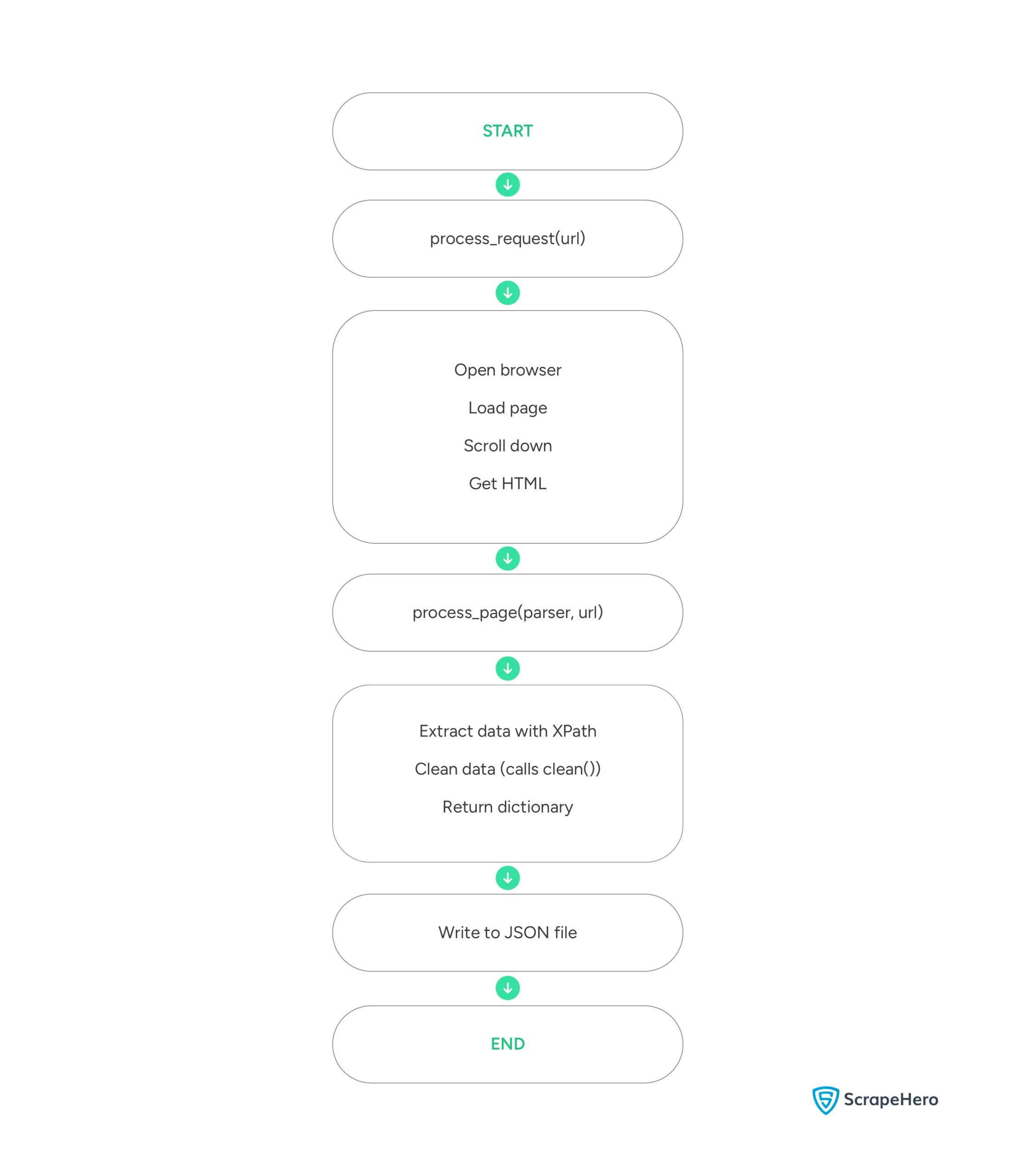
Here’s a flowchart showing the high-level execution of the code:
Here is the JSON data extracted using the code.
{
"address": "3700 West Flamingo Road, Las Vegas, NV 89103",
"ratings": {
"Excellent": "8,298",
"Good": "7,414",
"Average": "5,091",
"Poor": "2,866",
"Terrible": "3,348"
},
"amenities": {
"Hotel Amenities": "Free parking Free High Speed Internet (WiFi) Fitness Centre with Gym / Workout Room Pool Bar / lounge Casino and Gambling Game room Children Activities (Kid / Family Friendly)"
},
"official_description": "Rio Hotel & Casino is a vibrant oasis just one block off the famed Las Vegas Strip on Flamingo Road, with convenient access to Harry Reid International Airport and I-15. With an array of entertainment options, spacious 580-square-foot rooms, and dynamic dining experiences, this iconic resort delivers the complete Las Vegas experience to its guests. Newly renovated rooms are available for booking now. Read more",
"room_types": {
"Room Types": "Mountain view City view Landmark view Pool view Bridal suite Non-smoking rooms Suites"
},
"rating": "3.5",
"review_count": "27,017",
"name": "Rio Hotel & Casino",
"rank": "#15",
"highlights": "Blackout curtains Air conditioning Desk Dining area Refrigerator Cable / satellite TV Sofa bed Walk-in shower",
"hotel_url": "https://www.tripadvisor.in/Hotel_Review-g45963-d91673-Reviews-Rio_Hotel_Casino-Las_Vegas_Nevada.html"
}
Limitations of the Code
This code can successfully extract the hotel details. However, Tripadvisor will force you to solve CAPTCHAs if you use the code too frequently. You need CAPTCHA solvers to address that, which this tutorial does not discuss.
Therefore, this code for Tripadvisor data scraping is unsuitable for large-scale projects.
Moreover, you must update the XPaths whenever Tripadvisor changes its website structure. You need to analyze the webpage again to figure out the new XPaths.
Why Use a Web Scraping Service
You can start learning how to scrape Tripadvisor using this tutorial.
However, remember that you must include additional code to bypass anti-scraping measures. You also need to watch Tripadvisor’s website for any changes in the structure and update the XPaths, or your code won’t succeed.
This is where a web scraping service shines.
A web scraping service like ScrapeHero can take care of all the problems mentioned above. Leave all the coding to us; we can build enterprise-grade web scrapers to gather the data you need, including travel, airline, and hotel data.
Frequently Asked Questions
Legality depends on the legal jurisdiction, i.e., laws specific to the country and the locality. Gathering or scraping publicly available information is not illegal. Generally, web scraping Tripadvisor is legal if you are scraping publicly available data.
Reviews are also public on Tripadvisor; hence, you can scrape them using Python. However, you must figure out the XPaths of the reviews.