When scaling a data project, the debate over open source scraping vs. commercial solutions isn’t just about the price tag—it’s about choosing between two fundamentally different technical architectures.
While open source offers granular control over local environments, commercial scrapers handle the ‘invisible’ infrastructure of proxy rotation and anti-bot bypassing at scale.
This article breaks down what’s actually happening under the hood in each approach, helping you weigh the long-term trade-offs between architectural flexibility and operational reliability.
Open Source Scraping vs. Commercial Solutions: Open-Source Scraping Architecture
Building production-grade scraping with open-source tools requires you to handle everything yourself: infrastructure, anti-bot mechanisms, scaling, and data pipelines.
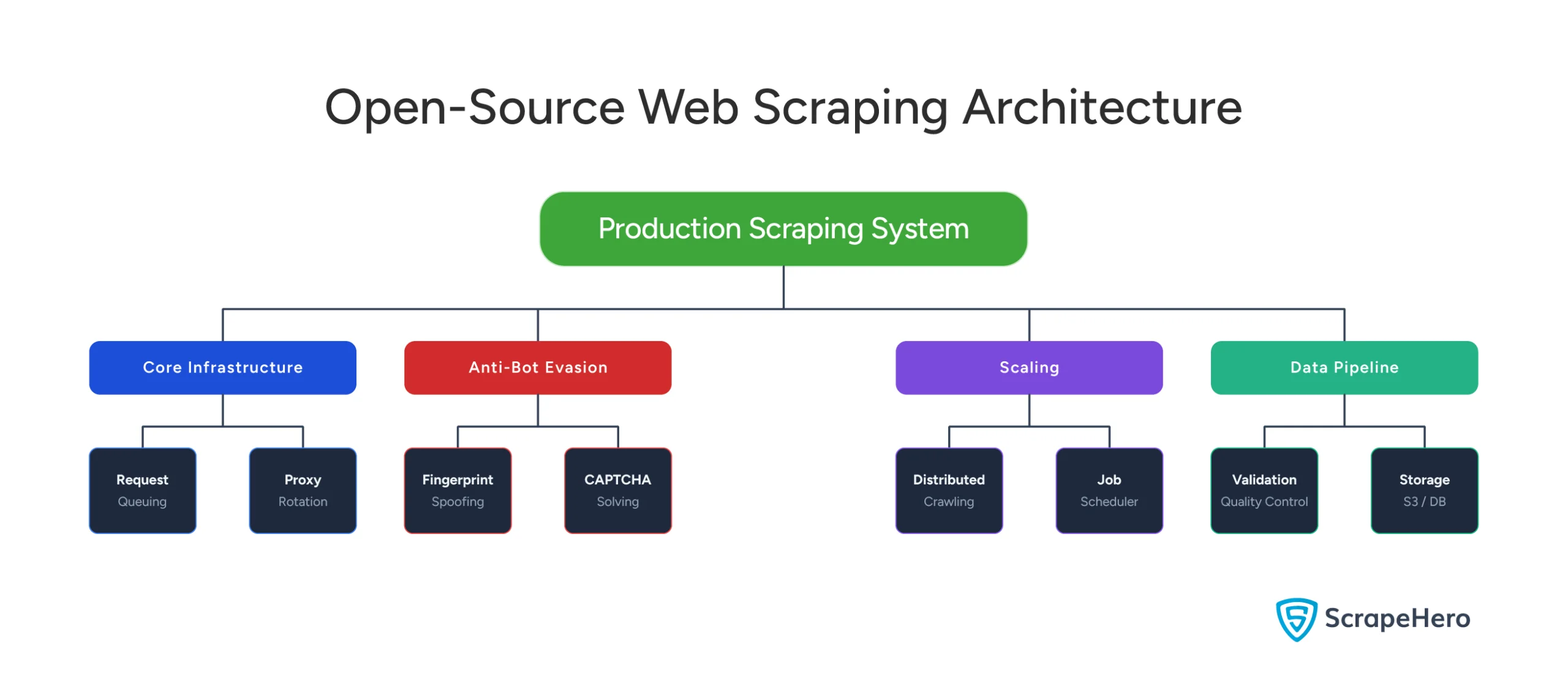
Core Infrastructure Components
Request Management and Queuing
Beyond simple Python lists, you need message queues (RabbitMQ, Redis, Kafka) to manage:
- Priority levels (hourly vs daily updates)
- Deduplication logic
- Exponential backoff retries
- Per-domain rate limiting
- Distributed request scheduling
You’re responsible for handling edge cases: queue backups, failed requests at scale, and urgent request prioritization.
Exponential Backoff with Jitter Simple exponential backoff (retry after 1s, 2s, 4s, 8s) prevents overwhelming a blocked target. But at scale, it creates a “thundering herd” problem: thousands of workers all retry simultaneously after the same backoff window, causing coordinated spikes that re-trigger blocks. The solution: add jitter. Randomize retry timing within each interval—retry after (2^n) + random(0, 2^n) seconds. This spreads requests across the backoff window. Even better: decorrelated jitter uses min(cap, random(base, previous_backoff * 3)), which dynamically adapts the backoff based on actual response times. At marketplace scale, jitter can cut re-block rates by 60%+ compared to deterministic backoff.
Proxy Infrastructure and Rotation
Single-IP scraping gets blocked within minutes. You need:
- Residential proxy networks ($300-$500/month minimum)
- Intelligent proxy rotation logic based on request counts or error rates
- Health checking and dead proxy removal
- Geographic distribution for region-specific content
- Session management across proxy switches
The challenge: distinguishing between proxy failures, site downtime, and anti-bot blocks—each requires different handling.
Browser Automation vs. HTTP Clients
Static HTML works well with lightweight HTTP libraries (e.g., Requests), but modern marketplaces use JavaScript rendering. Headless browsers (Puppeteer, Playwright, Selenium) execute JavaScript but consume 10-50x more resources. Running them at scale means:
- 200-500MB RAM per browser instance
- Orchestration for dynamic spin-up/down
- Automatic crash recovery and requeuing
Cumulative Layout Shift Detection Manually deciding when JavaScript rendering is necessary wastes resources. CLS (Cumulative Layout Shift) metrics reveal whether JavaScript is actually changing page content. Parse initial HTML and measure CLS—if low, you have the final DOM. If high, JavaScript is rewriting the page, and you need browser rendering. This algorithmic approach eliminates guesswork.
Data Extraction and Parsing
You need CSS selectors, XPath expressions, and parsing logic that handles layout variations.
However, marketplaces A/B test constantly. That means your scraper might encounter five different HTML structures for the same product page, requiring fallback selectors and error handling.
Schema Drift: The Silent Killer Schema drift detection automatically monitors CSS selector success rates and alerts when they drop below expected thresholds. Here, statistical methods flag when field distributions change (product prices suddenly all return $0). This proactive drift monitoring catches site changes before they corrupt pipelines.
Your scraper works perfectly—then Amazon A/B tests a new layout and extraction fails silently. You don’t notice for 6 hours.
Anti-Bot Evasion Stack
Browser Fingerprinting Evasion
Websites detect automated browsers through:
- Canvas/WebGL fingerprinting (graphics card identification)
- Font enumeration
- Plugin detection
- WebRTC leaks
Evasion requires patching headless browsers, randomizing user agents, and injecting fake signals—but these patches break with every browser update (Chrome releases every 4 weeks).
TLS Fingerprinting Defense
Before HTTP requests, the TLS handshake reveals client information through cipher suites, extensions, and curve preferences.
Automated tools produce fingerprints different from those of real browsers, so you need libraries that mimic real-browser TLS behavior or route through actual browser instances.
TLS Fingerprinting Deep Dive Modern anti-bot systems don’t just check browser headers—they analyze the TLS handshake itself through JA3/JA3S fingerprinting. This cryptographic hash captures cipher suite order, supported extensions, and elliptic curve preferences. Automated tools produce consistent fingerprints; real browsers vary. Amazon and Walmart specifically monitor for JA3 hash anomalies before serving pages. Defeating this requires either mimicking real device fingerprints or routing through actual browsers—both are expensive at scale.
CAPTCHA Solving and Behavioral Mimicry
Options to solve CAPTCHA include third-party solving services ($1-$3 per 1,000 CAPTCHAs, 10-30 seconds per request), ML-based solving, or perfecting fingerprinting to avoid CAPTCHAs entirely.
But advanced detection analyzes behavior—real users pause and scroll, bots are mechanically consistent.
This means you need random delays, mouse-movement simulation, and varied request patterns, which significantly slows scraping.
Scaling Architecture
Distributed Crawling Patterns
The master node manages queues and distributes work to worker nodes, creating new challenges: load balancing across workers, reassigning work when workers crash, handling network partitions, and race conditions in queue access.
Job Scheduling and Coordination
Different products need different update frequencies.
For instance, your scheduler needs to calculate next scrape times, prioritize backlogged jobs, handle dynamic schedule changes, and respect rate limits.
This requires integration with job schedulers (cron, Celery, Airflow) and monitoring.
State Management and Failure Handling
Maintaining sessions, cookies, pagination state, and incremental updates across distributed workers requires centralized storage (e.g., Redis or a database).
In case of failures, retry logic must distinguish between transient failures (immediate retry with a different proxy), anti-bot blocks (multi-hour backoff), site downtime (pause domain), and extraction failures (investigate and fix).
Data Pipeline & Quality
You need validation (type checking, range validation, completeness), storage (raw S3, structured PostgreSQL, cached Redis), and monitoring (success rates, latency, data quality metrics, cost tracking). This requires infrastructure like Prometheus, Grafana, or DataDog.
Reality Check
Very few production-hardened open-source packages exist. You’re assembling components and building orchestration yourself—expect 2-4 months to reach production-ready status, plus ongoing maintenance.
Open Source Scraping vs. Commercial Solutions: Commercial Scraping Architecture
The best marketplace scraping solution will abstract away the complexities mentioned above:
Managed Infrastructure
Request Routing and Management
Your API call enters a sophisticated routing system that load-balances across global worker pools, uses geographic routing, supports intelligent retries, and prioritizes requests. Behind the scenes, the provider manages thousands of concurrent workers, proxy rotation, and orchestration—achieving economies of scale that would be impossible individually.
Automatic Browser Rendering
Commercial solutions automatically analyze target pages and determine if JavaScript rendering is needed, parse static HTML when possible, fall back to browsers only when necessary, and pre-warm browser pools to reduce startup latency.
You don’t specify the approach; the service figures it out.
Pre-Built Extraction Schemas
For popular sites (Amazon, Walmart, eBay), providers maintain extraction templates with structured schemas, multiple selectors for layout variations, automatic updates when site structure changes, and fallback logic for A/B tests. When Amazon changes its layout, the provider’s team updates the template within hours.
Anti-Bot Capabilities
Maintained Fingerprint Databases
Unlike open-source solutions, which require you to manually patch browsers, commercial providers maintain databases of real browser fingerprints collected from browser extensions, mobile SDKs, analytics partnerships, and crowdsourcing. When making requests, they randomly select a real-world fingerprint profile including canvas/WebGL fingerprints, font lists, plugin configurations, and screen resolutions.
These databases update continuously as devices and browsers evolve.
Adaptive Challenge Solving and IP Reputation Management
Dedicated teams monitor new anti-bot measures and deploy countermeasures within hours (vs weeks for open-source). Intelligent IP reputation management tracks which IPs get blocked, rotates based on domain and request distribution, and implements cooling periods. This scale is nearly impossible to replicate individually.
Scalability & Reliability
Auto-Scaling and Redundancy
Infrastructure scales automatically with worker pools that expand during peak hours, queue buffering during spikes, and geographic distribution. Multiple layers of redundancy include multiple proxy providers, geographically distributed workers, multi-datacenter infrastructure, and automatic failover. SLA guarantees (99.5-99.9% uptime, 95%+ success rates) are backed by real-time monitoring and automatic scaling.
Built-In Observability
Dashboards show success rates, response times, and data quality metrics with alerting for failures. You get production-grade observability as a standard feature, eliminating the need to build your own monitoring stack.
Integration & Delivery
API Design and Flexibility
Multiple integration options include RESTful APIs, language-specific SDKs, webhooks for async workflows, and scheduled crawls via UI or API. Data delivery options provide JSON responses, webhooks, direct cloud storage writes (S3, GCS, Azure), database integration, and CSV/Excel exports.
Customization Boundaries
You can customize: fields to extract, delivery format/destination, scraping frequency, and geographic preferences. You typically cannot customize: exact fingerprinting techniques, proxy providers, retry logic, or internal infrastructure. For most use cases, this trade-off favors commercial marketplace data scraping solutions—you want reliable data, not infrastructure management.
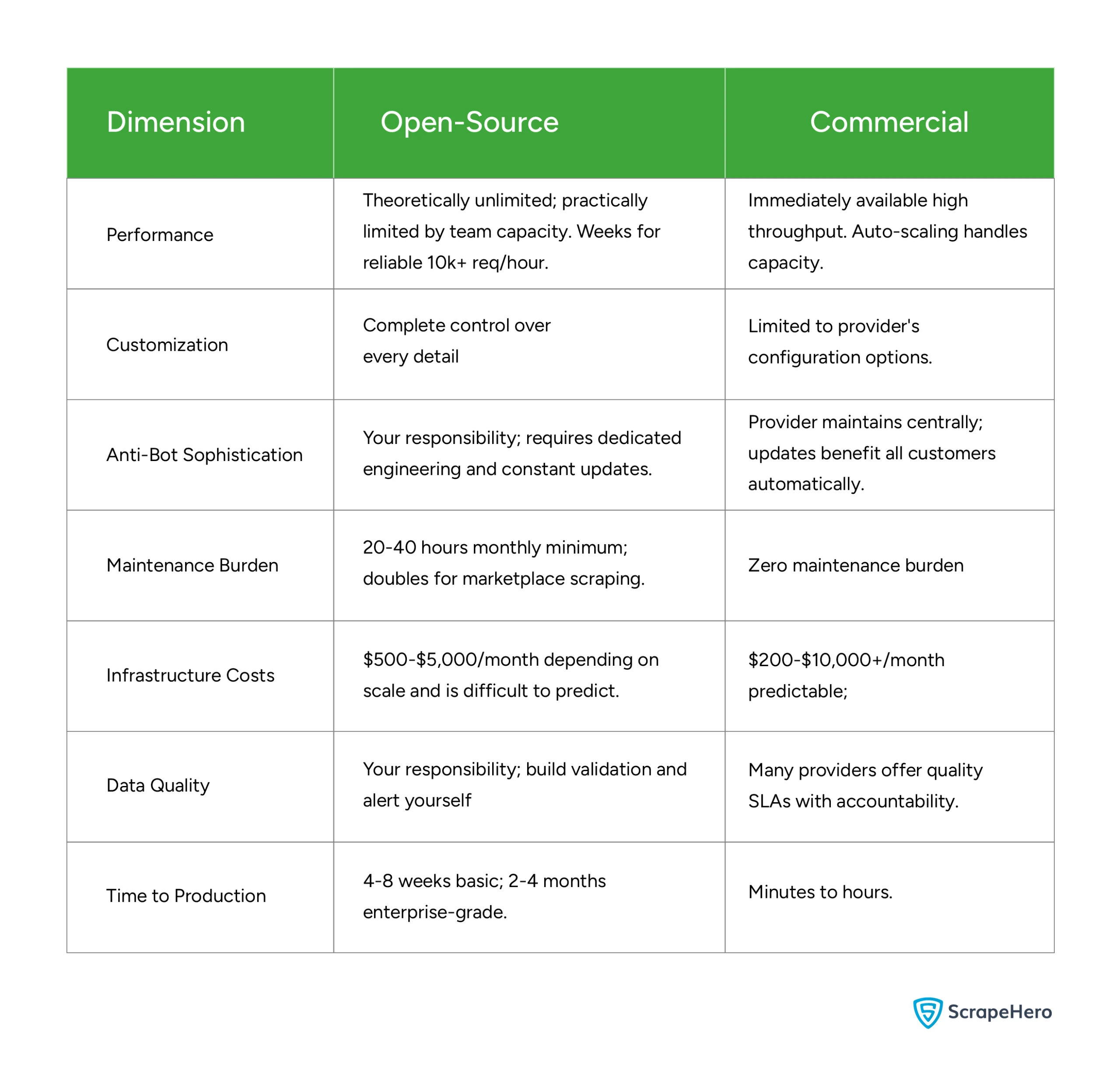
Open Source vs. Commercial Solutions: Side-by-Side Comparison
Performance
- Open-Source: Theoretically unlimited, but practically capped by your team’s capacity. Expect to spend weeks tuning the system to reliably handle 10k+ requests per hour.
- Commercial: High throughput is available immediately. Systems are designed with auto-scaling to handle sudden spikes in capacity without manual intervention.
Customization
- Open-Source: Offers complete, granular control over every detail of the scraper and the underlying architecture.
- Commercial: Flexibility is limited to the vendor’s specific configuration options and APIs.
Anti-Bot Sophistication
- Open-Source: This is entirely your responsibility. It requires dedicated engineering hours and constant updates to bypass evolving detection methods.
- Commercial: The provider manages this centrally. When they update their bypass logic, all customers benefit automatically without extra effort.
Maintenance Burden
- Open-Source: High. Expect 20–40 hours per month for basic tasks, which can double if you are scraping complex marketplaces.
- Commercial: Zero maintenance burden; the provider handles the “plumbing” and uptime.
Infrastructure Costs
- Open-Source: $500–$5,000 per month. Costs can be difficult to predict as they scale with traffic and engineering overhead.
- Commercial: $200–$10,000+ per month. While potentially higher at scale, the costs are predictable and tied to usage tiers.
Data Quality
- Open-Source: Your responsibility. You must build your own validation layers and alerting systems to catch “dirty” data.
- Commercial: Most providers offer Service Level Agreements (SLAs) on data quality, providing an external layer of accountability.
Time to Production
- Open-Source: Slow. Expect 4–8 weeks for a basic setup and 2–4 months for an enterprise-grade system.
- Commercial: Rapid. You can move from concept to production in minutes to hours.
Why You Need a Web Scraping Service
Building production-grade scraping requires thousands of hours managing distributed systems, anti-bot evasion, proxy rotation, browser automation, and data validation. Open-source’s hidden cost is perpetual maintenance: browser updates break fingerprinting every 4-6 weeks, site changes require weekly parser updates, and new anti-bot measures demand immediate response. When Amazon deploys a new CAPTCHA, you need solutions in hours, not weeks.
Marketplaces are especially challenging—they invest heavily in anti-bot technology, A/B test constantly, and aggressively rate-limit. Data quality is critical since pricing decisions depend on accuracy. Unless scraping is your core competency, this distracts from your actual product.
Managed web scraping services, such as ScrapeHero, handle everything without requiring software, hardware, proxies, or expertise.
ScrapeHero offers self-healing technology that auto-adapts to site changes, AI/ML-powered data quality checks on hundreds of millions of daily data points, and pre-built scrapers for Amazon, Walmart, and other major platforms. Our experts respond within an hour (free consultation, no obligation) with 98% customer retention. The platform crawls thousands of pages per second globally, handles CAPTCHA transparently, and delivers data in any format.
Get a free quote from ScrapeHero today—let your team focus on API calls instead of infrastructure.