
In e-commerce, timing isn’t just an advantage—it’s the entire game. While a standard price tracker tells you what the price is today, an Early Warning System (EWS) tells you the moment a competitor makes a move.
Most companies lose revenue not because their prices are too high, but because their reaction time is too slow. If a competitor changes a price at 9:00 AM and you don’t adjust until the following morning, you’ve lost an entire peak business day to them.
This guide will show you how to build a stateful, event-driven early warning system using Python, SQLite, and Slack webhooks.
What Are Early Warning Alerts for Pricing Changes?
An Early Warning System (EWS) for pricing changes is a tool that monitors competitor pricing. Unlike a basic price tracker, an EWS alerts users only when prices change by a specific threshold.
The system checks competitor prices at set intervals, calculating the difference from the previous price point. If this difference is above the established threshold, the system triggers pricing change alerts.
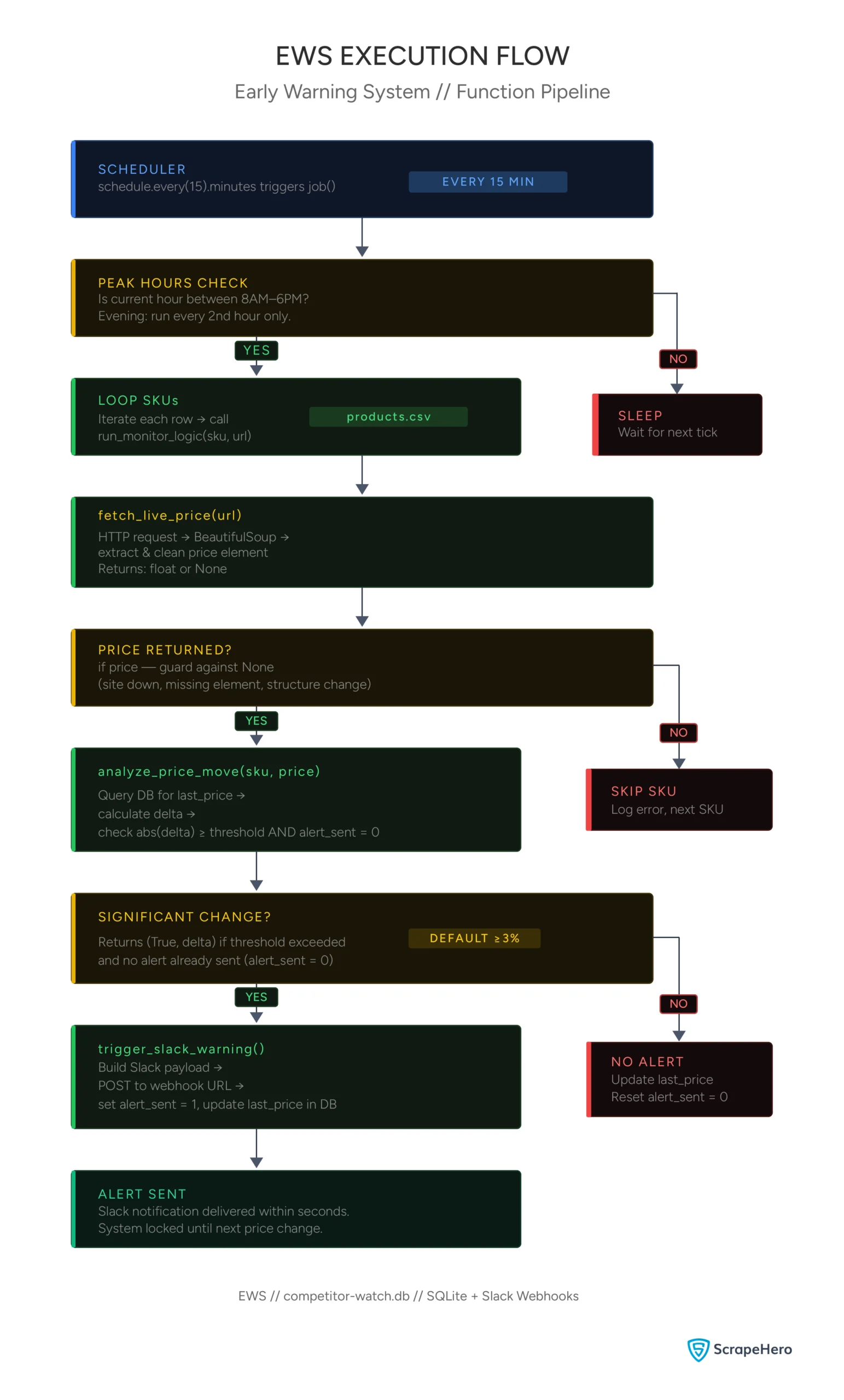
Setting Up the “Memory” (SQLite)
To detect a change, your price change monitoring system needs to know what the price was 15 minutes ago. A basic Python pricing tracker might save data to a CSV/JSON file, but reading and writing a flat file every few minutes is inefficient and prone to data corruption.
Instead, use SQLite. It is a serverless, zero-configuration database engine that lives as a single file on your machine. We use it here to store a product’s “State”.
import sqlite3
def init_monitor_db():
conn = sqlite3.connect('competitor_watch.db')
c = conn.cursor()
c.execute('''CREATE TABLE IF NOT EXISTS monitor
(sku TEXT PRIMARY KEY, last_price REAL, alert_sent INTEGER)''')
conn.commit()
conn.close()
This code creates a database named ‘competitor_watch.db’ that contains a table called ‘monitor’. The table has three columns:
- sku: This serves as the primary key, representing a unique identifier for each product.
- last_price: This column stores the floating-point price from the most recent scan.
- alert_sent: This is an integer (either 0 or 1) that functions as a flag. It prevents the system from sending repeated alerts every 15 minutes if the price remains unchanged.
The Scraping Logic
Here’s a simple scraper for early warning alerts on pricing changes that works well if the site doesn’t use dynamic pricing. For scraping data from websites with dynamically changing prices, you will likely need to use browser automation libraries such as Selenium or Playwright.
import requests
from bs4 import BeautifulSoup
import re
def fetch_live_price(url):
headers = {"User-Agent": "Mozilla/5.0..."}
try:
response = requests.get(url, headers=headers, timeout=10)
soup = BeautifulSoup(response.text, 'html.parser')
# Locate the price element (the selector depends on the website)
price_element = soup.find("span", {"class": "price-tag"})
raw_price = price_element.get_text() if price_element else None
# clean the price
clean_price = float(re.sub(r'[^\d.]', '', raw_price)) if raw_price else None
return clean_price
except Exception as e:
print(f"Error fetching data: {e}")
return NoneThis function uses BeautifulSoup to locate the price element and cleans it by removing the currency symbol, enabling it to be converted into a float. Converting the price to a float allows for easy comparison of different prices.
Ultimately, the function returns the cleaned price.
The Logic Engine (Detecting Volatility)
This is the “Brain” of your system that gives early warning alerts for pricing changes. In this snippet, we don’t just extract a price; we perform a comparative analysis. The script fetches the previous price from the database, calculates the percentage difference, and decides if the change is a “noise” fluctuation or a “strategic” move.
def analyze_price_move(sku, current_price, threshold=3.0):
conn = sqlite3.connect('competitor_watch.db')
c = conn.cursor()
c.execute("SELECT last_price, alert_sent FROM monitor WHERE sku=?", (sku,))
data = c.fetchone()
if data:
previous_price, alert_sent = data
delta = ((previous_price - current_price) / previous_price) * 100
if abs(delta) >= threshold and not alert_sent:
return True, delta
if current_price != previous_price:
c.execute("UPDATE monitor SET last_price=?, alert_sent=0 WHERE sku=?", (current_price, sku))
else:
c.execute("INSERT INTO monitor VALUES (?, ?, 0)", (sku, current_price))
conn.commit()
conn.close()
return False, 0First, the function queries the database to check if the SKU already exists. If it does, it calculates the Delta (Percentage change):
((Old Price – New Price) / Old Price) * 100
The function triggers an alert only when two conditions are met simultaneously:
- The delta exceeds the threshold (default 3%)
- No alert has already been sent for this price change (alert_sent = 0)
The second condition is critical. Without it, the system would fire a Slack alert every 15 minutes for as long as the competitor’s price remains unchanged. The alert_sent flag acts as a lock, preventing duplicate alerts for the same price change event.
Finally, if the price has changed by any amount, the function updates last_price and resets alert_sent to 0—ensuring the system is ready to alert again if the price changes further.
Event-Driven Alerts via Webhooks
Email notifications are often buried in inboxes. For an Early Warning System, you need instant push notifications.
Using the requests library, we send a JSON payload to a Slack Webhook URL. This allows your pricing team to receive a notification on their desktop or phone within seconds of a competitor’s change.
import requests
def trigger_slack_warning(sku, delta, current_price, url):
webhook_url = "https://hooks.slack.com/services/T000/B000/XXXX"
payload = {
"text": f"🚨 *COMPETITOR PRICE CHANGE DETECTED*\n"
f"*Product:* {sku}\n"
f"*Price Change:* {delta:.2f}%\n"
f"*New Price:* ${current_price}\n"
f"🔗 <{url}|View Competitor Site>"
}
requests.post(webhook_url, json=payload)
conn = sqlite3.connect('competitor_watch.db')
conn.execute("UPDATE monitor SET last_price=?, alert_sent=1 WHERE sku=?", (current_price, sku))
conn.commit()
conn.close()Once analyze_price_move confirms a significant price change, this function takes over as the notification layer of the EWS.
It builds a structured JSON payload using Slack’s Markdown formatting — the * symbols bold the key fields, and the <url|text> syntax creates a clickable link directly to the competitor’s page. This payload is then sent as a POST request to a Slack Incoming Webhook URL, which Slack provides when you set up a webhook integration in your workspace.
Within seconds, your pricing team receives a formatted alert on their desktop or phone.
The final step is equally important: the function sets alert_sent=1 in the database for that SKU. As discussed in the previous section, this is the lock that prevents the system from firing duplicate alerts every 15 minutes while the competitor’s price remains unchanged.
Together, analyze_price_move and trigger_slack_warning form a feedback loop—one detects the change and decides whether to act, the other acts and updates the state so the system knows not to act again until something new happens.
NOTE: You need to properly set up the incoming webhooks on your Slack Workspace for this trigger to work.
Overall Monitor Logic
Now, let’s tie up the three functions.
def run_monitor_logic(sku,url):
price = fetch_live_price(url)
if price:
price_change, delta = analyze_price_move(sku,price)
if price_change:
trigger_slack_warning(sku, delta, price, url)This function is the orchestration layer of the EWS—it doesn’t do any heavy lifting itself, but it connects the three core functions in the right sequence.
First, it calls fetch_live_price() to scrape the current price from the competitor’s page. The if price check guards against a failed scrape—if the target site is down, the element is missing, or the page has changed its structure, fetch_live_price() returns None and the pipeline stops cleanly rather than crashing downstream.
If a valid price is returned, it is passed to analyze_price_move(), which compares it against the stored price in the database. This function returns two values: a boolean indicating whether an alert should fire, and the delta value representing the size of the price change.
Finally, if a significant price change is confirmed, trigger_slack_warning() is called to notify the team and lock the alert_sent flag in the database.
Each function only executes if the previous one succeeded—making the pipeline fault-tolerant at every step.
Strategic Scheduling (The Time-Sensitive Pulse)
Data shows that 60-70% of price changes happen during peak business hours (8 AM – 6 PM). Running your scraper at high speed 24/7 is a waste of resources and increases the risk of your IP being banned.
The code below uses the datetime module to vary the frequency of checks based on the time of day.
import schedule
import time
from datetime import datetime
import pandas as pd
def job():
products = pd.read_csv('products.csv')
hour = datetime.now().hour
if 8 <= hour <= 18:
print(f"[{datetime.now()}] Peak Hour Check: Running monitor...")
for index, product in products.iterrows():
run_monitor_logic(product['sku'],product['url'])
elif 18 < hour <= 23:
if hour % 2 == 0:
print(f"[{datetime.now()}] Evening Check: Running monitor...")
for index, product in products.iterrows():
run_monitor_logic(product['sku'],product['url'])
if __name__ == "__main__":
init_monitor_db()
schedule.every(15).minutes.do(job)
while True:
schedule.run_pending()
time.sleep(1)The job() function starts by loading the product list from products.csv, which is a simple two-column file containing each SKU and its corresponding URL. It then checks the current hour to determine if monitoring should run.
The scheduling logic optimizes peak pricing hours by executing the run_monitor_logic() function for every product every 15 minutes between 8 AM and 6 PM. In the evening, the frequency reduces to every other hour, allowing for the capture of late repricing events without wasting resources overnight.
When the script is executed directly, the condition if __name__ == “__main__”: ensures that three things happen in order: first, the database is initialized using init_monitor_db(); second, the job() function is scheduled to run every 15 minutes; and third, a while True loop keeps the script running on your server, checking every second to see if a scheduled task needs to be executed.
The result is an efficient early warning system that operates most quickly when competitors are likely to act.
Here’s the complete code:
import sqlite3
import requests
import re
import schedule
import time
from datetime import datetime
from bs4 import BeautifulSoup
import pandas as pd
def init_monitor_db():
conn = sqlite3.connect('competitor_watch.db')
c = conn.cursor()
c.execute('''CREATE TABLE IF NOT EXISTS monitor
(sku TEXT PRIMARY KEY, last_price REAL, alert_sent INTEGER)''')
conn.commit()
conn.close()
def fetch_live_price(url):
headers = {"User-Agent": "Mozilla/5.0 (Windows NT 10.0; Win64; x64) AppleWebKit/537.36 (KHTML, like Gecko) Chrome/119.0.0.0 Safari/537.36"}
try:
response = requests.get(url, headers=headers, timeout=10)
soup = BeautifulSoup(response.text, 'html.parser')
# Locate the price element
# Note: Update the selector based on the target site
price_element = soup.find("span", {"class": "price-tag"})
raw_price = price_element.get_text() if price_element else None
# Clean the price: removes currency symbols and commas
# Example: "$1,499.00" becomes "1499.00"
clean_price = float(re.sub(r'[^\d.]', '', raw_price)) if raw_price else None
return clean_price
except Exception as e:
print(f"Error fetching data: {e}")
return None
def analyze_price_move(sku, current_price, threshold=3.0):
conn = sqlite3.connect('competitor_watch.db')
c = conn.cursor()
c.execute("SELECT last_price, alert_sent FROM monitor WHERE sku=?", (sku,))
data = c.fetchone()
if data:
previous_price, alert_sent = data
delta = ((previous_price - current_price) / previous_price) * 100
if abs(delta) >= threshold and not alert_sent:
return True, delta
if current_price != previous_price:
c.execute("UPDATE monitor SET last_price=?, alert_sent=0 WHERE sku=?", (current_price, sku))
else:
c.execute("INSERT INTO monitor VALUES (?, ?, 0)", (sku, current_price))
conn.commit()
conn.close()
return False, 0
def trigger_slack_warning(sku, delta, current_price, url):
# Replace with your Slack Incoming Webhook URL
webhook_url = "https://hooks.slack.com/services/T000/B000/XXXX"
payload = {
"text": f"🚨 *COMPETITOR PRICE CHANGE DETECTED*\n"
f"*Product:* {sku}\n"
f"*Price Change:* {delta:.2f}%\n"
f"*New Price:* ${current_price}\n"
f"🔗 <{url}|View Competitor Site>"
}
requests.post(webhook_url, json=payload)
conn = sqlite3.connect('competitor_watch.db')
conn.execute("UPDATE monitor SET last_price=?, alert_sent=1 WHERE sku=?", (current_price, sku))
conn.commit()
conn.close()
def run_monitor_logic(sku, url):
price = fetch_live_price(url)
if price:
price_change, delta = analyze_price_move(sku, price)
if price_change:
trigger_slack_warning(sku, delta, price, url)
def job():
products = pd.read_csv('products.csv')
hour = datetime.now().hour
if 8 <= hour <= 18:
print(f"[{datetime.now()}] Peak Hour Check: Running monitor...")
for index, product in products.iterrows():
run_monitor_logic(product['sku'], product['url'])
elif 18 < hour <= 23:
if hour % 2 == 0:
print(f"[{datetime.now()}] Evening Check: Running monitor...")
for index, product in products.iterrows():
run_monitor_logic(product['sku'], product['url'])
if __name__ == "__main__":
init_monitor_db()
schedule.every(15).minutes.do(job)
while True:
schedule.run_pending()
time.sleep(1)
Scaling and Practical Hurdles
Building the logic is the first step. Scaling an EWS to monitor thousands of SKUs poses three major challenges — each with a real business cost.
JavaScript Rendering
Many modern e-commerce sites don’t include the price in the initial “Source Code.” They load it later using JavaScript. For these sites, a standard request call will fail, and you will need a tool like Playwright or Selenium to “render” the page first.
This means you need to perform two actions:
- Add more code to launch the browser, navigate to the page, pause the script, and extract the HTML code.
- Ensure that your current infrastructure can handle a full-fledged browser every time it starts monitoring.
This is non-negotiable at scale because launching a browser every 15 minutes to monitor thousands of SKUs consumes significant computing power. For example:
- A single headless Chromium instance typically consumes 200–500 MB of RAM per session.
- Even simple monitoring tasks in headless mode can consume nearly 100% of a CPU core during initial page load and JavaScript execution.
Headless browsers are 2x to 15x faster than traditional browsers with a GUI, but they still require significantly more infrastructure than direct HTTP requests. If you’re monitoring 1,000 SKUs sequentially, you won’t be able to cycle through all of them in 15 minutes — you’ll need parallel processing, which means more infrastructure and higher costs.
IP Fingerprinting
High-frequency scraping from a single IP is a red flag. Professional systems use Proxy Rotation to make requests appear from different locations. This isn’t a one-time expense — proxy costs scale directly with the number of SKUs you monitor and the frequency with which you check them.
Ongoing Maintenance
This is the cost most teams underestimate. You can’t predict how target sites will evolve their anti-scraping measures. When your system breaks — and it will — your developers shift focus from building new features to debugging scrapers. Every hour your EWS is down, you’re in the dark while competitors reprice around you.
Wrapping Up: Why You Need a Web Scraping Service
A price tracker records history; an EWS changes your future. By using a stateful database and webhook alerts, an early warning system for pricing changes can reduce your market response time from hours to just minutes.
But as you scale, the infrastructure, proxies, and maintenance overhead can quietly consume more resources than the system saves.
Get real-time data without the complications of proxy management, headless browsers, and site maintenance. Use ScrapeHero’s web scraping service and get enterprise-grade competitive intelligence delivered directly to your dashboard.