Shein data scraping can be challenging due to its dynamic content and anti-scraping measures. However, a browser automation library such as Selenium can help you interact with dynamic webpages and scrape data from Shein.
Here’s a step-by-step guide on how to scrape Shein data using Selenium.
Data Scraped from Shein
This tutorial for Shein web scraping extracts three data points from its super-deals page.
- Product name
- Product Price
- Product URL
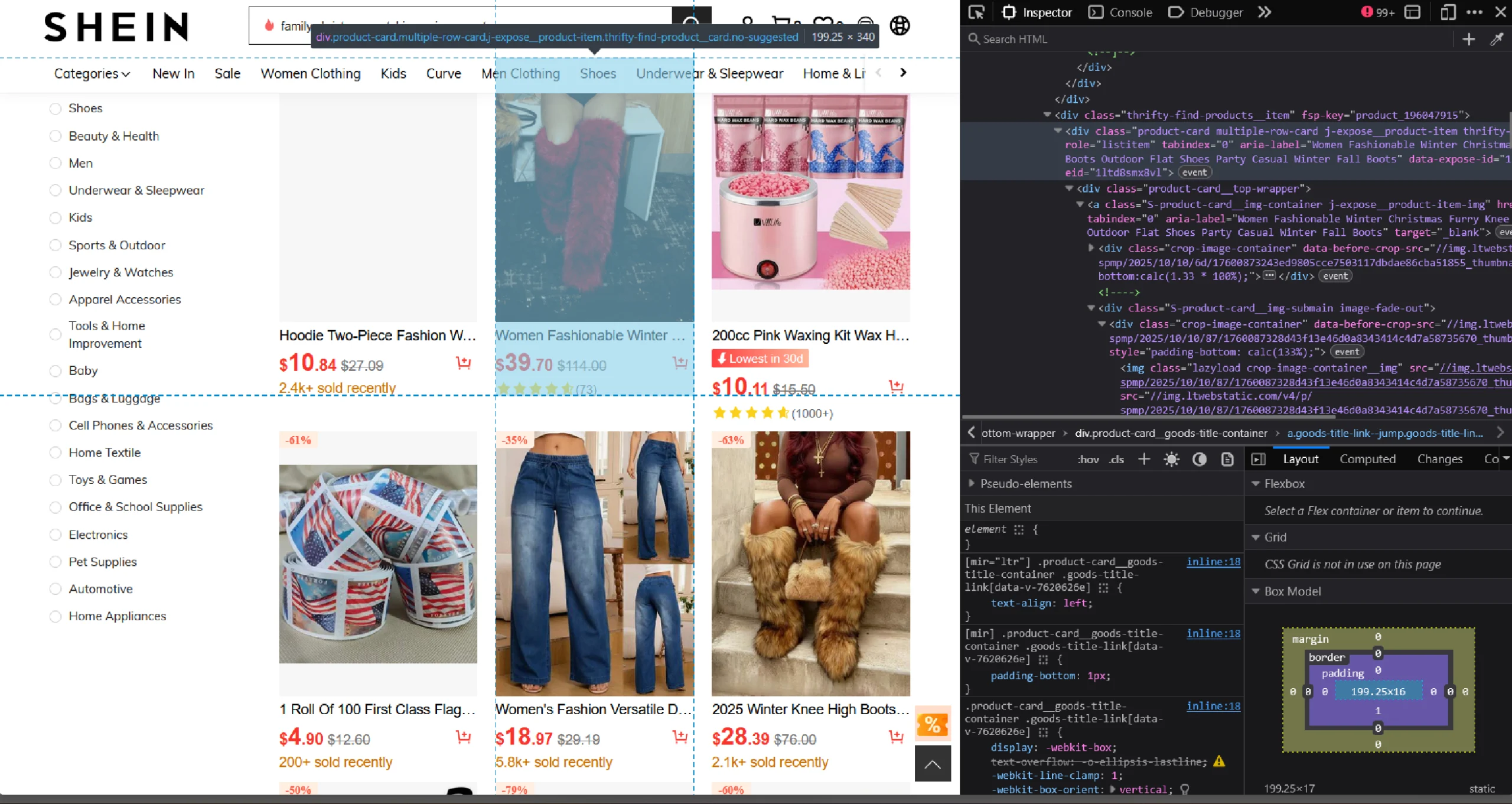
You can use the browser’s inspect panel to determine which HTML elements on Shein’s home page contain the details:
- Right-click on a product’s data, like price
- Click ‘Inspect’
Shein Data Scraping: The Environment
The code uses Selenium Python to fetch the HTML source code of Shein’s super-deals page. Selenium’s ability to interact with browsers makes it excellent for scraping e-commerce websites like Shein.
For parsing the source code, BeautifulSoup is used.
Both Selenium and BeautifulSoup are external libraries, so you need to install them using Python pip.
pip install bs4 selenium Besides the external libraries, the code also uses three packages from the Python standard library:
- json to save the extracted data to a JSON file
- urllib.parse to make relative links absolute
- time to delay the script execution
Shein Data Scraping: The Code
Here’s the complete code if you want to get started with Shein data scraping right away.
import json
from bs4 import BeautifulSoup
from selenium import webdriver
from selenium.webdriver.common.by import By
from urllib.parse import urljoin
from time import sleep
source = "https://us.shein.com/super-deals"
options = webdriver.ChromeOptions()
options.add_argument("--headless=new")
with webdriver.Chrome(options) as browser:
browser.get(source)
products = []
sleep(5)
response = browser.page_source
soup = BeautifulSoup(response,'lxml')
product_list = soup.find('div',{'class':'thrifty-find-products'}).find_all('div',{'class':'product-card'})
print(len(product_list))
for div in product_list:
#extract details
try:
name = div['aria-label']
product_id = div['data-expose-id'].split('-')[1]
slug = name.replace(' ','-').lower()
url = f"https://us.shein.com/{slug}-p-{product_id}.html"
price = div.find('div', {'class': 'final-price'}).text.strip()
except:
continue
#append the details to the array
products.append(
{
"Name":name,
"Price":price,
"URL": urljoin("https://shein.com",url)
}
)
with open("shein.json",'w') as f:
json.dump(products,f,indent=4,ensure_ascii=False)
Begin your code to scrape Shein’s website by importing the packages mentioned above.
import json
from bs4 import BeautifulSoup
from selenium import webdriver
from selenium.webdriver.common.by import By
from urllib.parse import urljoin
from time import sleep
This code only imports two Selenium modules: webdriver and By:
- The webdriver module interacts with the browser (navigating to a URL, setting browser options, etc.)
- The By module lets you specify how to locate an HTML element (by XPath, class name, etc.).
The scraper extracts the product details from Shein’s super deals page.
source = "https://us.shein.com/super-deals"
Selenium browser is faster in headless mode. You can start the browser in headless mode by adding the argument “–headless=new” to the browser’s options and launching the browser with it.
options = webdriver.ChromeOptions()
options.add_argument("--headless=new")
The code uses a context manager to handle launching and closing the browser.
with webdriver.Chrome(options) as browser:
Note: ChromeOptions() is used when you are using the Chrome browser while running Selenium. You need to use the appropriate methods for the browser you want to use.
Within the context, use the get() method with the *source *variable as the argument to visit the super-deals page.
browser.get(source)
You can now extract the product details, but first, declare an empty array to store the details.
products = []
Next, pause the script execution for 5 seconds to allow all the products on the page to load.
sleep(5)
You can now get the HTML source code using Selenium’s page_source attribute.
response = browser.page_source
The next step is to parse the fetched HTML source code. Pass the source code to BeautifulSoup with lxml as the parser.
soup = BeautifulSoup(response,'lxml')Parsing creates a BeautifulSoup object that provides methods for extracting elements from the source code.
Use the .find() method to select the div element containing product listings and the .find_all() method to find each *div *element holding the product details.
product_list = soup.find('div',{'class':'thrifty-find-products'}).find_all('div',{'class':'product-card'})
This gives you a list of div elements, each containing the details of a product. Iterate through the div elements, and in each iteration:
- Extract name, URL, and price
- Append the details to the array defined before the loop
for div in product_list:
#extract details
try:
name = div['aria-label']
product_id = div['data-expose-id'].split('-')[1]
slug = name.replace(' ','-').lower()
url = f"https://us.shein.com/{slug}-p-{product_id}.html"
price = div.find('div', {'class': 'final-price'}).text.strip()
except:
continue
#append the details to the array
products.append(
{
"Name":name,
"Price":price,
"URL": urljoin("https://shein.com",url)
}
)
Finally, save the extracted Shein product data to a JSON file.
with open("shein.json",'w') as f:
json.dump(products,f,indent=4,ensure_ascii=False)
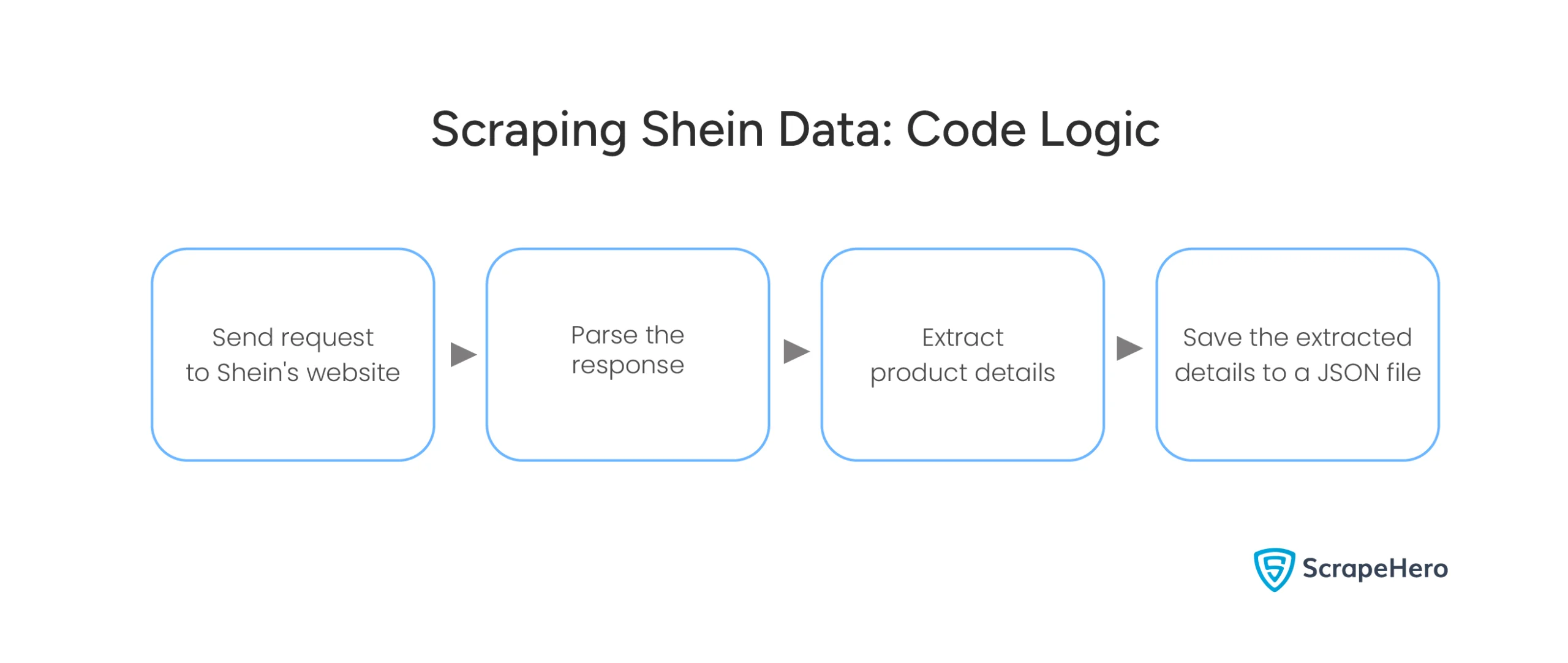
Here is a flowchart showing the entire process.
Shein Data Scraping: Code Limitations
Shein has strong anti-scraping mechanisms, such as CAPTCHA challenges and IP rate limiting. To overcome this, you may need to rotate proxies and use CAPTCHA solvers. This code doesn’t do that, which also means it’s unsuitable for large-scale web scraping.
Moreover, you must keep watching Shein’s website for any changes in its HTML structure because this code relies on it to extract the product details.
Why Not Use a Web Scraping Service?
Selenium WebDriver and BeautifulSoup are excellent for Shein data scraping. This tutorial showed how to scrape Shein’s super-deals page; similarly, you can scrape their other pages by modifying the code.
You also need to change the code for large-scale web scraping or whenever Shein changes its HTML structure. However, you can avoid all that by choosing ScrapeHero’s Web Scraping Service.
ScrapeHero is a fully-managed web scraping service provider capable of building large-scale web scraping and crawling.
FAQ
Although it’s legal to scrape a public website, scraping Shein or any website without permission may violate its terms of service. It’s essential to consult a legal expert to ensure compliance. Check out this page on the legality of web scraping to learn more.
Shein has rate limits and IP bans that prevent scraping. Rotating proxies allow you to send requests from different IPs, reducing the risk of being blocked.
Scraping Shein without browser automation is difficult because the site uses JavaScript to load content dynamically. However, if you don’t want to use Selenium, you can use other browser automation libraries like Playwright or Puppeteer.
Here are the steps for web scraping without getting blocked by Shein.
1. Use rotating proxies
2. Mimic human behavior (like random delays between requests)
3. Respect the site’s robots.txt file
4. Avoid too many requests