
Did you know the information archiving market reached nearly $8 billion in 2023? This massive growth underscores the growing need for programmatic content archiving to manage data at scale. For modern organizations, preserving legacy web content is no longer optional—it is a critical requirement for regulatory compliance, legal discovery, and historical research.
Ready to automate your data lifecycle? This guide walks you through building a custom system that identifies aging content, converts it to industry-standard WARC files, and offloads it to AWS S3 Glacier for secure, long-term preservation.
Understanding the Three-Step Approach to Programmatic Content Archiving
This automated content archiving consists of three distinct phases:
- Identifying URLs that need archiving
- Converting them to WARC format
- Uploading them to cloud storage
Apache Airflow orchestrates these steps automatically, making the entire process repeatable and scalable.
Setting Up the Environment
Install these packages using PIP before running the script in this tutorial:
- requests: For fetching URLs and sitemaps
- warcio: For creating WARC archive files
- boto3: AWS SDK for uploading files to S3
- apache-airflow: The orchestration framework
pip install requests warcio boto3 apache-airflow
Note: You must configure boto3 credentials for the script to run.
Here’s the complete script if you want to start coding directly:
import requests
import xml.etree.ElementTree as ET
import os
import io
from datetime import datetime, timedelta
from urllib.parse import urlparse
from pathlib import Path
import boto3
from warcio.warcwriter import WARCWriter
from warcio.statusandheaders import StatusAndHeaders
from airflow.decorators import dag, task
# --- Configuration ---
SITEMAP_URL = "https://www.scrapehero.com/post-sitemap.xml"
AWS_BUCKET_NAME = "my-archival-bucket"
S3_KEY_PREFIX = "warc_archives/"
DEFAULT_DAYS_OLD = 300 # Archive content older than 300 days
# ============================================================================
# STEP 1: Fetch URLs from Sitemap
# ============================================================================
def get_urls_to_archive(sitemap_url, days_old=DEFAULT_DAYS_OLD):
# Calculate cutoff dynamically
print(f"-> Fetching sitemap from: {sitemap_url}")
cutoff_date = datetime.now() - timedelta(days=days_old)
print(f"-> Archiving URLs older than {cutoff_date.date()} ({days_old} days)")
try:
response = requests.get(sitemap_url, timeout=10)
response.raise_for_status()
except requests.exceptions.RequestException as e:
print(f"Error fetching sitemap: {e}")
return []
try:
root = ET.fromstring(response.content)
except ET.ParseError as e:
print(f"Error parsing XML sitemap: {e}")
return []
# Define XML namespace for sitemaps
namespace = {'sitemap': 'http://www.sitemaps.org/schemas/sitemap/0.9'}
seed_urls = []
# Iterate through each entry in the sitemap
for url_element in root.findall('sitemap:url', namespace):
loc_element = url_element.find('sitemap:loc', namespace)
if loc_element is None or not loc_element.text:
continue
loc = loc_element.text
lastmod_element = url_element.find('sitemap:lastmod', namespace)
# Check if exists and is before the cutoff date
if lastmod_element is not None and lastmod_element.text:
lastmod_str = lastmod_element.text.split('T')[0] # Extract date part
try:
lastmod_date = datetime.strptime(lastmod_str, '%Y-%m-%d')
if lastmod_date < cutoff_date: seed_urls.append(loc) except ValueError: # Handle unexpected date formats continue print(f"-> Identified {len(seed_urls)} URLs for archiving.")
return seed_urls
# ============================================================================
# STEP 2: Create WARC Files from URLs
# ============================================================================
def archive_url_to_warc(url):
parsed_url = urlparse(url)
path_segment = parsed_url.path.strip('/') # Remove leading/trailing slashes
# Get the last segment of the path, or use 'index' if path is empty
filename_base = os.path.basename(path_segment) if path_segment else 'index'
# Add timestamp to avoid filename collisions
timestamp = datetime.now().strftime("%Y%m%d_%H%M%S")
home_path = os.path.join(Path.home(),'warch_archives')
os.makedirs(home_path, exist_ok=True)
warc_filename = f"{filename_base}_{timestamp}.warc.gz"
full_path = os.path.join(home_path, warc_filename)
try:
print(f" Archiving {url}...")
response = requests.get(url, stream=True, timeout=30)
response.raise_for_status()
with open(full_path, 'wb') as output_file:
writer = WARCWriter(output_file, gzip=True)
# Create HTTP response headers
http_headers = StatusAndHeaders(
f'{response.status_code} {response.reason}',
list(response.headers.items()),
protocol='HTTP/1.1'
)
# Create and write WARC record
record = writer.create_warc_record(
url,
'response',
payload=io.BytesIO(response.content),
http_headers=http_headers
)
writer.write_record(record)
print(f" ✓ Archived {url} to {warc_filename}")
return full_path
except requests.exceptions.RequestException as e:
print(f" ✗ Error fetching {url}: {e}")
return None
except Exception as e:
print(f" ✗ Unexpected error archiving {url}: {e}")
return None
def create_warcs_from_urls(urls):
if not urls:
print("No URLs to archive.")
return []
print(f"\nCreating WARC files for {len(urls)} URLs...")
warc_files = []
for i, url in enumerate(urls[:10], 1):
print(f"[{i}/{len(urls)}] Processing {url}")
warc_file = archive_url_to_warc(url)
if warc_file:
warc_files.append(warc_file)
print(f"\nSuccessfully created {len(warc_files)} WARC file(s).")
return warc_files
# ============================================================================
# STEP 3: Upload WARC Files to S3 Glacier
# ============================================================================
def archive_warc_to_s3_glacier(warc_file_path, bucket_name, s3_key_prefix='warc_archives/'):
# Verify file exists
if not os.path.exists(warc_file_path):
raise FileNotFoundError(f"WARC file not found: {warc_file_path}")
s3_client = boto3.client(
's3',
aws_access_key_id=ACCESS_KEY,
aws_secret_access_key=SECRET_KEY,
aws_session_token=SESSION_TOKEN
)
file_name = os.path.basename(warc_file_path)
s3_key = f"{s3_key_prefix}{file_name}"
file_size = os.path.getsize(warc_file_path)
try:
print(f"Uploading {file_name} to s3://{bucket_name}/{s3_key} (Glacier)...")
s3_client.upload_file(
warc_file_path,
bucket_name,
s3_key,
ExtraArgs={'StorageClass': 'GLACIER'}
)
print(f"✓ Successfully uploaded {file_name} to S3 Glacier.")
return {
'bucket': bucket_name,
's3_key': s3_key,
'file_size': file_size,
'storage_class': 'GLACIER',
'uploaded_at': datetime.now().isoformat()
}
except Exception as e:
print(f"✗ Error uploading {file_name} to S3: {e}")
raise
def upload_all_warcs_to_glacier(warc_files, bucket_name):
if not warc_files:
print("No WARC files to upload.")
return []
print(f"\nUploading {len(warc_files)} WARC file(s) to S3 Glacier...")
results = []
for i, warc_file in enumerate(warc_files, 1):
print(f"[{i}/{len(warc_files)}] {warc_file}")
try:
print(warc_file)
result = archive_warc_to_s3_glacier(warc_file, bucket_name)
results.append(result)
# Optional: Delete local file after successful upload
os.remove(warc_file)
print(f" Local file deleted.")
except Exception as e:
print(f" Failed to upload {warc_file}: {e}")
print(f"\nSuccessfully uploaded {len(results)}/{len(warc_files)} WARC file(s).")
return results
# ============================================================================
# AIRFLOW DAG DEFINITION
# ============================================================================
@dag(
dag_id='website_archival_pipeline',
description='Archive old website URLs to S3 Glacier',
schedule='@weekly', # Run every Monday at midnight
start_date=datetime(2024, 1, 1),
catchup=False,
params={
'days_old': DEFAULT_DAYS_OLD,
'bucket_name': AWS_BUCKET_NAME,
'sitemap_url': SITEMAP_URL
},
tags=['archival', 'aws', 's3'],
)
def website_archival_pipeline():
@task()
def get_urls_task(sitemap_url, days_old):
return get_urls_to_archive(sitemap_url, days_old)
@task()
def create_warcs_task(urls):
return create_warcs_from_urls(urls)
@task()
def upload_glacier_task(warc_files, bucket_name):
return upload_all_warcs_to_glacier(warc_files, bucket_name)
# Define task dependencies and data flow
urls = get_urls_task(
sitemap_url=SITEMAP_URL,
days_old=DEFAULT_DAYS_OLD
)
warcs = create_warcs_task(urls)
results = upload_glacier_task(
warc_files=warcs,
bucket_name=AWS_BUCKET_NAME
)
return results
# Instantiate the DAG
dag = website_archival_pipeline()
# ============================================================================
# STANDALONE USAGE (for testing without Airflow)
# ============================================================================
if __name__ == '__main__':
print("=" * 70)
print("Website Archival Pipeline - Standalone Execution")
print("=" * 70)
# Step 1: Get URLs
print("\n[STEP 1] Fetching URLs from sitemap...")
archive_list = get_urls_to_archive(SITEMAP_URL, days_old=DEFAULT_DAYS_OLD)
if not archive_list:
print("No URLs found. Exiting.")
exit(0)
# Step 2: Create WARC files
print("\n[STEP 2] Creating WARC files...")
warc_files = create_warcs_from_urls(archive_list)
if not warc_files:
print("No WARC files created. Exiting.")
exit(0)
# Step 3: Upload to S3 Glacier
print("\n[STEP 3] Uploading to S3 Glacier...")
try:
results = upload_all_warcs_to_glacier(warc_files, AWS_BUCKET_NAME)
print("\n" + "=" * 70)
print("Pipeline completed successfully!")
print("=" * 70)
except Exception as e:
print(f"\nPipeline failed: {e}")
exit(1)
Let’s understand the script:
The script starts by importing the necessary packages.
- requests: For fetching the HTML/XML
- xml.etree.ElementTree: For parsing the HTML
- os: For creating folders
- io: For handling data streams
- datetime: For handling date and time strings
- urllib.parse: For parsing URLs
- pathlib: For handling file paths
- boto3: For interacting with your AWS account
- warcio: For dealing with WARC files
- airflow: For scheduling the workflows in Apache Airflow
import requests
import xml.etree.ElementTree as ET
import os
import io
from datetime import datetime, timedelta
from urllib.parse import urlparse
from pathlib import Path
import boto3
from warcio.warcwriter import WARCWriter
from warcio.statusandheaders import StatusAndHeaders
from airflow.decorators import dag, task
Next, the code defines four variables that configure the content archival system.
-
- sitemap_url: Address of a website’s sitemap
- aws_bucket_name: Unique identifier for your storage container, Amazon’s Simple Storage Service (S3)
- s3_key_prefix: The prefix acts similarly to a folder path to organize items in your container
- default_days_old: Time threshold to decide whether a page should be archived
SITEMAP_URL = "https://www.scrapehero.com/post-sitemap.xml"
AWS_BUCKET_NAME = "my-archival-bucket"
S3_KEY_PREFIX = "warc_archives/"
DEFAULT_DAYS_OLD = 300
The script then defines functions for each step mentioned above.
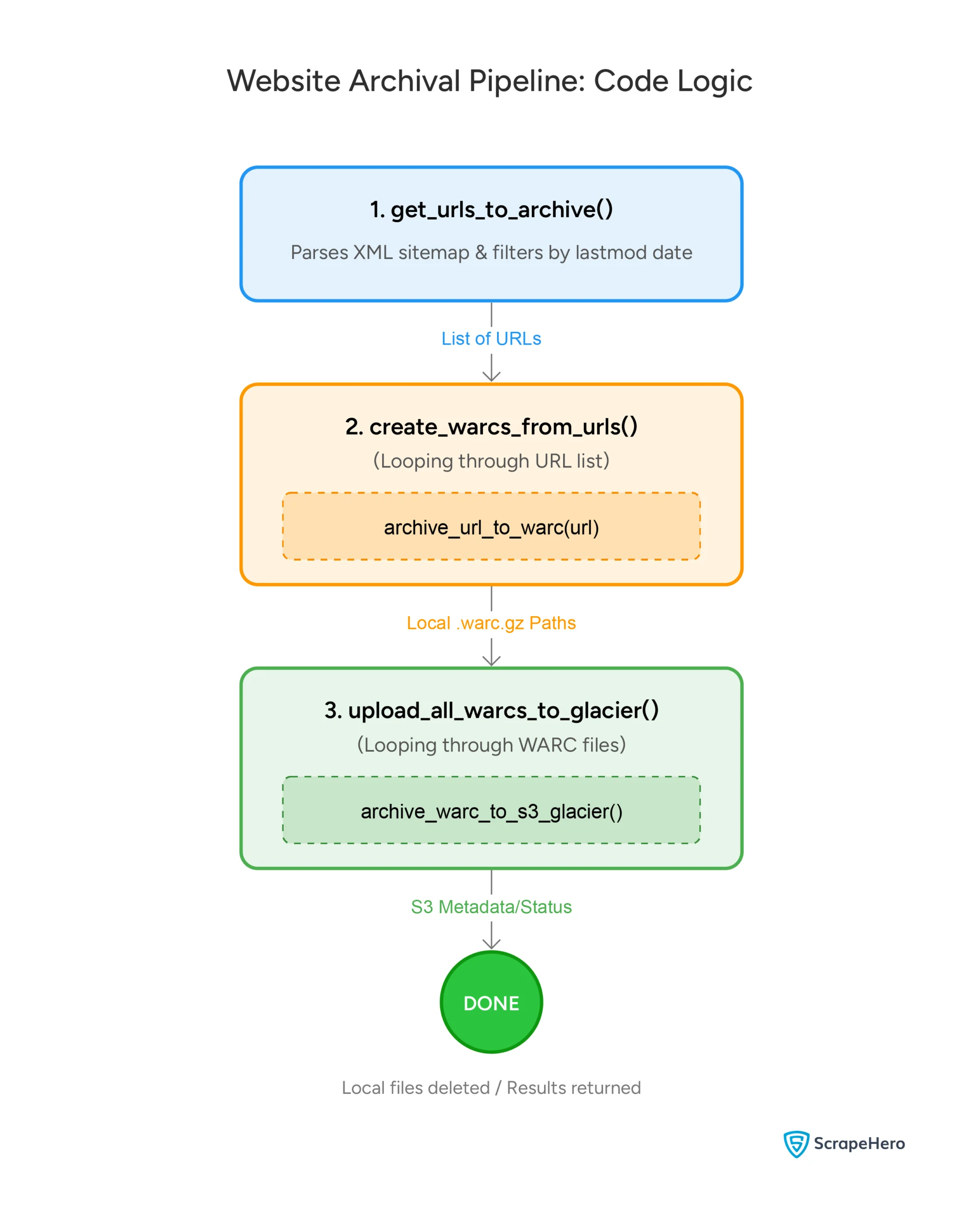
Step 1: Fetching URLs from a Sitemap
For the first step, the code defines a get_urls_to_archive() function that takes the variables sitemap_url and default_days_old and returns a list of URLs to archive.
It starts by calculating the cutoff date.
def get_urls_to_archive(sitemap_url, days_old=DEFAULT_DAYS_OLD):
# Calculate cutoff dynamically
cutoff_date = datetime.now() - timedelta(days=days_old)
print(f"-\> Archiving URLs older than {cutoff_date.date()} ({days_old} days)")
Then, the function makes a GET request to the sitemap URL.
try:
response = requests.get(sitemap_url, timeout=10)
response.raise_for_status()
except requests.exceptions.RequestException as e:
print(f"Error fetching sitemap: {e}")
return []
Once the sitemap is downloaded, the function parses the XML using xml.etree.
try:
root = ET.fromstring(response.content)
except ET.ParseError as e:
print(f"Error parsing XML sitemap: {e}")
return []
# Define XML namespace for sitemaps
namespace = {'sitemap': 'http://www.sitemaps.org/schemas/sitemap/0.9'}
The function then extracts all the URLs in the sitemap and loops through them. In each iteration, it
- Finds the lastmod tag, which contains the date on which the page was last modified
- Compares the lastmode date with the cutoff date
- Stores the URLs of those pages in an array that were modified before the cutoff date
for url_element in root.findall('sitemap:url', namespace):
loc_element = url_element.find('sitemap:loc', namespace)
if loc_element is None or not loc_element.text:
continue
loc = loc_element.text
lastmod_element = url_element.find('sitemap:lastmod', namespace)
if lastmod_element is not None and lastmod_element.text:
lastmod_str = lastmod_element.text.split('T')[0]
try:
lastmod_date = datetime.strptime(lastmod_str, '%Y-%m-%d')
if lastmod_date < cutoff_date:
seed_urls.append(loc)
except ValueError:
continue
This filtering ensures only genuinely old content is archived, saving storage and processing costs.
Step 2: Converting URLs to WARC Format
WARC (Web ARChive) is the standard format for preserving web content. It captures the HTTP response, headers, and payload in a single file that can be replayed or analyzed later.
That’s why the second step creates WARC files from the URLs. This involves downloading each URL and wrapping the response in WARC formatting.
To do so, the script defines a function archive_url_to_warc() that accepts a URL, creates a WARC file, and returns the full path of the file.
It starts by parsing the URL and creating a file name from it.
def archive_url_to_warc(url):
parsed_url = urlparse(url)
path_segment = parsed_url.path.strip('/')
filename_base = os.path.basename(path_segment) if path_segment else 'index'
Then, it creates a timestamp and establishes a file path.
timestamp = datetime.now().strftime("%Y%m%d_%H%M%S")
home_path = os.path.join(Path.home(),'warch_archives')
os.makedirs(home_path, exist_ok=True)
warc_filename = f"{filename_base}_{timestamp}.warc.gz"
full_path = os.path.join(home_path, warc_filename)
The filename is derived from the URL’s path to ensure organized storage, and the timestamp prevents collisions when the same URL gets archived multiple times.
Once the file path is established, the function fetches the URL and converts it to WARC format:
response = requests.get(url, stream=True, timeout=30)
response.raise_for_status()
with open(full_path, 'wb') as output_file:
writer = WARCWriter(output_file, gzip=True)
http_headers = StatusAndHeaders(
f'{response.status_code} {response.reason}',
list(response.headers.items()),
protocol='HTTP/1.1'
)
record = writer.create_warc_record(
url,
'response',
payload=io.BytesIO(response.content),
http_headers=http_headers
)
writer.write_record(record)
The function packages the response headers and body into a WARC record and writes it to a gzip-compressed file for efficient storage.
Step 3: Uploading to S3 Glacier for Long-Term Storage
The final step uploads your WARC files to S3 Glacier. Two functions handle this process:
- archive_warc_to_s3_glacier() accepts the path to the WARC file, the S3 bucket name, and an optional S3 key prefix and returns the uploaded file’s details.
- upload_all_warcs_to_glacier() accepts WARC file paths and an S3 bucket name and calls the above function for all the files.
archive_warc_to_s3_glacier()
This function first checks if the WARC file exists. If it doesn’t, it raises a FileNotFoundError.
def archive_warc_to_s3_glacier(warc_file_path, bucket_name, s3_key_prefix='warc_archives/'):
if not os.path.exists(warc_file_path):
raise FileNotFoundError(f"WARC file not found: {warc_file_path}")Next, it uses bot3.client() to upload the file to Amazon S3 Glacier with the corresponding warc_file_path, bucket name, and the S3 key.
s3_client = boto3.client(
's3',
aws_access_key_id=ACCESS_KEY,
aws_secret_access_key=SECRET_KEY,
aws_session_token=SESSION_TOKEN
)
file_name = os.path.basename(warc_file_path)
s3_key = f"{s3_key_prefix}{file_name}"
file_size = os.path.getsize(warc_file_path)
The upload itself specifies the Glacier storage class, ensuring the lowest cost for dormant data:
s3_client.upload_file(
warc_file_path,
bucket_name,
s3_key,
ExtraArgs={'StorageClass': 'GLACIER'}
)
After uploading, the function returns a dictionary containing the bucket name, S3 key, file size, storage class, and upload timestamp.
return {
'bucket': bucket_name,
's3_key': s3_key,
'file_size': file_size,
'storage_class': 'GLACIER',
'uploaded_at': datetime.now().isoformat()
}
upload_all_warcs_to_glacier()
This function accepts a list of WARC file paths and an S3 bucket name as arguments. It first checks if the list is empty and returns an empty list if it is.
def upload_all_warcs_to_glacier(warc_files, bucket_name):
if not warc_files:
print("No WARC files to upload.")
return []
print(f"\nUploading {len(warc_files)} WARC file(s) to S3 Glacier...")
Then, it initializes an empty list to store the upload results and iterates over the list of WARC files, uploading each one to S3 Glacier using the archive_warc_to_s3_glacier() function.
results = []
for i, warc_file in enumerate(warc_files, 1):
print(f"[{i}/{len(warc_files)}] {warc_file}")
try:
print(warc_file)
result = archive_warc_to_s3_glacier(warc_file, bucket_name)
results.append(result)
You can also delete the local WARC file after successful upload.
os.remove(warc_file)
print(f" Local file deleted.")
If any error occurs during the upload process, it prints an error message and continues to the following file.
except Exception as e:
print(f" Failed to upload {warc_file}: {e}")
print(f"\nSuccessfully uploaded {len(results)}/{len(warc_files)} WARC file(s).")
Finally, it returns the list of upload results.
return results
Orchestrating with Apache Airflow
Apache Airflow automates the entire pipeline, ensuring consistency and reliability.
First, the script defines a Directed Acyclic Graph (DAG) that orchestrates the entire pipeline. The DAG is scheduled to run weekly and takes three parameters: days_old, bucket_name, and sitemap_url.
@dag(
dag_id='website_archival_pipeline',
schedule='@weekly',
start_date=datetime(2024, 1, 1),
params={
'days_old': DEFAULT_DAYS_OLD,
'bucket_name': AWS_BUCKET_NAME,
'sitemap_url': SITEMAP_URL
},
)
Next, the script defines a website_archival_pipeline function that orchestrates the entire pipeline. The function defines three Airflow tasks using decorators:
- get_urls_task
- create_warcs_task
- upload_glacier_task.
def website_archival_pipeline():
@task()
def get_urls_task(sitemap_url, days_old):
return get_urls_to_archive(sitemap_url, days_old)
@task()
def create_warcs_task(urls):
return create_warcs_from_urls(urls)
@task()
def upload_glacier_task(warc_files, bucket_name):
return upload_all_warcs_to_glacier(warc_files, bucket_name)
urls = get_urls_task(sitemap_url=SITEMAP_URL, days_old=DEFAULT_DAYS_OLD)
warcs = create_warcs_task(urls)
results = upload_glacier_task(warc_files=warcs, bucket_name=AWS_BUCKET_NAME)
The DAG runs weekly, automatically discovering aged content, converting it, and archiving it without manual intervention.
Testing Without Airflow
For development and testing, you can run the pipeline standalone:
if __name__ == '__main__':
print("[STEP 1] Fetching URLs from sitemap...")
archive_list = get_urls_to_archive(SITEMAP_URL, days_old=DEFAULT_DAYS_OLD)
print("\n[STEP 2] Creating WARC files...")
warc_files = create_warcs_from_urls(archive_list)
print("\n[STEP 3] Uploading to S3 Glacier...")
results = upload_all_warcs_to_glacier(warc_files, AWS_BUCKET_NAME) This standalone mode is ideal for verifying the pipeline works correctly before deploying it to Airflow.
Programmatic Content Archiving: Key Takeaways
Building a reliable website archival system requires three essential components:
- Intelligent URL selection based on age
- Standard preservation formats like WARC
- Durable cloud storage like S3 Glacier
By combining these elements with orchestration through Airflow, you create a maintenance-free system that preserves your digital content for years to come.
Why Use a Web Scraping Service
The script shown in this tutorial provides a solid foundation for programmatic content archiving. However, on a large scale, using a specialized web scraping service can be a better choice. This lets you collect and store valuable data at scale with minimum resources.
A web scraping service like ScrapeHero takes care of essential elements like server infrastructure, scaling, and uptime, and builds you a custom API. This allows you to focus on just uploading the archived data to the cloud storage of your choice.
Furthermore, we can build scrapers that selectively extract data for archival purposes, which is often a more efficient approach than simply storing entire web pages.
So if you want to make your programmatic content archiving efforts more efficient, connect with ScrapeHero. Our custom solutions tailored to help you archive websites at scale will facilitate easier access to valuable content in the future.